

Daily planner view for Amplify content scheduling
The Social Planner now gives publishers more control and visibility over their content scheduling workflow with a daily grid view, new filters, and a reorganized interface.
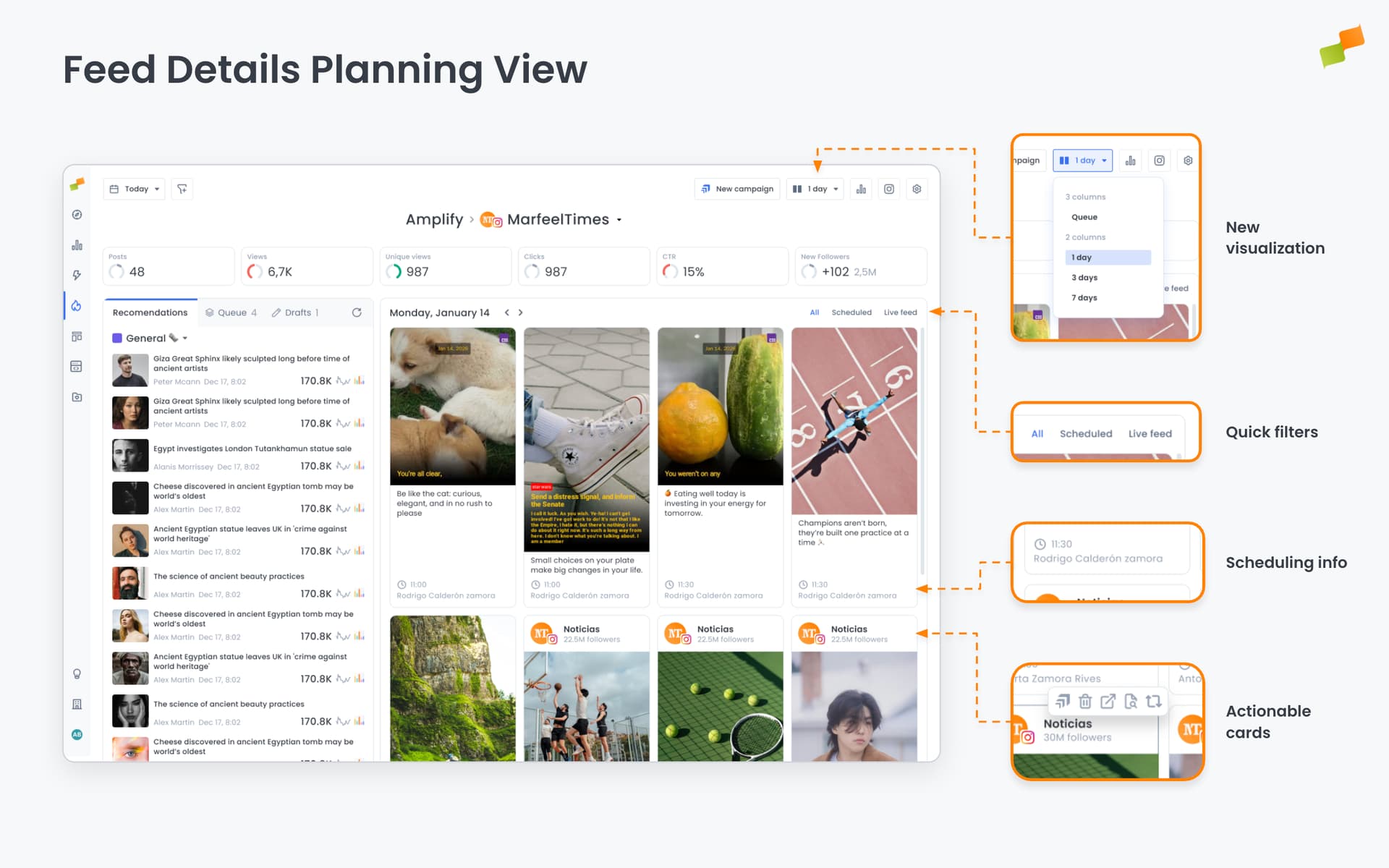
Plan your day with the new grid view
Section titled “Plan your day with the new grid view”The Social Planner now includes a dedicated 1-day planner view that displays all your scheduled posts in an intuitive card-based grid layout. This view makes it easy to see everything planned for a specific day at a glance, helping you visualize your daily content distribution and make quick adjustments.
Navigate between days using the previous/next day controls in the planner header, making it simple to review and manage your content calendar day by day.
Filter to focus on what matters
Section titled “Filter to focus on what matters”The new filtering system helps you zero in on the content you need. Choose from three filter options:
- All: See everything scheduled and published for the selected day
- Scheduled: Focus only on upcoming posts that have not been published yet
- Live Feed: View only posts that have already been published to your social channels
These filters help you quickly separate draft and scheduled content from published posts, streamlining your review and editing workflow.
Reorganized planner interface
Section titled “Reorganized planner interface”The planner view options have been reorganized to make switching between planning modes easier. The interface now groups views into:
- Queue (3-column view): The traditional queue-based planner, now the default view
- Calendar views (2-column): Choose between 1 day, 3 days, or 7 days to see your content timeline
This reorganization puts the most commonly used queue view front and center, while keeping the calendar views readily accessible when you need a broader timeline perspective.
Improved navigation experience
Section titled “Improved navigation experience”The planner header now stays visible as you scroll through your content, ensuring key controls and filters are always accessible. This makes it easier to adjust your view or apply filters without losing your place in a long list of posts.
Built for publisher efficiency
Section titled “Built for publisher efficiency”These enhancements save publishers time and reduce friction in their social media workflow. Whether you are planning content weeks in advance or making last-minute adjustments to today’s schedule, the enhanced Social Planner provides the flexibility and clarity you need to manage your social presence effectively.
What views are available in the Amplify Social Planner?
The Social Planner offers a queue view (3-column layout) and calendar views for 1 day, 3 days, or 7 days. The queue view is the default, while calendar views provide a broader timeline perspective.
How do the Social Planner filters work?
Three filter options are available: All (shows scheduled and published posts), Scheduled (only upcoming posts), and Live Feed (only published posts). Filters help separate draft content from published posts.
Does the planner header stay visible while scrolling?
Yes. The planner header remains fixed as you scroll through content, keeping controls and filters accessible at all times without losing your place in a long list of posts.