

INP breakdown and Core Web Vitals in Explore
A new suite of performance analysis features gives you full visibility into what scripts are slowing down your site, so you can fix what matters faster.
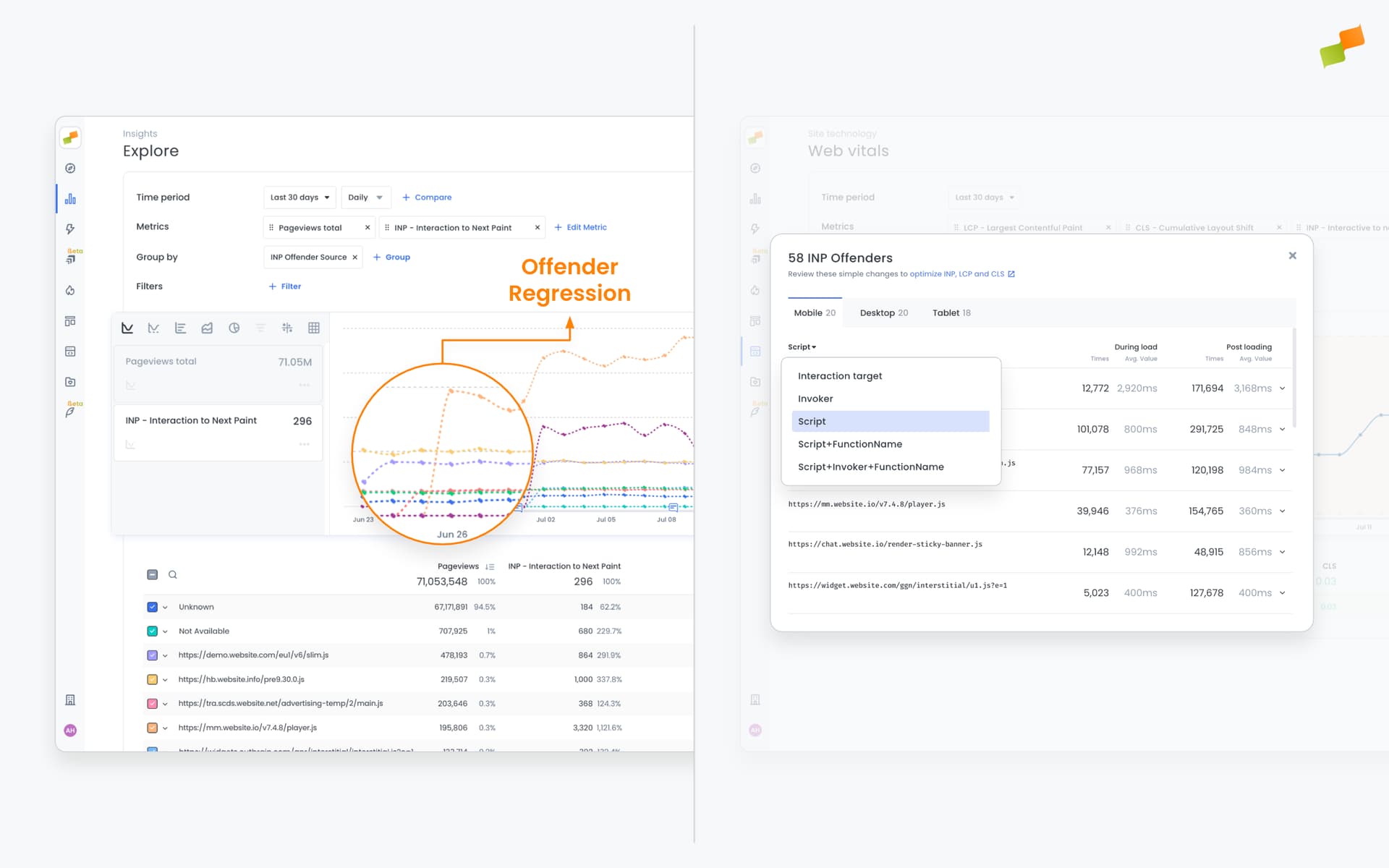
From pinpointing the JS files and functions blocking responsiveness, to tracking Core Web Vitals in Explore and API access, to deeper ad performance analytics, this update brings everything together for smarter, faster decisions.
INP Breakdown
Section titled “INP Breakdown”Built for dev teams who need answers, not guesswork. Go deep on INP (Interaction to Next Paint) and identify what’s really behind sluggish interactions:
- JavaScript files slowing down responsiveness
- Specific functions with full call stacks and execution times
- Problematic elements (buttons, forms, links) causing delays
- Device-level impact, broken down by mobile, desktop, and tablet
Core Web Vitals, now in Explore
Section titled “Core Web Vitals, now in Explore”You can now analyze LCP, INP, FID, CLS, and TTFB directly in Explore. Go beyond the what and uncover the why and where:
- Compare performance by section, tag, tag group, or custom vars
- Evaluate A/B test variants using custom dimensions
- Track offender trends for INP, CLS, and LCP via dimensions like script, function, invoker, and selector
All Core Web Vitals metrics and dimensions are fully integrated with Dashboards, Sheets exports, and are available via API, giving you consistent insights across all Marfeel tools.
Enhanced ad performance data
Section titled “Enhanced ad performance data”Expanded ad analytics capture the full experience around ad delivery:
- Technical context: browser, OS, and device breakdowns
- User experience metrics: LCP, CLS, INP
- Engagement signals: scroll depth, read time, content interaction
- Consent status: cookie preferences for compliant optimization
- Custom Vars breakdowns to compare monetization on A/B tests. Are pages with this bidder monetizing better than those without?
These updates are now live for all Enterprise customers and require no changes to your setup. Head to Explore and start uncovering the insights that matter to your users and your bottom line.
What does the INP Breakdown feature show?
INP Breakdown identifies the JavaScript files, specific functions with full call stacks, problematic elements like buttons and forms, and device-level impact causing slow interactions on your site.
Which Core Web Vitals metrics are available in Explore?
LCP, INP, FID, CLS, and TTFB are all available in Explore. You can compare performance by section, tag, tag group, or custom vars, and track offender trends via dimensions like script, function, invoker, and selector.
What ad performance data is included in these updates?
Enhanced ad analytics capture technical context (browser, OS, device), user experience metrics (LCP, CLS, INP), engagement signals (scroll depth, read time), consent status, and Custom Vars breakdowns for A/B monetization testing.