

Facebook Preset now available for Amplify auto posting
You can now choose Facebook Preset as the post type for auto posting on Facebook. The styled backgrounds you already used on posts you create manually now apply to the posts Amplify publishes for you.
Presets make short, high-impact messages stand out in a busy feed. Until now, that styling stopped at manual posts: everything your feed auto-published went out as a standard post. Now your automated posts carry the same look as your hand-crafted ones.
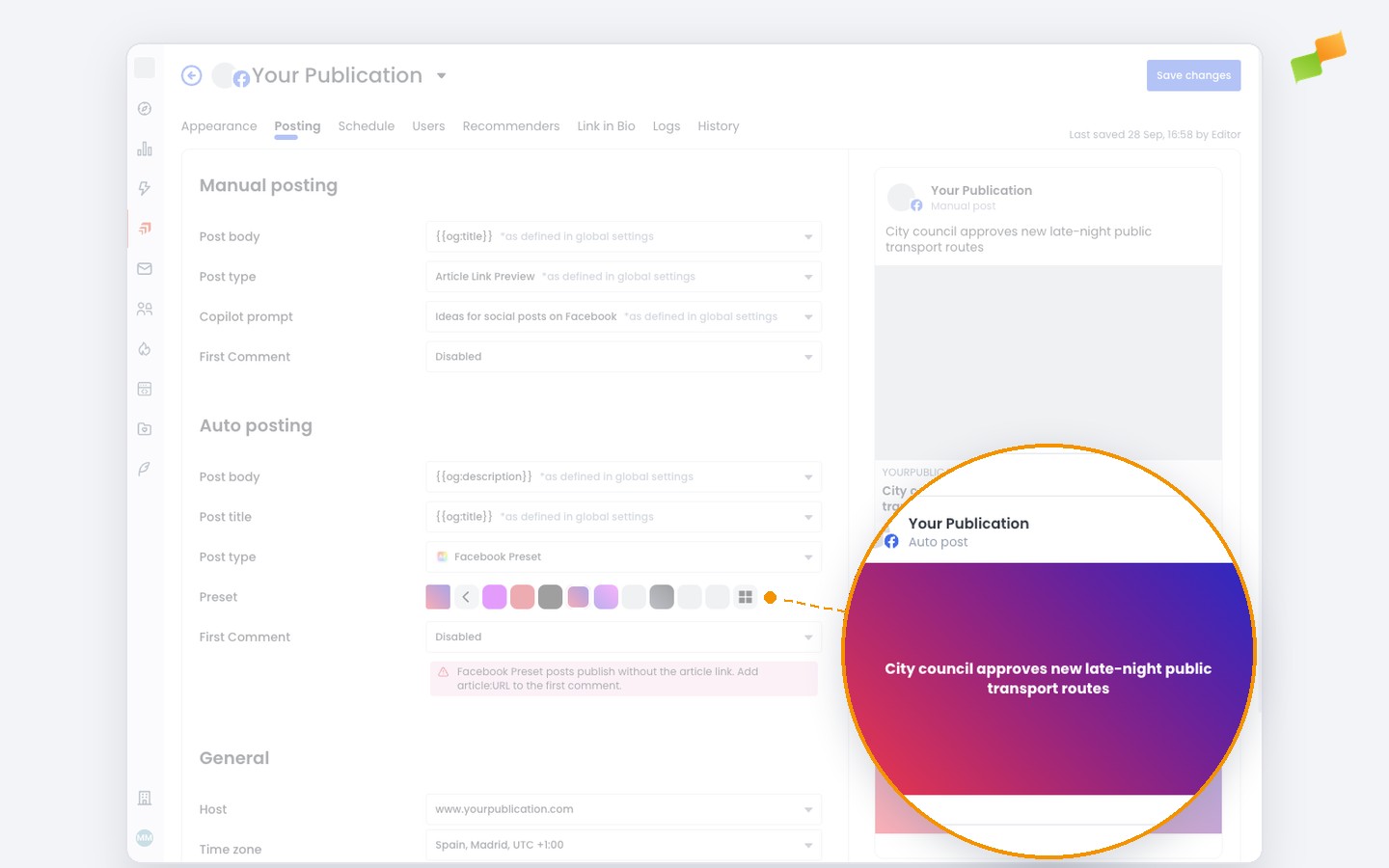
Here’s how you can get started:
- Open your Facebook feed’s settings and go to the Posting tab
- Under Auto posting, set Post type to Facebook Preset
- Pick a background in Preset and check the result in the auto post preview
- Add article:URL to the First Comment so readers can reach the article
Preset posts publish without the article link in the post itself, so we warn you when the first comment doesn’t include it. Facebook only styles text up to 150 characters, so longer post bodies are trimmed before publishing.
You can also set the preset once in your global posting settings: every Facebook feed that doesn’t pick its own inherits it. Learn more about Facebook presets in the Amplify post types guide.
Same style, now on autopilot.