

Marfeel April 2023 Launch Week: Copilot, Compass, and more
Marfeel’s largest product release to date packed groundbreaking features for the digital publishing industry. This release introduces Marfeel Copilot, a powerful AI-driven solution, along with Compass view enhancements, SERP Monitoring, Content Planner, and multimedia updates designed to elevate newsrooms and publishers at large.
Keep reading for an explanation of each new feature and learn more about how Marfeel continues to lead the way in transforming the media landscape.
All the recordings are here
Section titled “All the recordings are here”
Marfeel Copilot
Section titled “Marfeel Copilot”Marfeel Copilot brings the power of next-generation AI to newsrooms, combining large language models (LLMs) with publisher historical data so everyone can spend more time on the best parts of their jobs.
Marfeel Copilot is integrated into Marfeel in two ways:
- It integrates as an assistant which lets you chat with your data . Say goodbye to queries, ask questions to Marfeel like a human in natural language via the Omnisearch bar autonomously.
- It smoothly integrates with Marfeel UI elements like the Heads Up Display (HUD) and Article Detail pages you use daily sparking new ideas and making suggestions to unleash your creativity and to unlock your productivity.
Marfeel’s approach to generative AI empowers editors to do their jobs better by sparking ideas, demystifying data, and making the blank canvas a thing of the past. With Marfeel, editors can focus on delivering comprehensive and thorough content that addresses potential reader questions and goes beyond basic information to provide in-depth coverage.
Speak to your data
Section titled “Speak to your data”Marfeel Copilot allows you to speak to your data and ask questions in natural language. One of the obsessions at Marfeel is to demystify data, making it accessible and digestible to everyone, no matter how knowledgeable they are about Marfeel or data analytics.
The Omnisearch box is a key component of Marfeel’s Compass view, which instantly shows the most relevant match to any question users have.
Quick Filtering
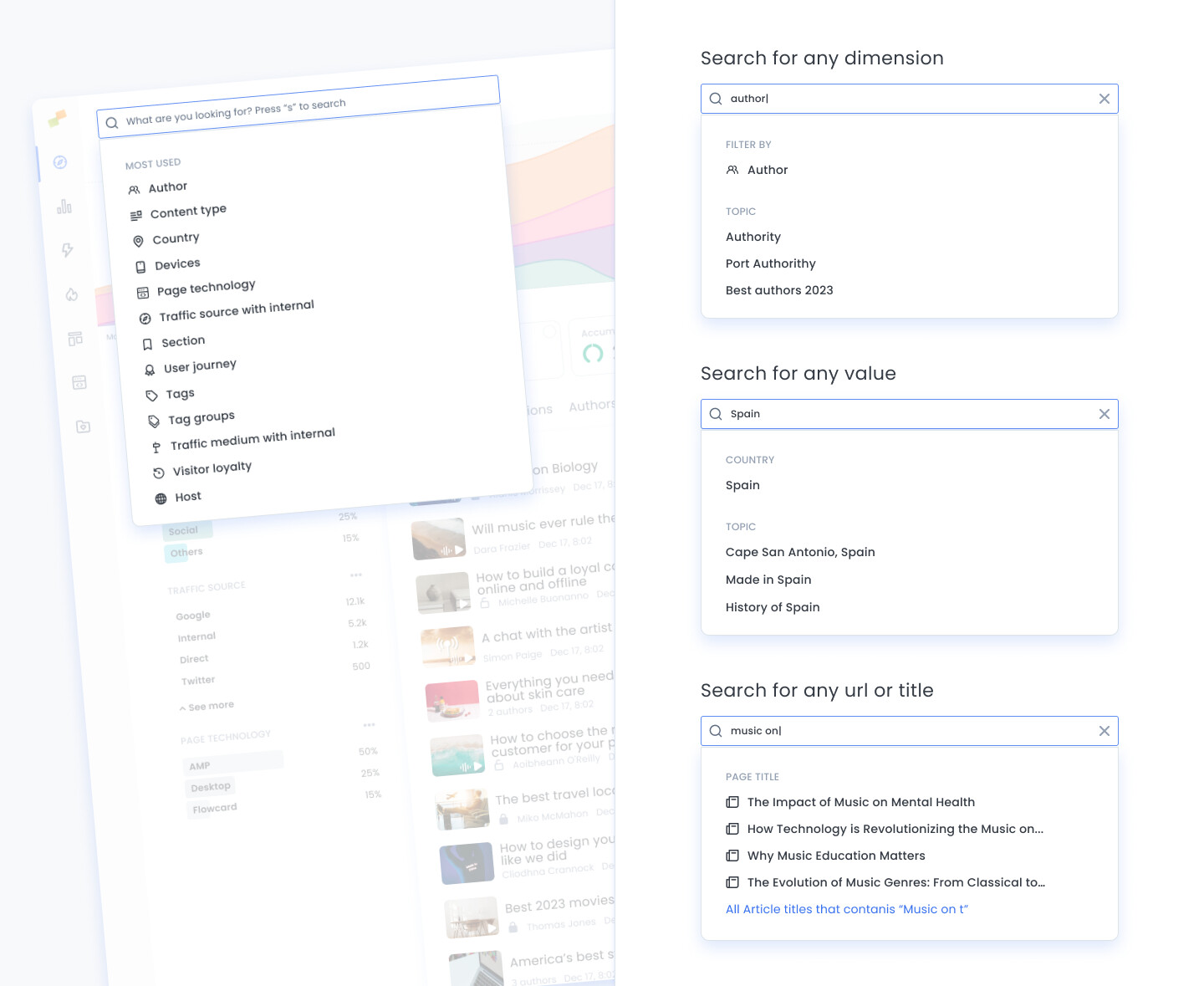
Section titled “Quick Filtering”The Omnisearch bar can be used as a shortcut to filtering:
- Search for any dimension to create a filter, e.g.
author - Search for any value without having to guess its dimension name, e.g.
DiscoverorCanadaorJohn - Type 3 letters of the title or URL of the story you are looking for and the system will find it in a fraction of a second
Query Assistant
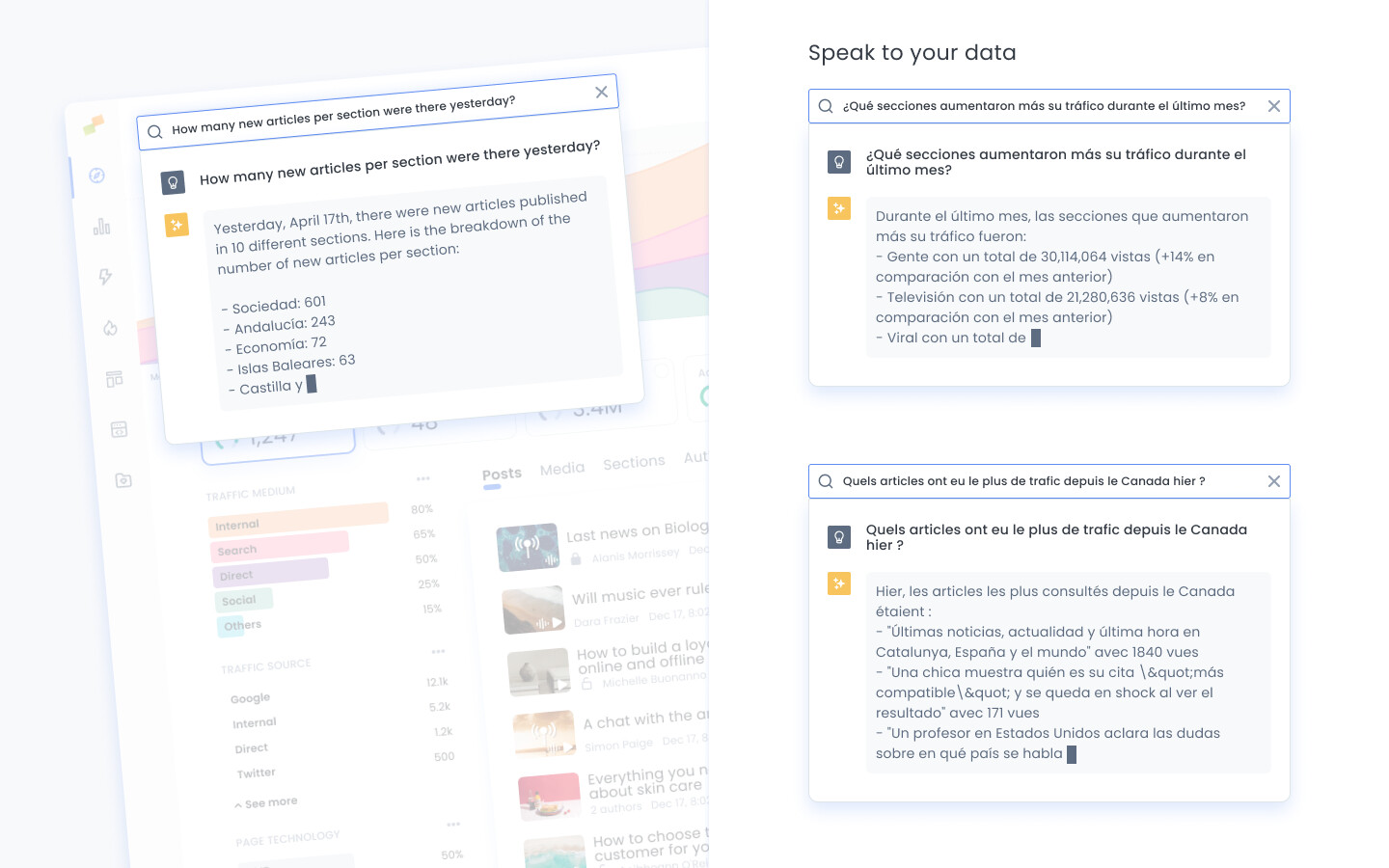
Section titled “Query Assistant”The new Marfeel Assistant allows you to speak to your data. You can ask your data questions like:
- Which were the top 3 articles yesterday?
- Which articles had the most traffic from Canada yesterday?
- Which were the main traffic sources for John Smith?
- Which were the top 3 stories from Google Discover last week?
- Which sections increased their traffic the most during last month?
- Which of my articles performed best last week?
- How much traffic and how many new articles per section and author were there yesterday?
Documentation Assistant
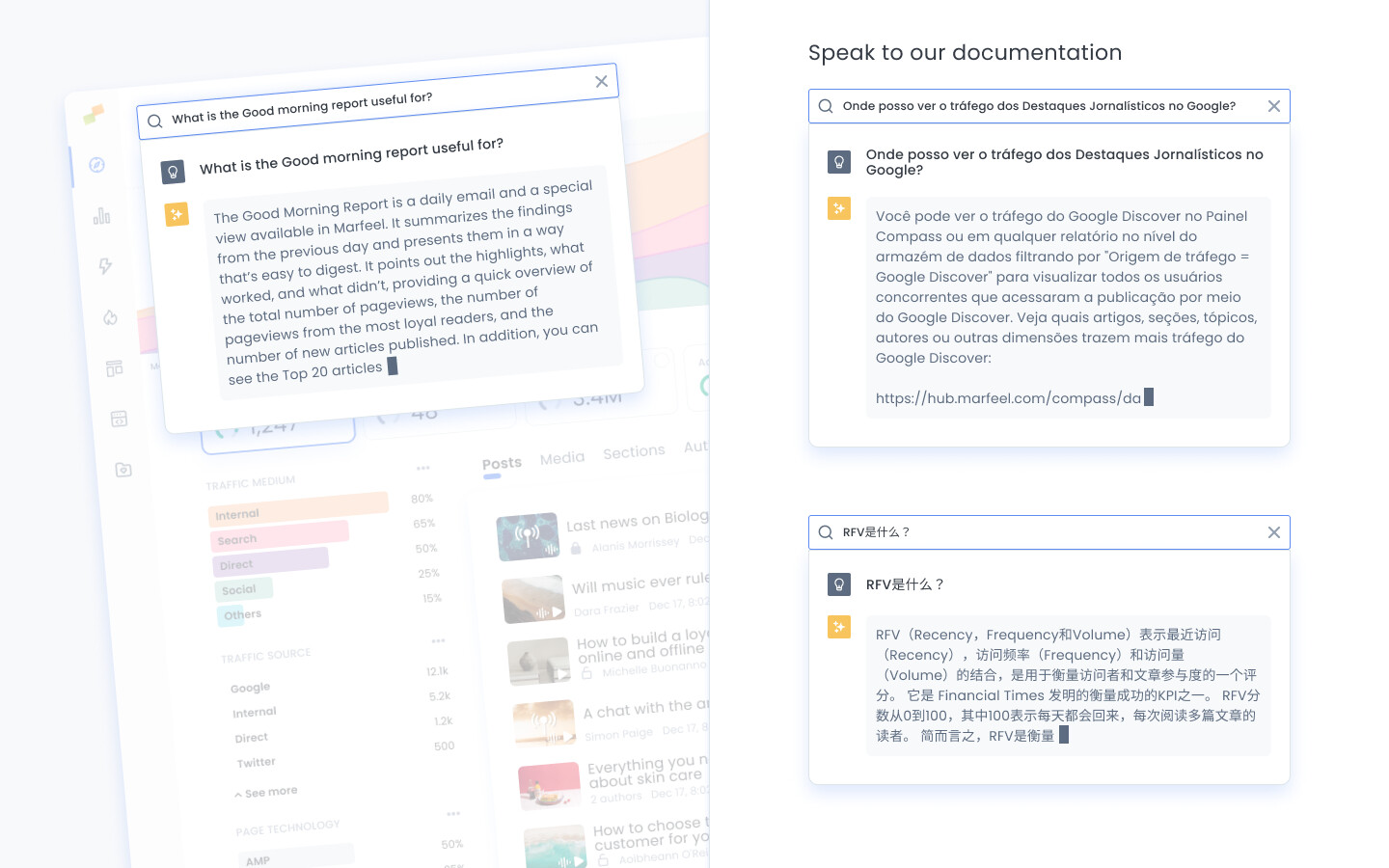
Section titled “Documentation Assistant”Users can now ask questions about the Marfeel product via the Omnisearch bar. Based on all the documentation available in our help center, the system formulates a concise answer to questions like:
- What is RFV?
- What is Refresh traffic?
- Where can I see Google News Showcase traffic?
- What is the Good morning report useful for?
Ideas and Suggestions
Section titled “Ideas and Suggestions”In the context of an article, Marfeel Copilot makes data-driven suggestions and sparks fresh ideas for editors and content strategists. It empowers editors, unlocks their productivity potential, and breaks blank canvas situations.
All ideas and suggestions are trained with the tone of the author, the section, and your most successful stories.
Marfeel Copilot suggestions seamlessly blend into the newsroom daily habits via UI elements like the Heads Up Display (HUD) and Article Detail pages.
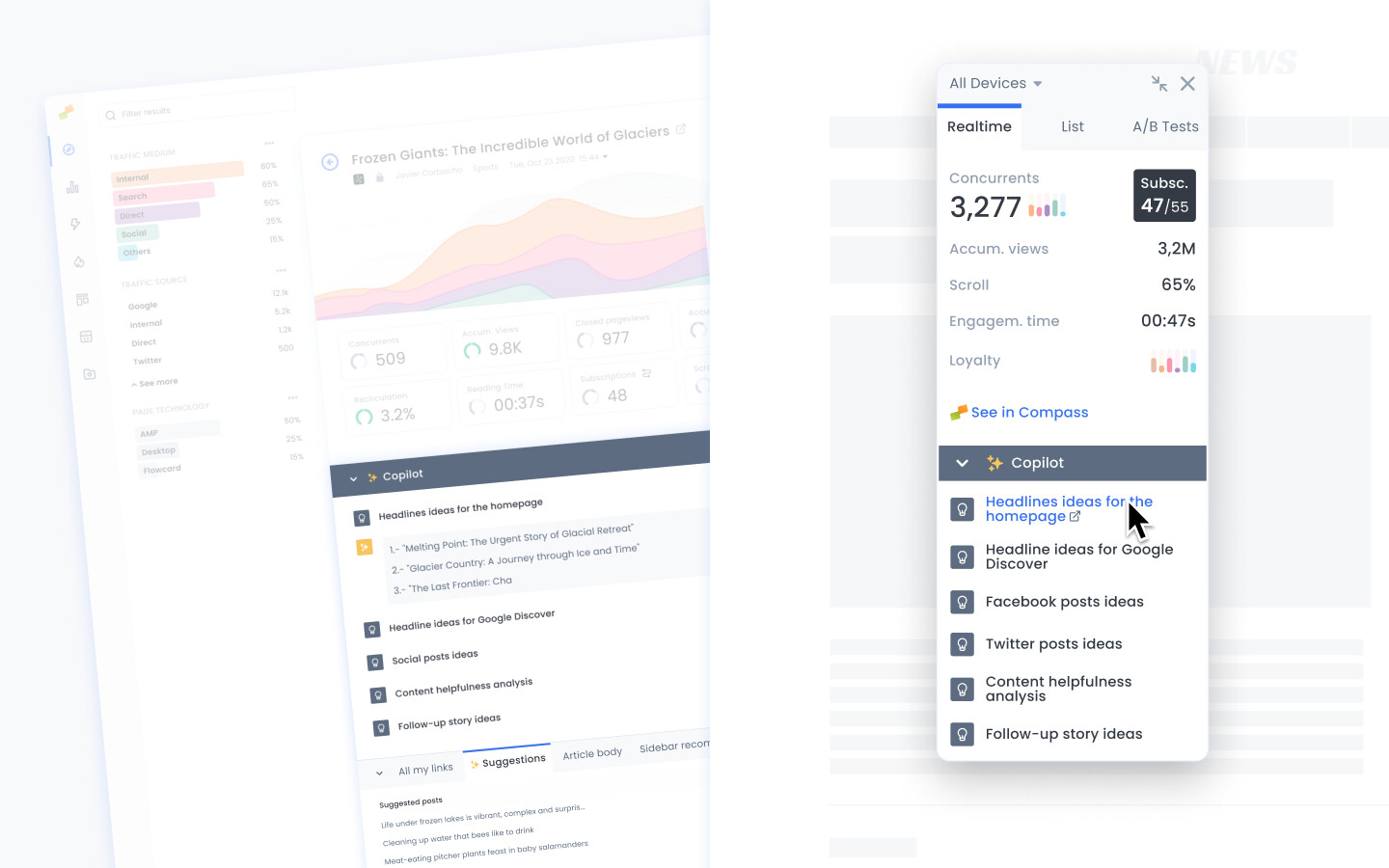
- Headline ideas for the homepage. The recommendations are trained with the author’s tone of voice, the section, and your own headline A/B tests. The more A/B tests and the more data Marfeel has on recirculation modules and CTRs, the more accurate it gets.
- Headline ideas for Google Discover. The recommendations are trained with your best headlines based on Google Search Console and CTR data. If you don’t have Google Search Console connected to Marfeel, then it’s trained based on the articles with the most Discover traffic.
- Content Helpfulness Analysis. Search engines like Google classify content into what they define as helpful content. Algorithms and concepts like E-E-A-T or YMYL apply here. Marfeel Content Helpfulness Analysis runs your articles through a quality rater with Google public documentation and provides you the results.
- Expansion ideas upon potential reader questions. It helps focus on making sure that the article or content is as comprehensive and thorough as possible in addressing the potential questions that readers may have. It emphasizes the importance of leaving no gaps or missing pieces of information that could leave the reader with unanswered questions. It helps:
- Increase user engagement encouraging readers to stay on the page longer
- Extend the lifespan of articles with an evergreen touch
- Improve search engine rankings addressing user questions and intentionality
- Establish authority by demonstrating your expertise and providing valuable insights
- Follow-up story ideas: Recommendations for new related articles and different angles you might want to cover.
- Facebook post ideas. Facebook recommendations trained on your own Facebook posts.
- Twitter post ideas. Twitter recommendations trained on your own Tweets.
Links suggestions
Section titled “Links suggestions”Marfeel’s Link Suggestions Module suggests relevant articles from your website for your editors to cross-link. This feature improves link building and engagement, drives readership, and increases time spent on your website. By leveraging advanced algorithms and user behavior analysis, the module provides contextually relevant recommendations to keep your audience engaged.
HUD Headline A/B testing suggestions
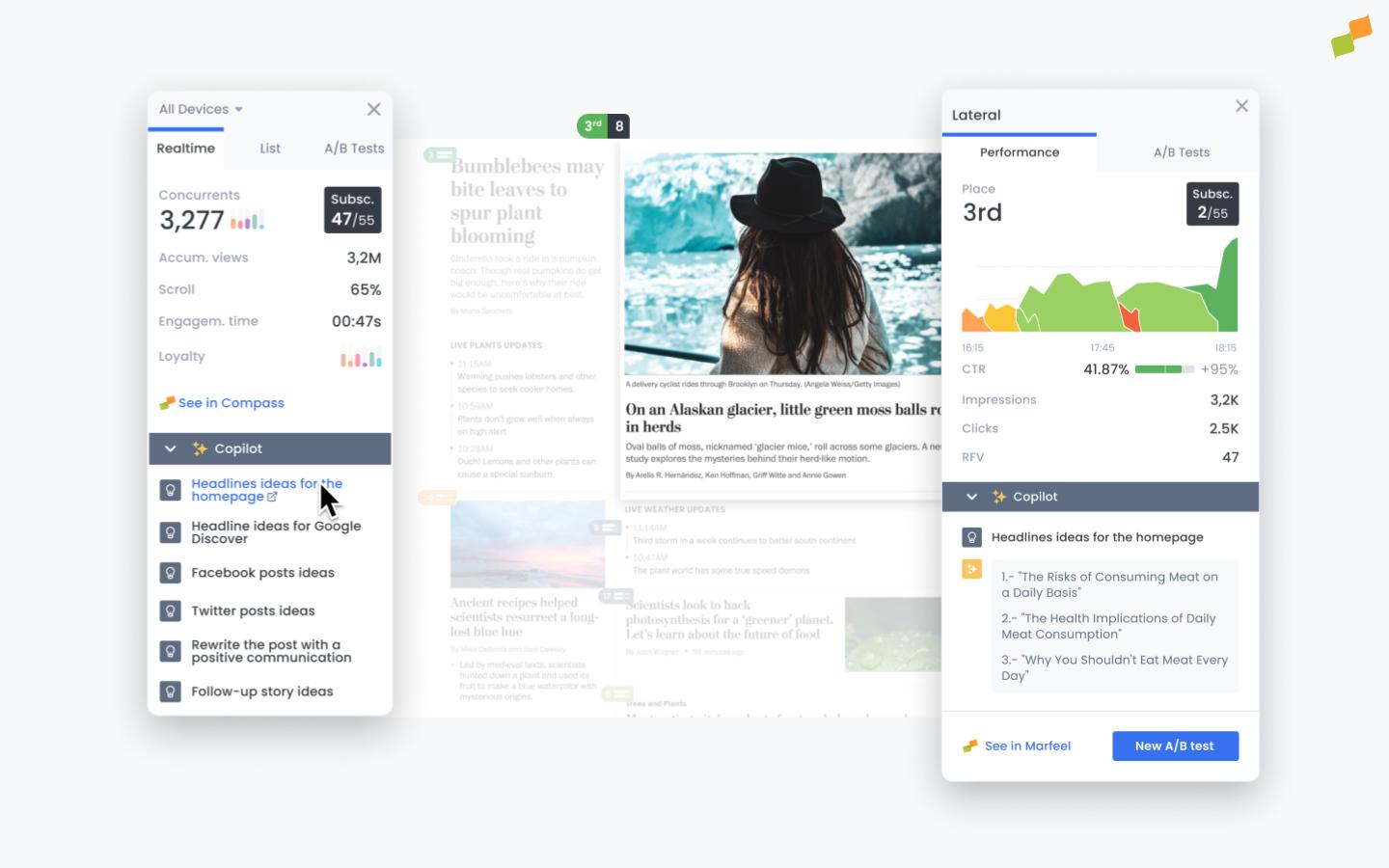
Section titled “HUD Headline A/B testing suggestions”Marfeel Copilot is integrated directly in the Heads Up Display (HUD) to smoothly merge with newsroom daily habits. When selecting a story, Marfeel Copilot automatically suggests alternative headlines based on the historically successful A/B tests the newsroom has run in the past.
Clicking on any of the suggested headlines automatically sets up an A/B test for that variant, saving your Home editors’ time to focus on more important things.
Compass View
Section titled “Compass View”The Marfeel Compass screen now goes beyond reporting audience metrics. It has transformed into the ultimate hub for various newsroom teams, including marketing, social media, and video teams along with subscription and advertisement managers.
These enhancements maintain the sleek aesthetics and simplicity you love while unlocking powerful combinations of elements to elevate your experience.
Sparklines
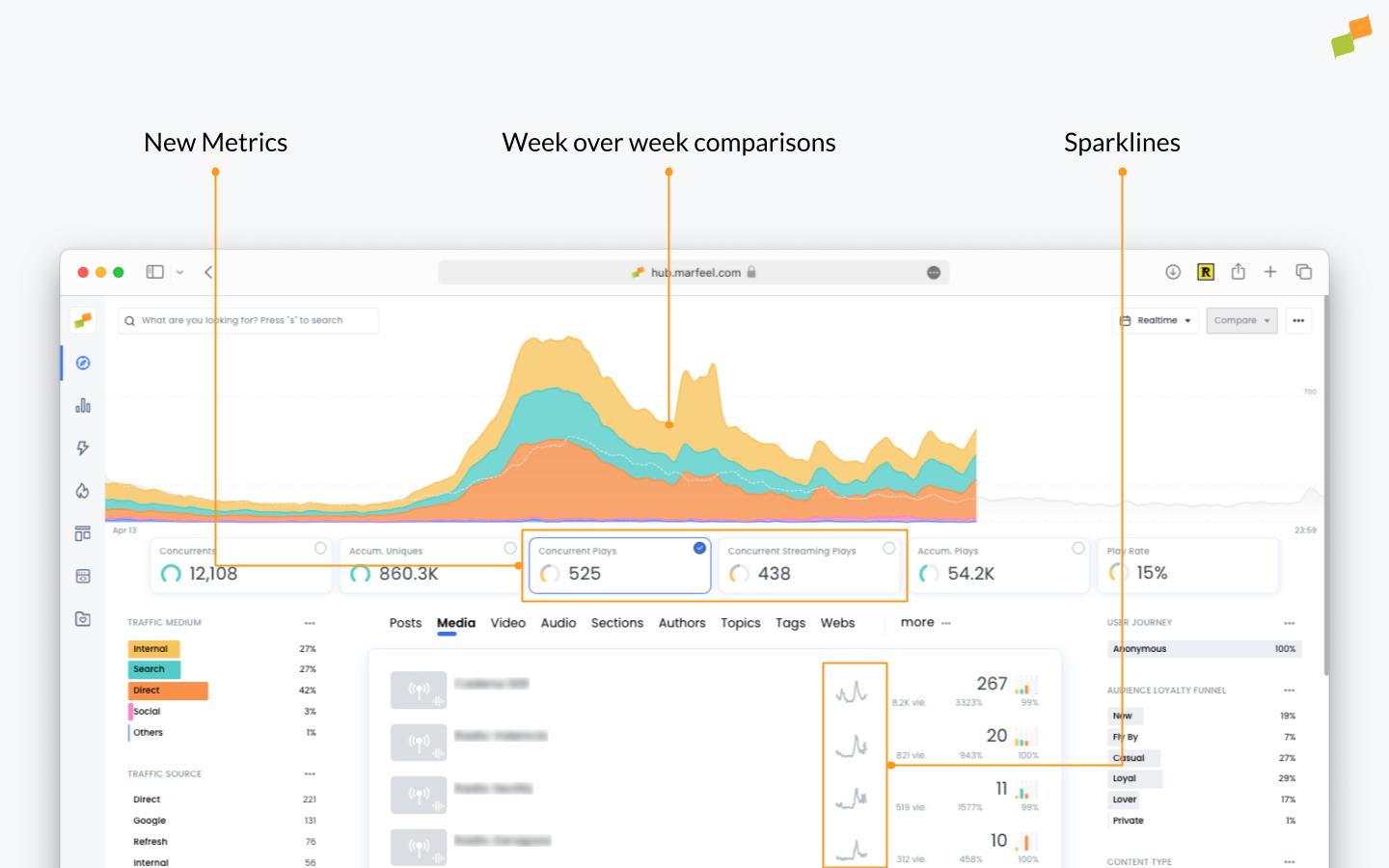
Section titled “Sparklines”Sparklines let you see which content is trending at a glance, helping you discover opportunities without having to study the details of each article.
https://community-statics.marfeel.com/original/2X/8/81a40cc56553063c0e3ea4652107509e41bab793.jpeg
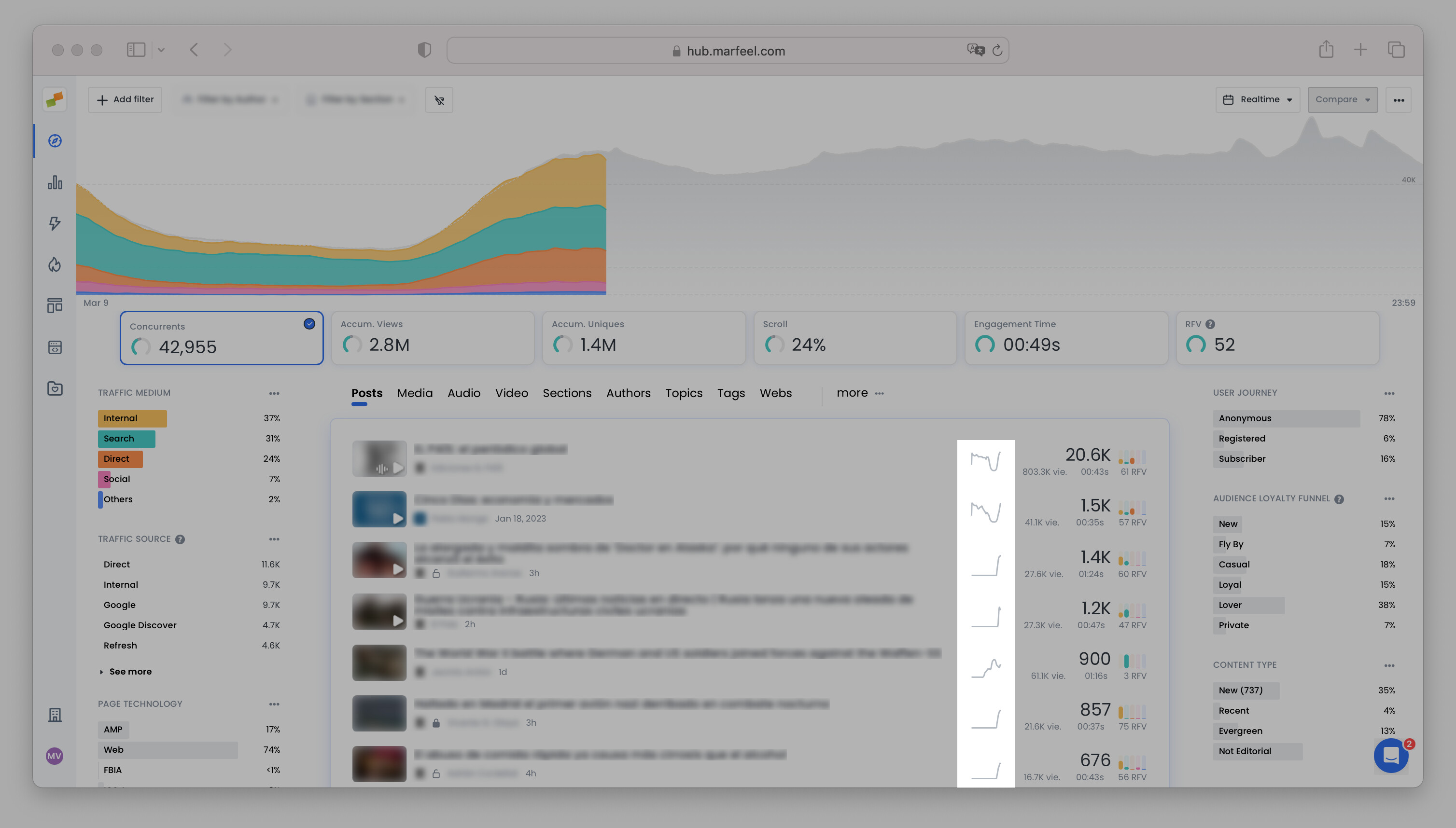
The Sparklines are dynamically calculated based on any filter in order to:
- Understand how an article is performing on the home page
- Understand when an article is exhausted in Facebook or Discover
- &c.
Predictive Metrics
Section titled “Predictive Metrics”Featured metrics on Compass view serve as visual cues to indicate how the metric is performing compared to the previous 4 weeks on the same day and at the same time. Predictive metrics now extend to all dimensions and drill-downs, which is convenient in situations such as the following:
https://community-statics.marfeel.com/original/2X/0/0142f4758485c0b59b98797e0c0c26999b735578.jpeg
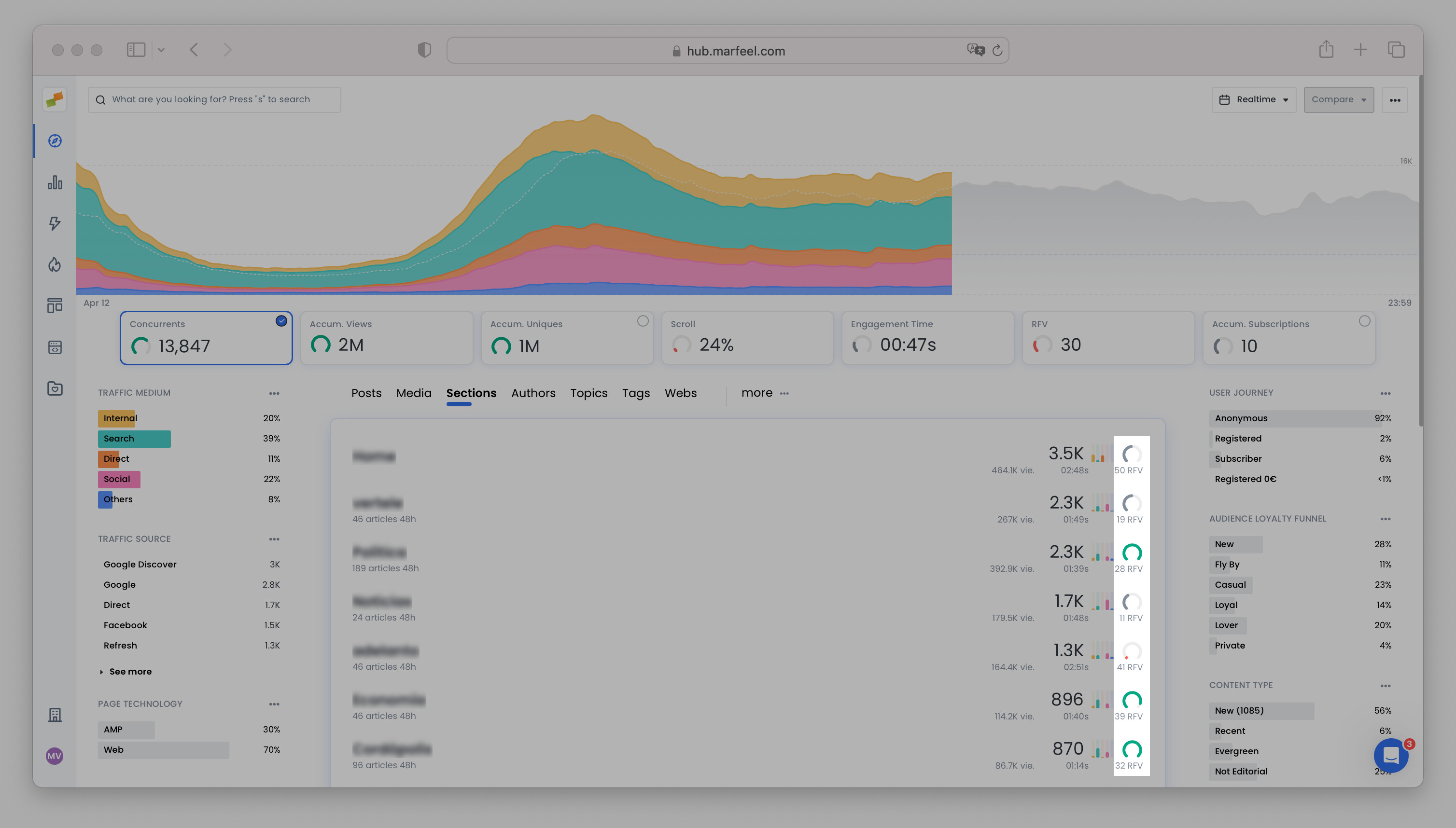
- Identify hidden opportunities: the global traffic might be above expectations but now you can easily identify sections that are underperforming and take action. Great traffic in one section will no longer hide improvement opportunities in others.
- Blog networks or multi-domain accounts: See at a glance how individual hosts are performing decoupled from the global account performance. Global traffic might be below projections even while other properties are performing great.
Date Picker
Section titled “Date Picker”Users can now go to any date and time period they want. Viewer users can only go back in time 60 days, in order to protect the data of your most valuable assets. Analysts can go back in time as far as they want.
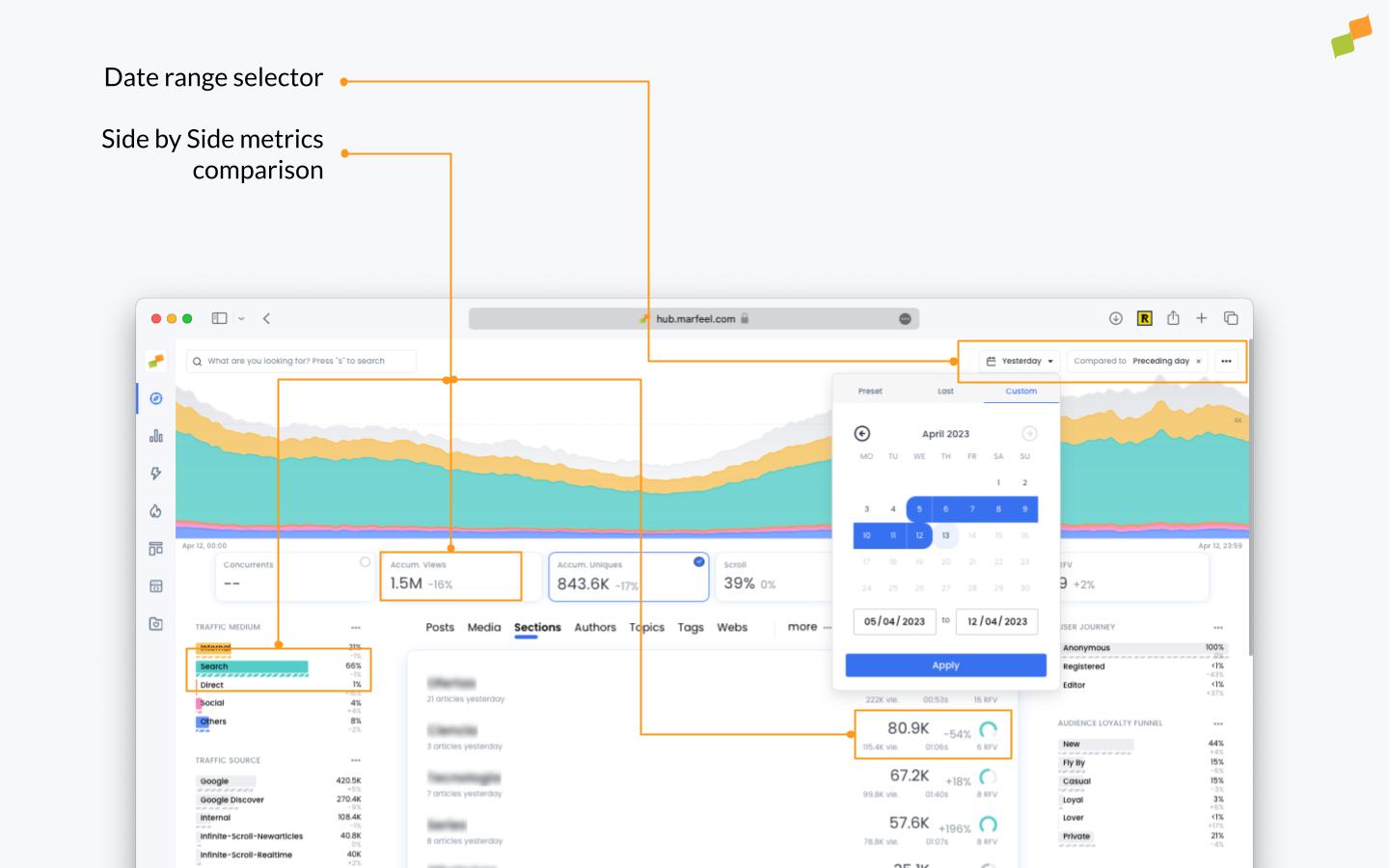
Compare dates
Section titled “Compare dates”Marfeel Compass view now includes a “compare date range” selector allowing you to compare two dates or two date ranges. The compare dates feature is ideal when there are drops in traffic, helping pinpoint which sections, topics, authors, domains, or any other dimension is seeing a decrease. This is particularly useful for discovery analysis after Google Core or CMS updates.
Selectable Metrics
Section titled “Selectable Metrics”Some Featured Metrics are now selectable. When you click on these KPIs, the entire Compass View updates to report on that metric.
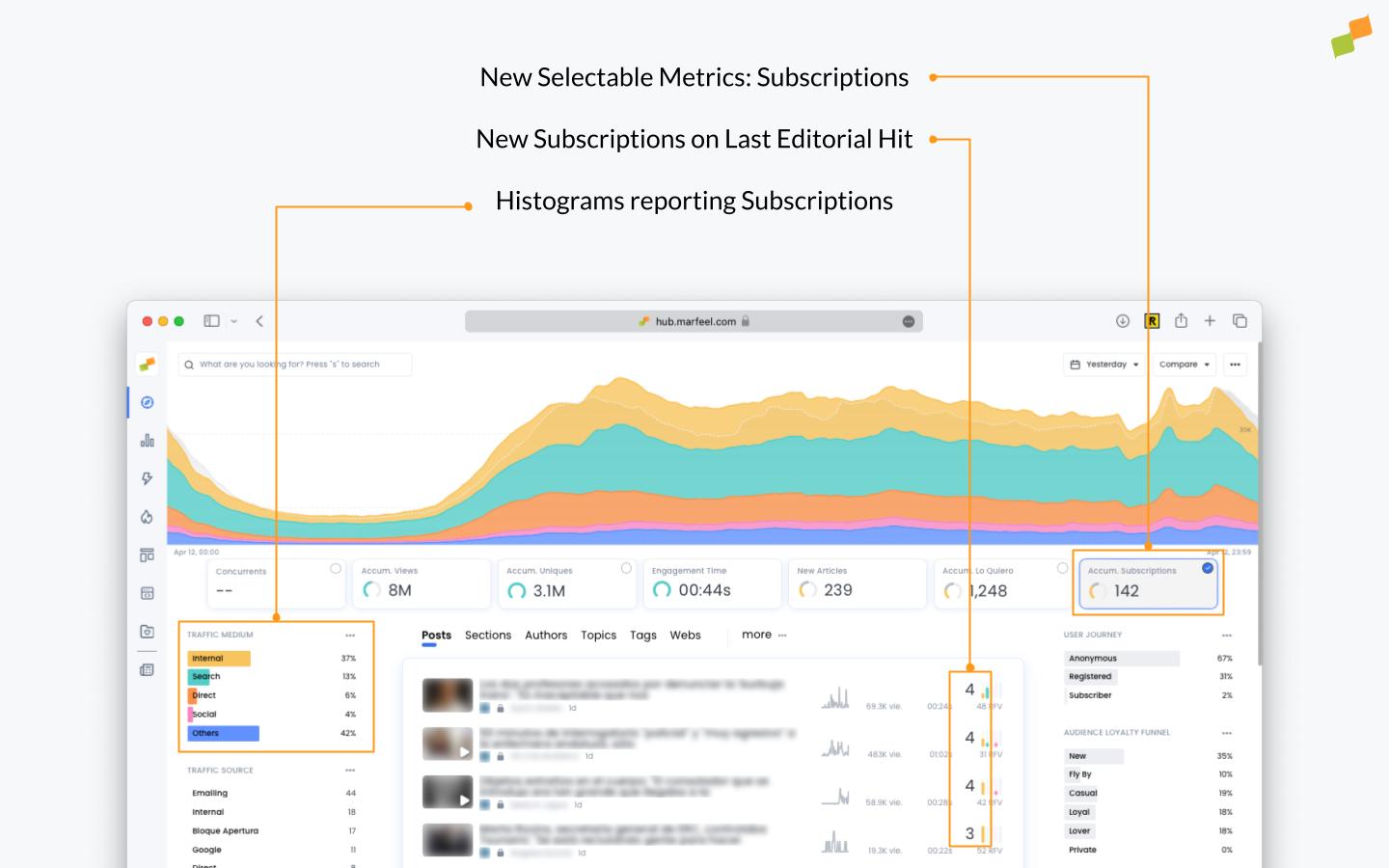
For example:
- Selecting
Accum. Uniquesautomatically changes the date range toToday. When selectingConcurrentsit changes back toRealtime. - Selecting
Subscriptionscauses the main metric on each article to display the number of subscriptions. Faceted filters show the histogram of where subscriptions come from. - Selecting
Advertisement revenueshows how much revenue each Post, Article, or Section is generating. - Selecting
Social Interactionsshows the posts, articles, and sections with the most social interactions.
Compass personalization
Section titled “Compass personalization”Selectable Metrics allow different users with different goals to focus on the KPI that matters most to them, using the same Compass view. Compass can now be personalized to show or hide different metrics and options depending on different user needs.
-
Any user can select different metrics, tabs, and personalize Compass.
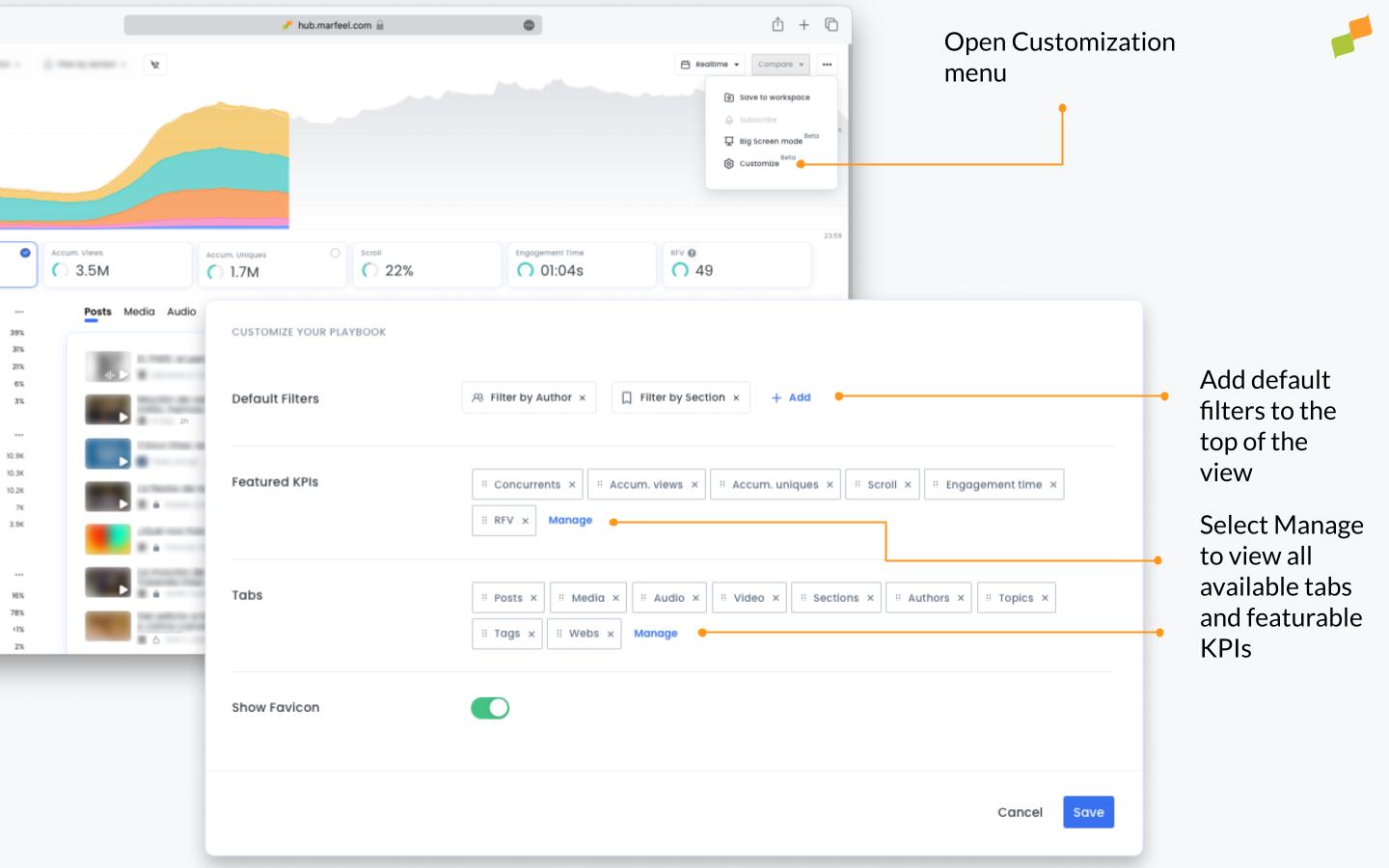
-
A user can save their configuration as a report to return to it later.
-
Admins can configure default Compass views at the organization level to get everyone on the same page.
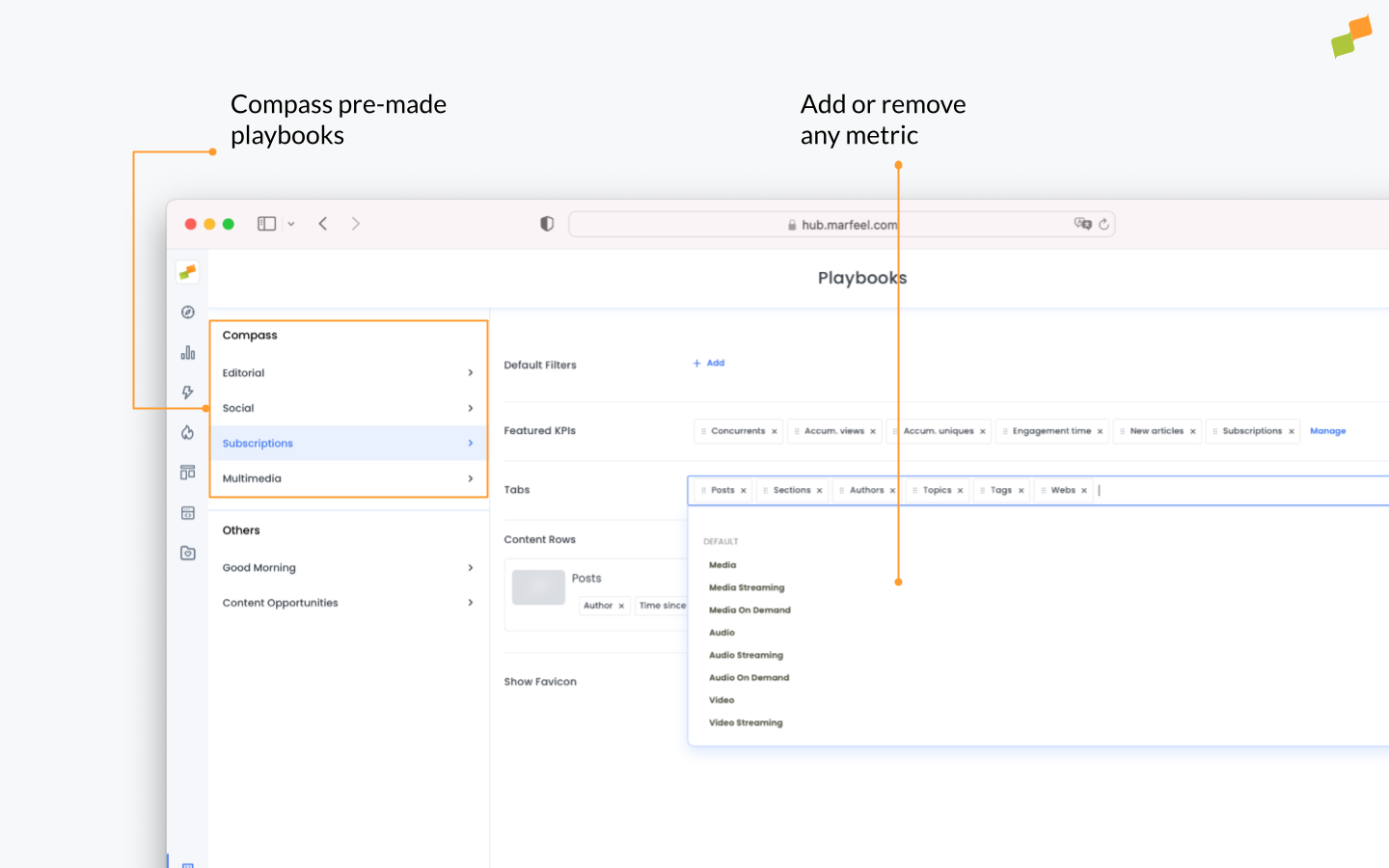
-
Marfeel has created several out-of-the-box configurations specialized for:
- Editorial users
- Subscriptions and Marketing managers
- Social Media teams
- Video teams
- Broadcasting teams
- Advertisement teams
Marfeel supports custom article dimensions through Tags and Tag Groups. You can now show tags for articles and customize their look and feel.
Last but not least, this release introduces a dynamic paywall algorithm. This feature tailors article access recommendations based on individual users, their past interactions, the article being read, and numerous other data points. In implementations so far, the dynamic algorithm has contributed to 12-18% of total subscriptions and boasts a conversion rate 2-3 times higher than traditional hard paywalls, all while restricting far less content.
Workspaces
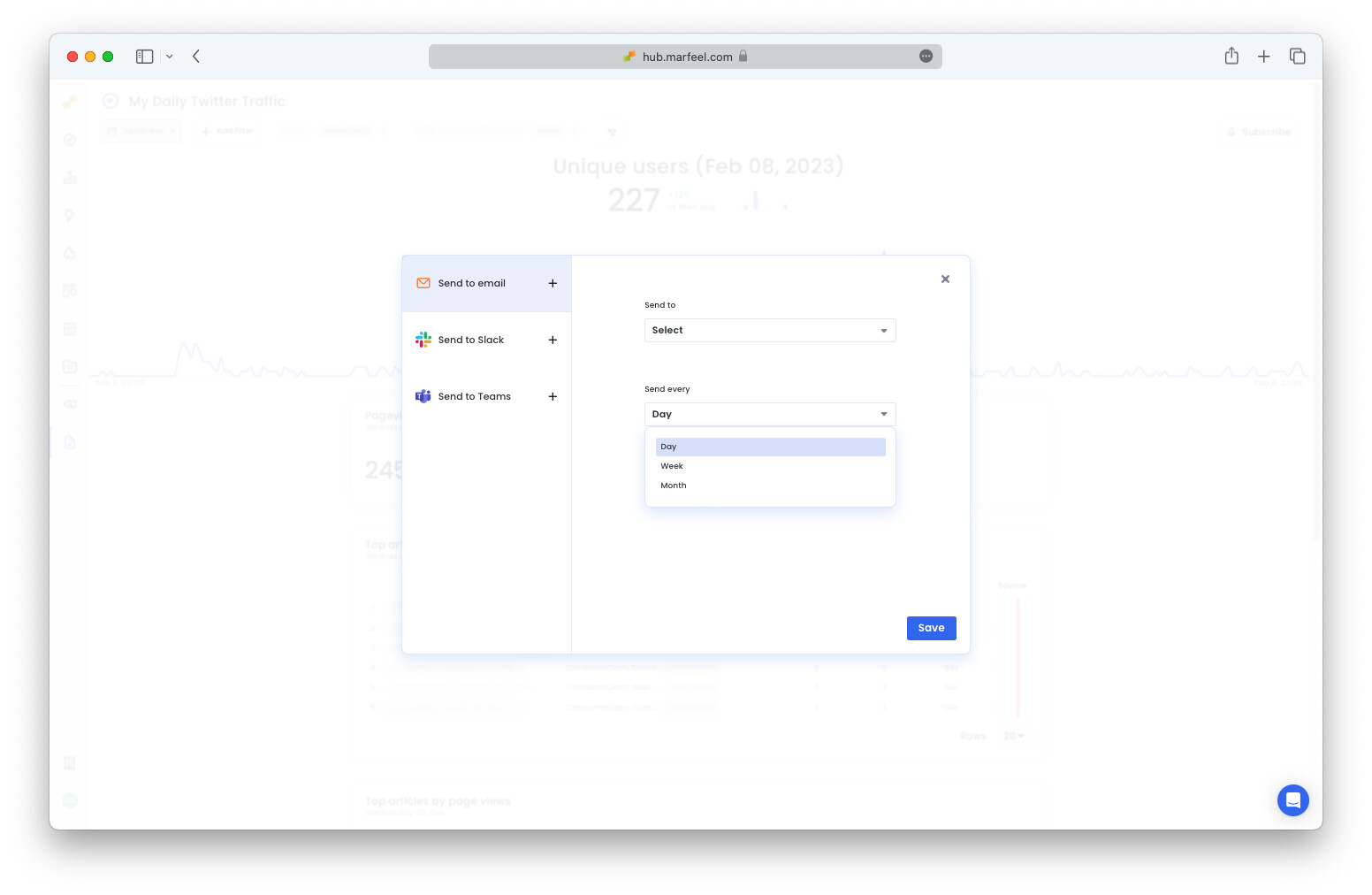
Section titled “Workspaces”You can now schedule any saved report to be sent by email, Teams, or Slack. Scheduled reports instill and maintain good habits for you and your team.
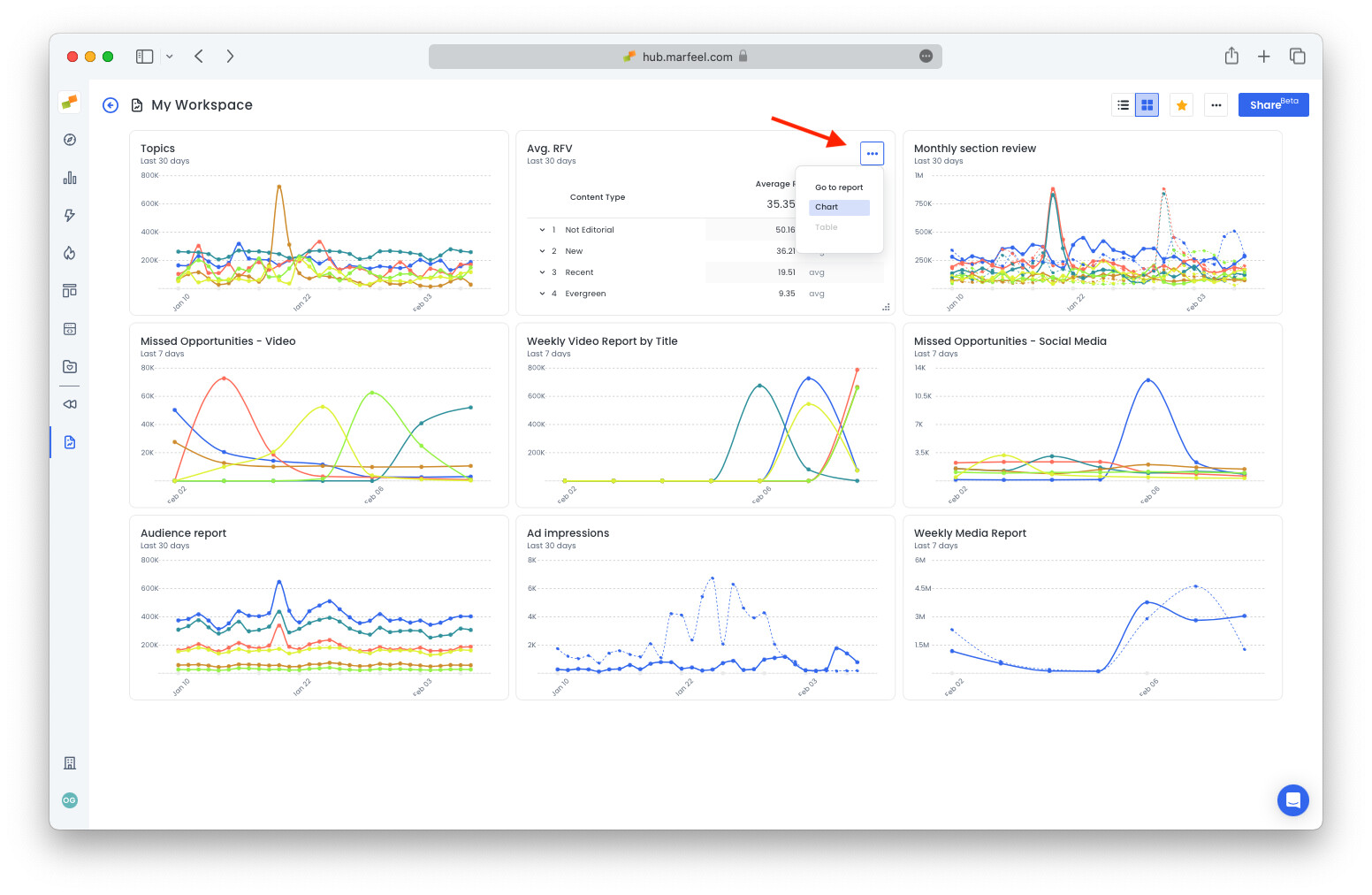
You can now visualize the saved reports in any Workspace as a dashboard. You can add or remove reports, toggle the visualization of a report from graphic to table, resize individual widgets, and reorder them.
Contextual
Section titled “Contextual”Since day one, Marfeel has had support for Topics or NLP-based entities. Entities allow publishers to better understand the topics on which they have authority on channels like Google Discover.
Along these lines, this release adds a set of new content classifications:
Topic Categories & Descriptions
Section titled “Topic Categories & Descriptions”Topics are now classified into parent categories for easier understanding and analysis. Here are some examples:
- Topic Category: Corporation, Topics: Tesla Inc, Silicon Valley Bank, JPMorgan Chase
- Topic Category: Person, Topics: Warren Buffett, Joe Biden, Elon Musk
A new Topic Categories dimension is available, and each individual Topic Category (e.g. Corporation, Person, TVShow) is also a dimension that you can use for your analysis.
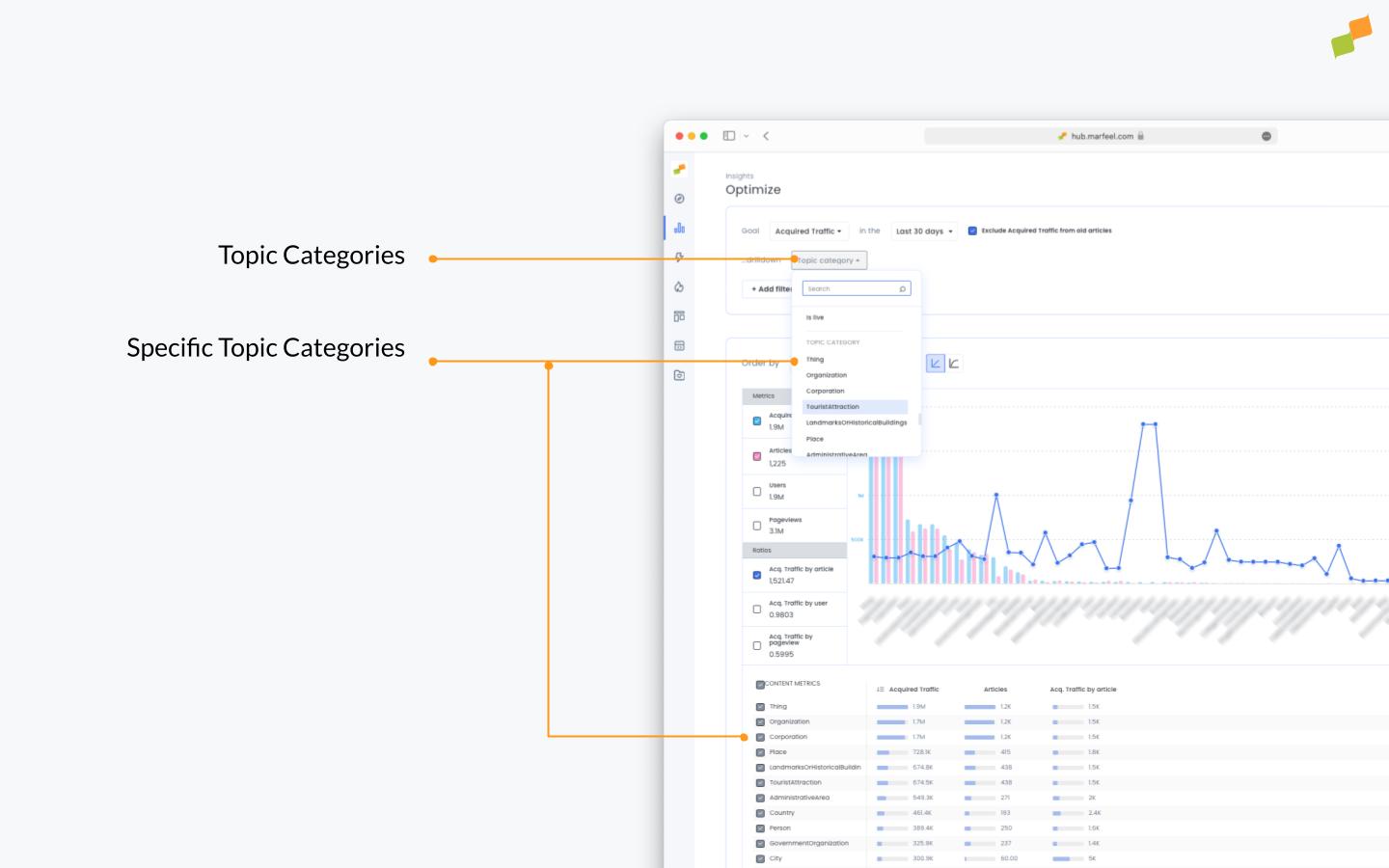
Along with Topic Categories, a Topic Description dimension has also been added.
Sentiment analysis and IAB Categorization
Section titled “Sentiment analysis and IAB Categorization”Publishers can add Sentiment analysis and IAB Categorization via IBM Watson to perform deep analysis and answer questions like:
- Do positive articles get more exposure on Google Discover?
- Do negative articles have higher CTRs?
- Do certain IAB categories monetize better than others?
Most importantly, this data is now part of the Marfeel Data Activation platform, which makes all this information available to Google Ad Manager for publisher sales houses to capitalize on contextual campaigns. Get ready for the cookieless era.
Multimedia for Broadcasters
Section titled “Multimedia for Broadcasters”The multimedia module now supports on-demand and live streaming of audio and video in real time and historically. The multimedia SDK is available on Android and iOS SDKs, Alexa, Google Assistant, and HTTP endpoints are provided for OTT integrations.
Marfeel now provides qualitative metrics like unmute rate and engagement rate to help video teams understand the impact of auto-play, giving more visibility and higher distribution to more engaging media than others.
A wide range of out-of-the-box no-code video and audio providers are supported: Dailymotion, YouTube, Kaltura, VideoJS, JWPlayer, STNPlayer, and Spreaker.
Recording here.
Advertising
Section titled “Advertising”- Advertising Compass View
- Advertising Playbook
SERP Monitoring
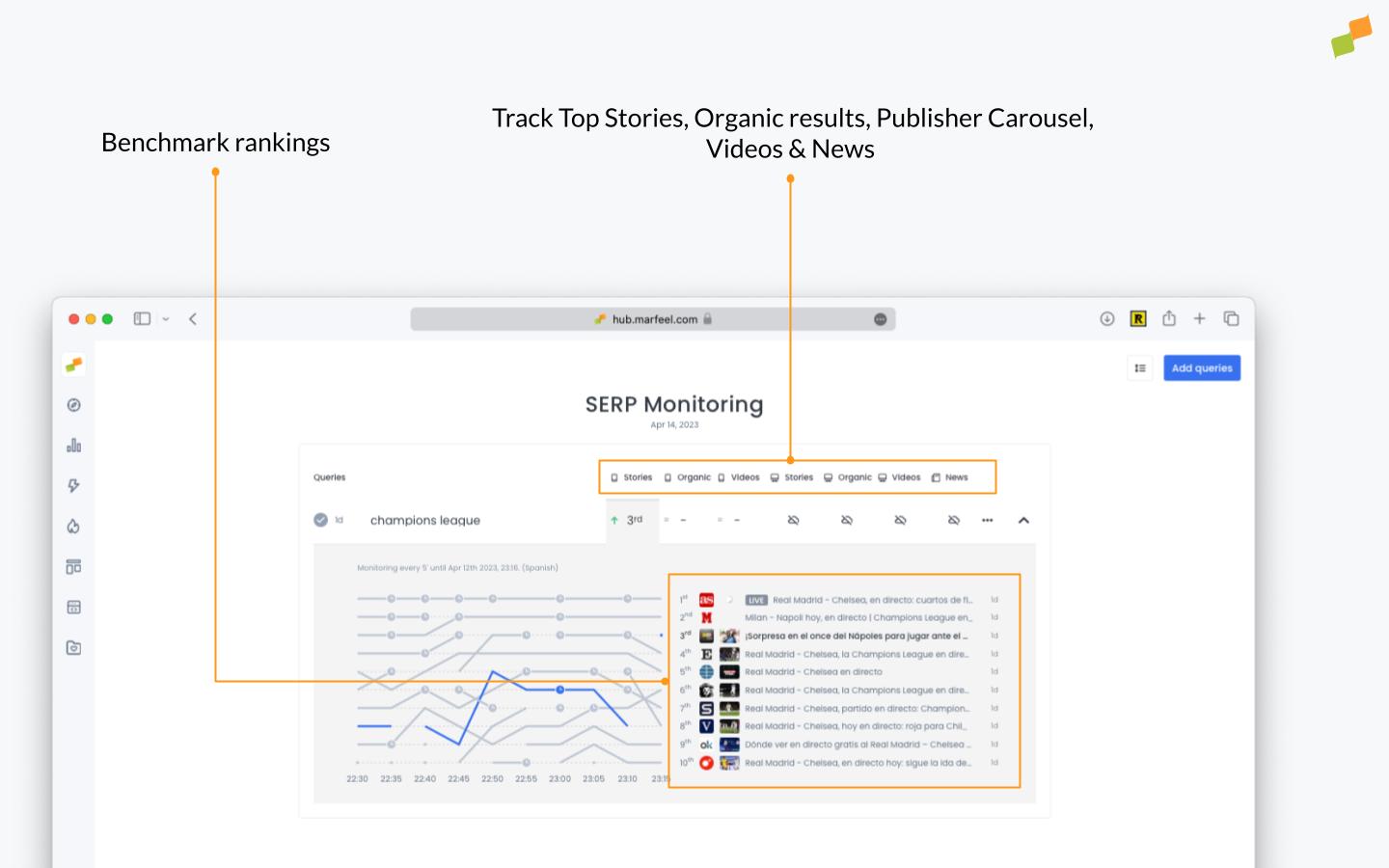
Section titled “SERP Monitoring”The Marfeel SERP Monitoring module has been specifically designed for news SEO and editorial teams to increase your visibility on Google News and the Top Stories on the Google SERPs.
Key Features:
- All-in-One SERP Analysis: SERP Monitoring provides comprehensive tracking of Top Stories, Organic Results, Publisher Carousel, Videos, and more.
- Uncover Top Stories Rankings: Easily access the rankings for Top Stories (formerly known as the News Carousel) to stay on top of the game.
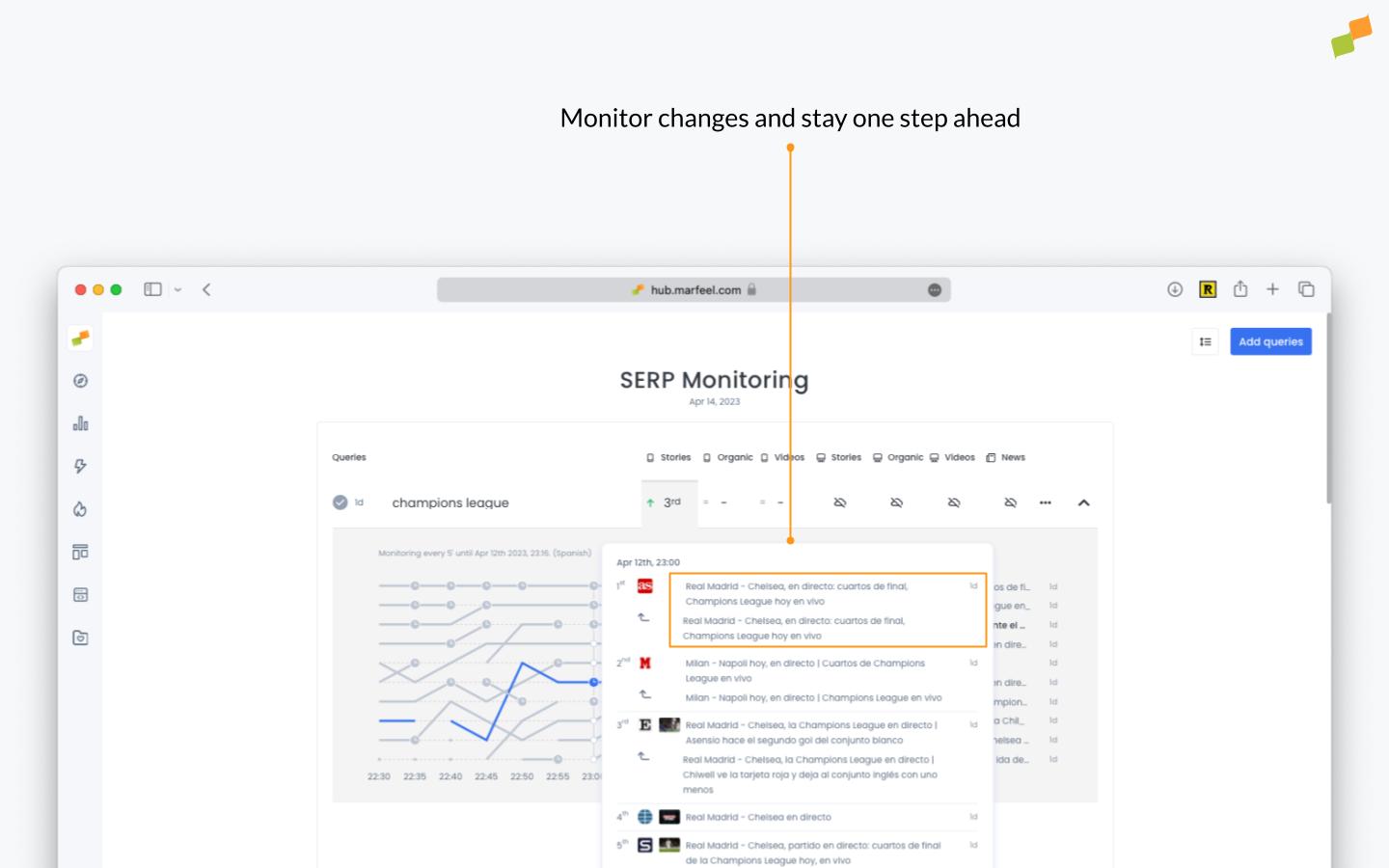
- Keep an Eye on the Competition: Monitor competitors’ changes and stay one step ahead.
- Track Video, Publisher, and Live Carousel Rankings: Comprehensive tracking of all aspects of the SERP ecosystem.
- Optimize for Maximum Visibility: With this news SEO tool, you are better equipped to increase your visibility in Google News and the Top Stories on Google SERPs.
- Monitor Article Performance: Track how your articles perform in News Boxes (desktop and mobile) during a given period of time and identify potential optimization opportunities.
- Benchmark and Strategize: Compare your visibility with competitors and use this data to build a winning SEO strategy.
Content Planner
Section titled “Content Planner”Marfeel’s Content Planner module offers a comprehensive set of features to help you implement Kanban workflows for your editorial teams. You can create custom boards and columns, add and assign tasks, set due dates, set quotas, track progress, and collaborate with your team members. You can also visualize your team’s work in real time, coordinate efforts, identify bottlenecks, and make data-driven decisions to improve your content production workflow.
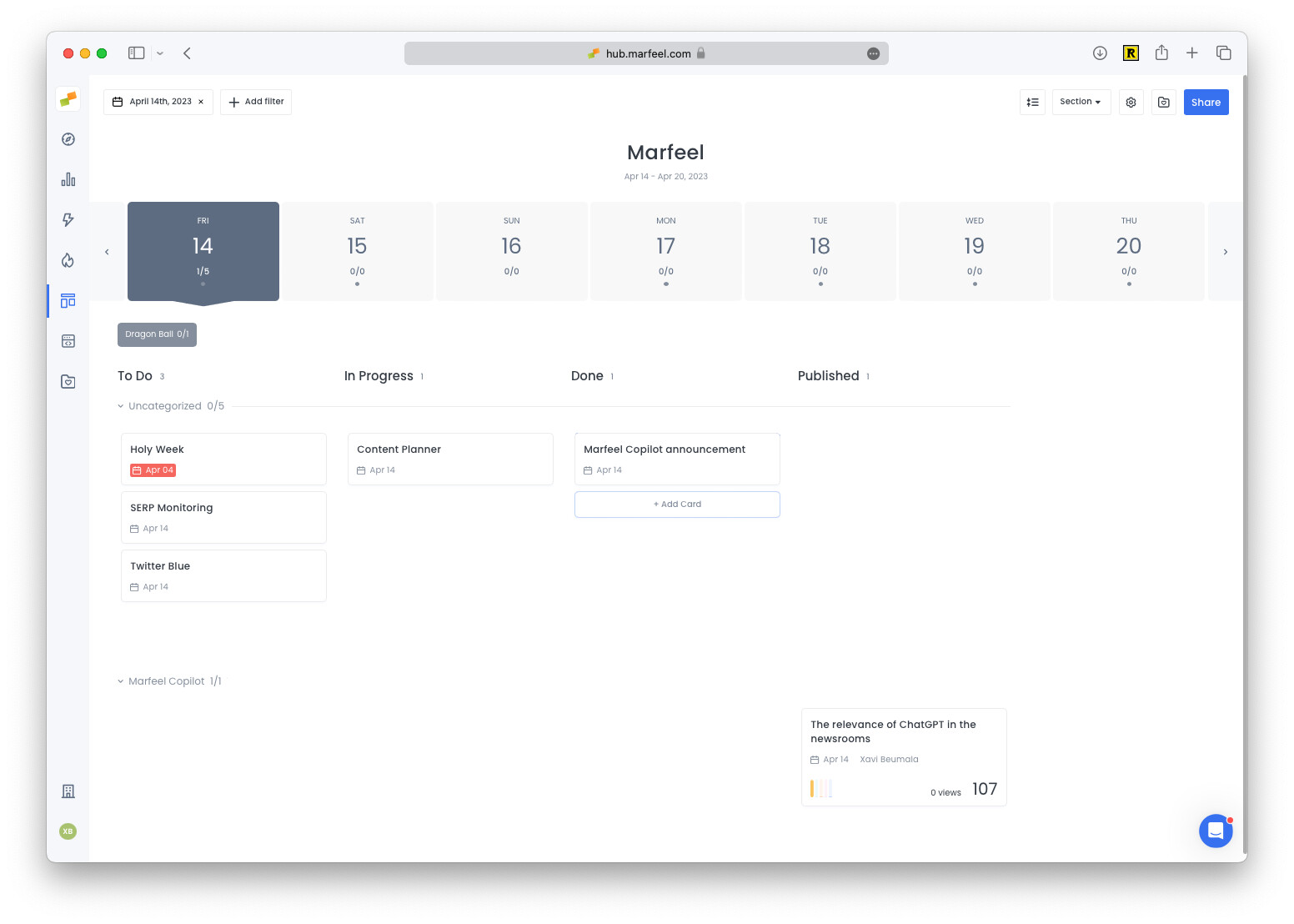
If you already spend considerable time on the above tasks, Marfeel Content Planner can help you:
- Create a list of the articles a section team needs to write.
- Work with external news agencies.
- Create a workflow between editorial and SEO.
- Work with home editors to sync up when an article appears on the home page.
- Align with social teams for social distribution.
Social
Section titled “Social”- TikTok
- YouTube
What is Marfeel Copilot?
Marfeel Copilot is an AI-driven solution that combines large language models with publisher historical data. It integrates as a chat assistant for querying data in natural language and provides AI-powered suggestions for headlines, content expansion, and social media posts.
What new features were added to Marfeel Compass view?
The April 2023 update added sparklines for trending content, predictive metrics across all dimensions, a date picker with compare date ranges, selectable metrics that update the entire view, and personalization options including pre-made playbooks for editorial, subscriptions, social media, video, and advertising teams.
What does the Marfeel SERP Monitoring module do?
The SERP Monitoring module tracks Top Stories, organic results, publisher carousel, and video rankings on Google SERPs. It helps news SEO and editorial teams increase visibility on Google News, monitor competitor changes, and benchmark article performance.