

Site technology audits for real-time SEO monitoring
The Audits module runs over 220 real-time checks on your articles and AMP pages, catching technical SEO problems before they erode traffic. As a core component of Marfeel’s Site Technology category, it proactively identifies crawling failures, structured data errors, indexing issues, and more, so you can fix them within seconds of detection.
Features
Section titled “Features”- Comprehensive auditing: Over 220 audits run in real time as articles are published, on-demand, or integrated into your CI infrastructure. Audit categories include:
- SEO regression prevention: The module guards your site’s technical SEO by surfacing hard-to-identify regressions that can silently reduce traffic for weeks.
- Immediate error detection: Errors appear within seconds of publishing an article, and the alerting system notifies you whenever a regression is introduced.
Error severity levels
Section titled “Error severity levels”- Critical: Issues that are likely impacting your site’s traffic significantly.
- Error: Problems that could potentially harm your site’s performance.
- Warning: Issues that require monitoring, as they may indicate underlying problems.
Audits module interface
Section titled “Audits module interface”The Audits module consists of two main screens: List View and Detail View.
List View
Section titled “List View”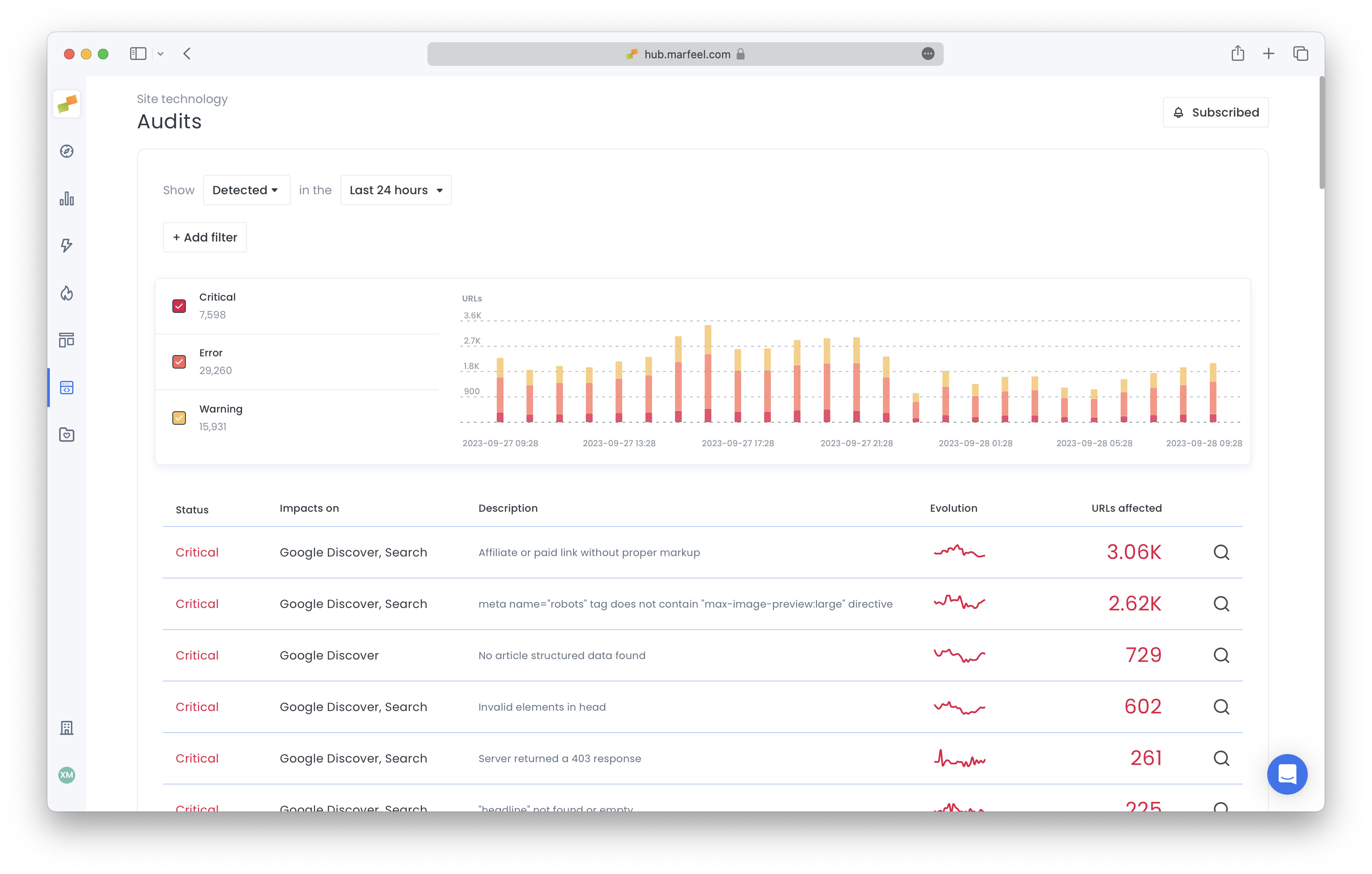
- Error Evolution Chart: A visual representation of error trends over time.
- Error Type Summary: Error types listed with their volume and individual sparklines.
Detail View
Section titled “Detail View”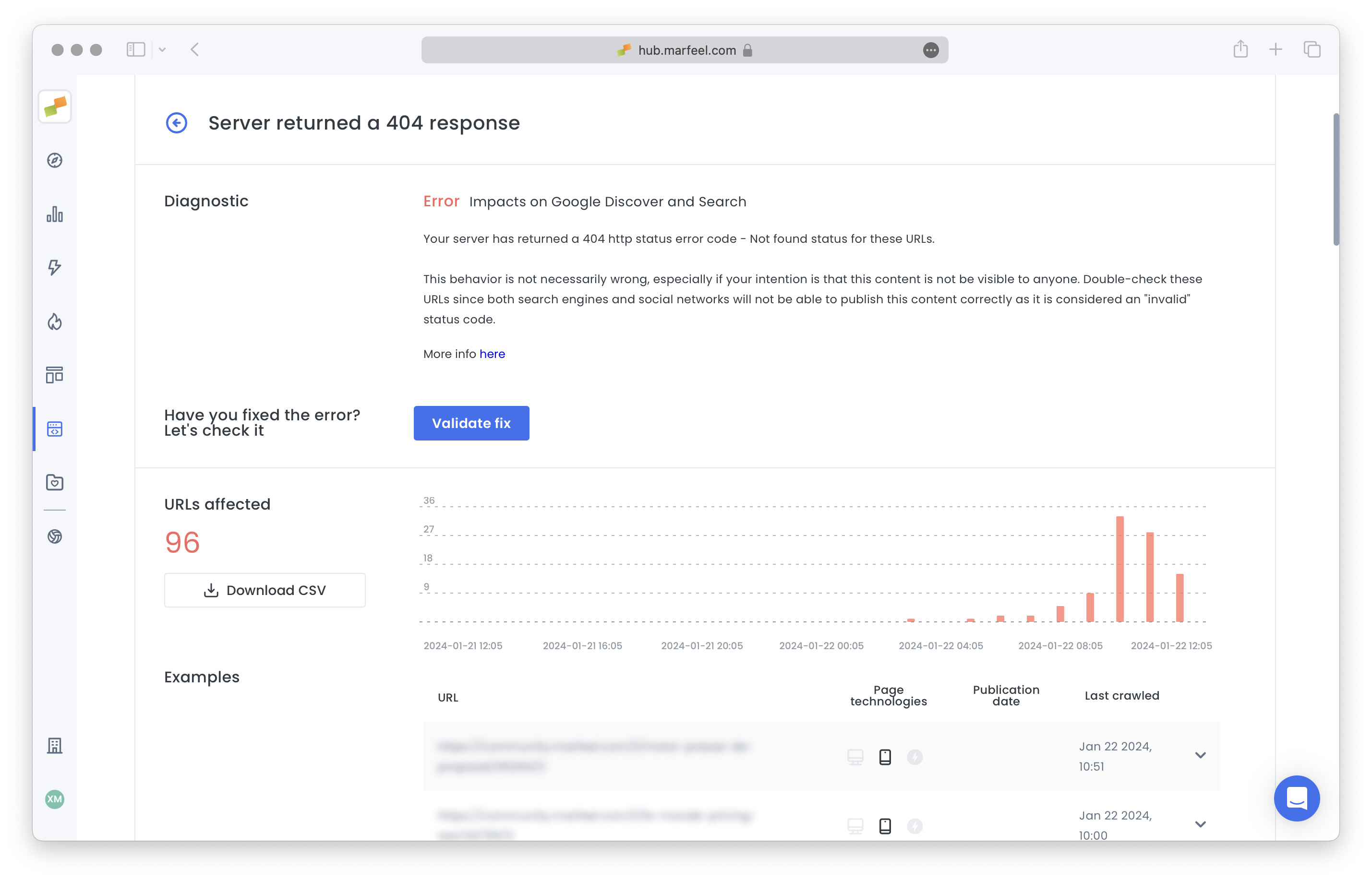
The Detail View provides a granular examination of specific audits, such as articles where the published date is later than the modified date. It includes:
- Error Evolution Chart: Historical performance of the selected audit.
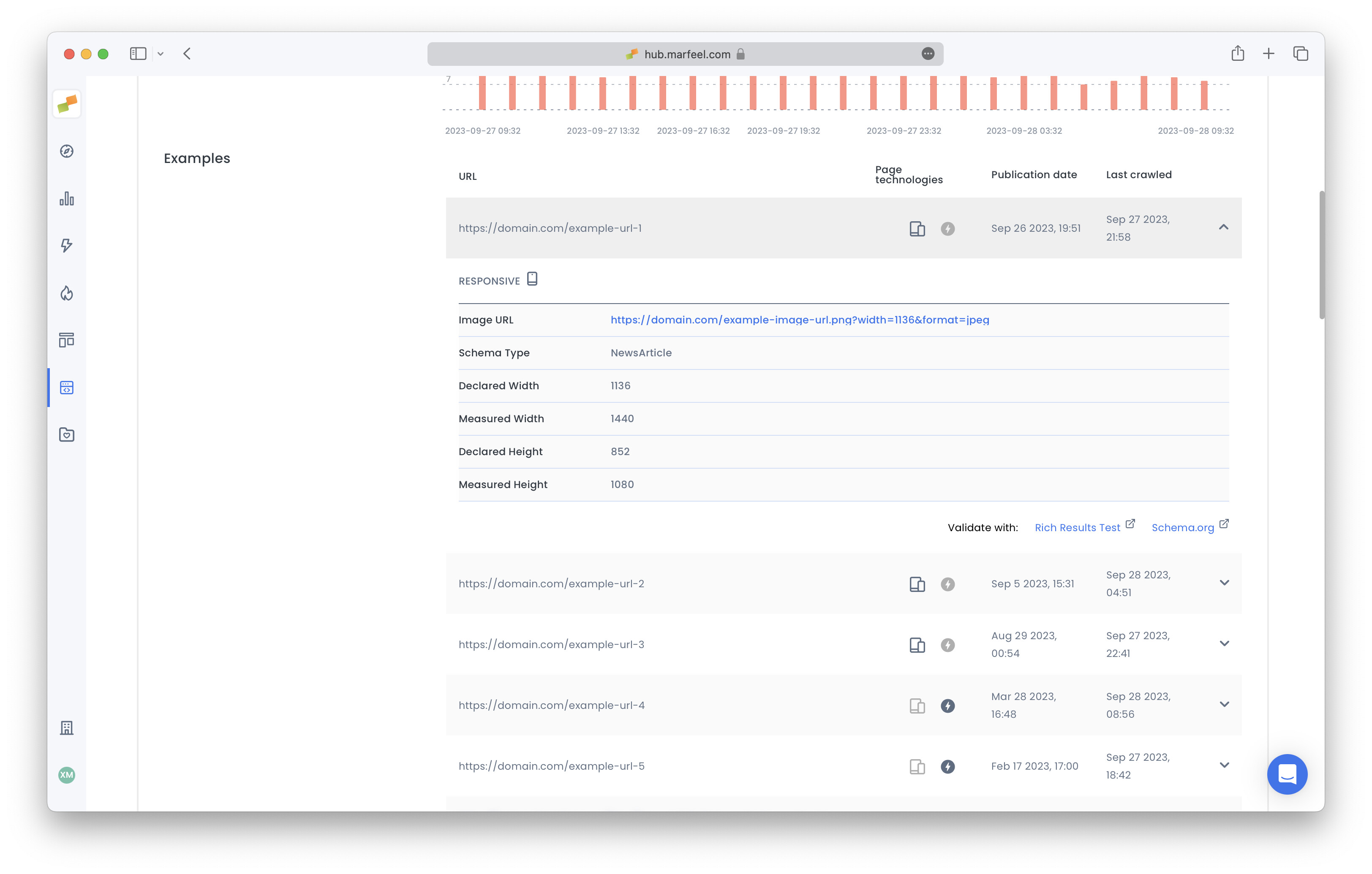
- Latest 50 Affected URLs: URLs impacted by the audit across mobile, desktop, AMP, or responsive technologies.
- Detailed Error Information: Expanded rows reveal specifics about the audit findings, such as failing selectors or incorrect field values.
- Validation Links: Direct links to external validation tools tailored to the audit type, including the Rich Results Test, Schema.org, AMP Validator, or Facebook Debugger.
Audit filtering
Section titled “Audit filtering”Both List View and Detail View support filtering by:
- Host: Focus on specific domains.
- Audit Category: Narrow results to a specific audit category.
- Content Type: Select from new, recent, evergreen, and not editorial content types.
Download affected URLs in a CSV
Section titled “Download affected URLs in a CSV”Most audits relate to generic errors pointing to problems in rendering templates, deploying pipelines, systems, or CMS structures. Some cases require a URL-by-URL fix. For those scenarios, the Detail View provides a CSV download button for the full list of affected URLs. It respects the active filters and is limited to 10,000 results.
Audit modes: Active vs Detected
Section titled “Audit modes: Active vs Detected”Audits can be inspected in two modes:
- Active: Shows audits currently failing based on the most recent validation. Errors are continually revalidated for all traffic-generating URLs, and cleared if the last validation is older than 2 weeks.
- Detected: Highlights newly discovered errors. This mode shows how many new errors the system identified during a given week and their distribution over that period.
Audit revalidation
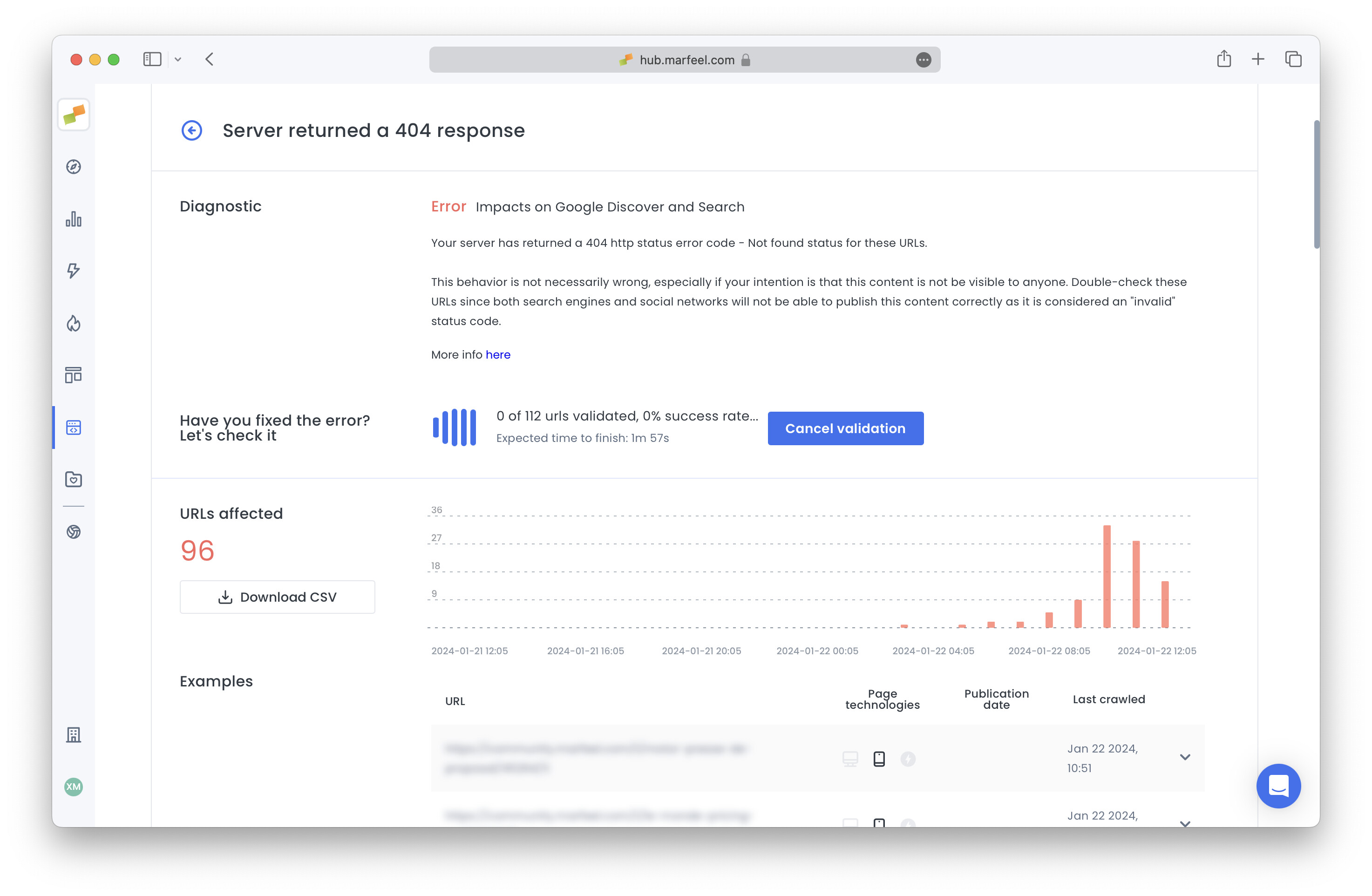
Section titled “Audit revalidation”After fixing an error, you can trigger a revalidation from the Detail View. The system revalidates all URLs matching your selected filters. If the success ratio drops below 50% after the first 200 URLs, revalidation is automatically canceled. You can also cancel revalidations manually. Only one revalidation can run per audit at a time.
Auditing criteria
Section titled “Auditing criteria”Marfeel audits all new URLs and periodically revalidates URLs with traffic. The revalidation period ranges from 12 to 72 hours depending on the URL’s traffic volume. Any URL must reach at least 2 visits in a 5-minute period to qualify for revalidation. URLs that include a no-index <meta> tag are skipped during the auditing process.
Specific audits for article, product, and recipe
Section titled “Specific audits for article, product, and recipe”- Articles: Many audits run exclusively for URLs classified as articles. A URL qualifies as an article if it meets one of the following criteria:
- It includes article structured data.
- It has a published date.
- It contains a URL with six or more words in its slug and more than 200 words in the body.
- Products: Product audits execute when product structured data is found.
- Recipes: Recipe audits execute when recipe structured data is found.
Send an audit proposal
Section titled “Send an audit proposal”Have a unique case that’s not covered by the Audits module? Share your experience and stand a chance to win a €50 Amazon gift card. Tell us about it today! 🤑
How many audits does the Audits module run?
The Audits module runs over 220 audits on articles and AMP counterparts in real time. These cover crawling availability, AMP validation, structured data schema validation, search engine indexing, Open Graph tagging, sitemap validation, and Marfeel platform adoption.
What error severity levels exist in the Audits module?
Errors are categorized into three severity levels: Critical (likely impacting traffic significantly), Error (could potentially harm performance), and Warning (requires monitoring as it may indicate underlying problems).
How often does the Audits module revalidate URLs?
Marfeel audits all new URLs and periodically revalidates URLs with traffic. The revalidation period ranges from 12 to 72 hours depending on the URL’s traffic volume. A URL must reach at least 2 visits in a 5-minute period to be revalidated. URLs with a no-index meta tag are skipped.