

Find and link relevant articles in Marfeel Copilot
Marfeel Copilot+ provides advanced features for discovering highly relevant articles related to your main text and adding links to them with minimal effort.
Open the Linking tab in the Sidebar to analyze the document. Marfeel Copilot+ then suggests closely related articles at both the document and paragraph levels.
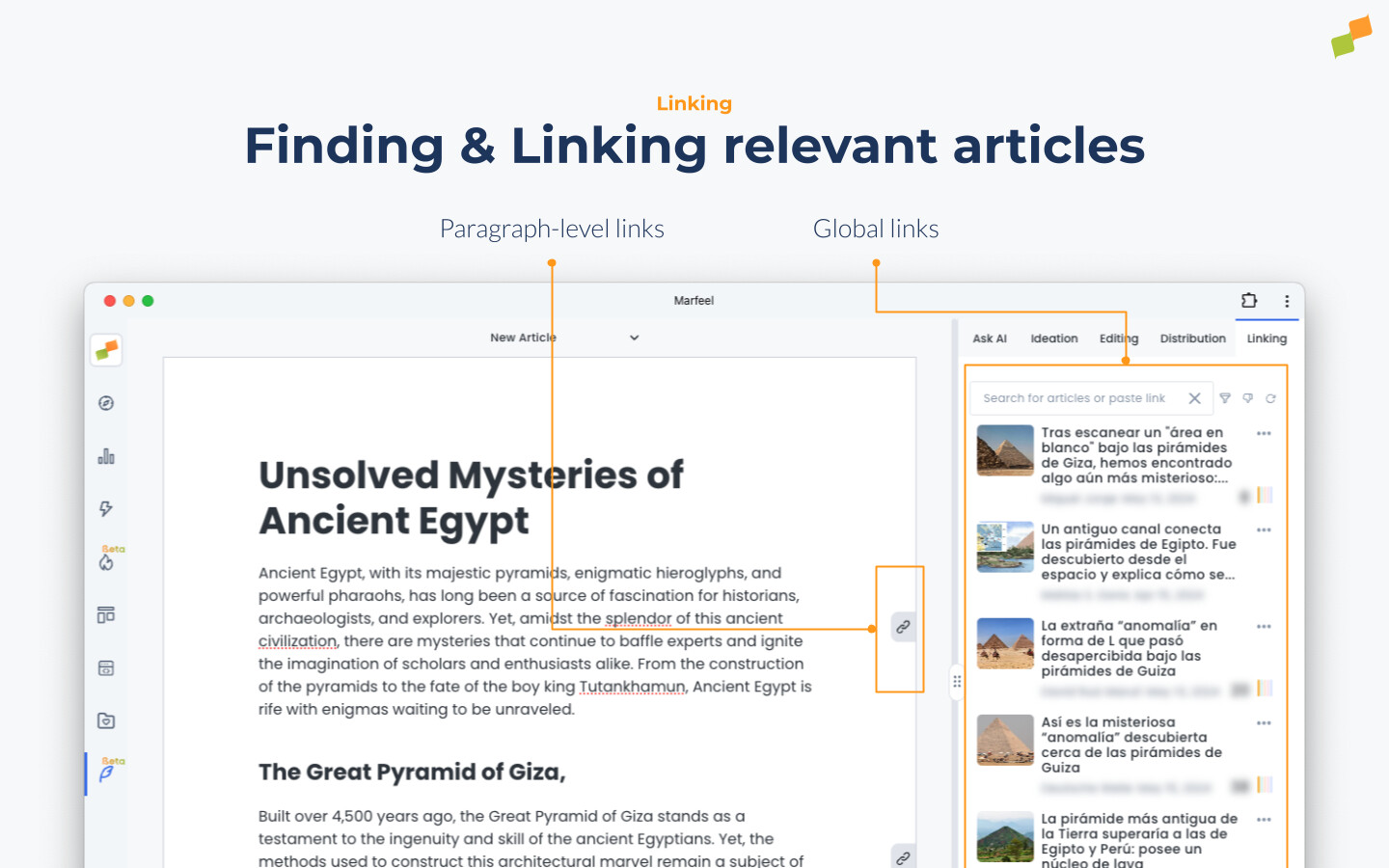
If document modifications are detected upon opening the Linking tab, a re-analysis is initiated and related articles are recalculated. The list can also be regenerated manually.
Related links are accessible in two locations: the global sidebar and the anchor icon on the right margin of the document at the paragraph level.
Related articles
Section titled “Related articles”Related articles display editorial metadata — article title, image, author, and publication date — alongside performance metrics such as accumulated total page views and traffic sources.
Accumulated PageViews are calculated using cohort metrics and are restricted to articles published after 1st April 2024. Upon publication, the system retains traffic data at intervals of 15 minutes, 1 hour, 24 hours, 48 hours, and 28 days. The traffic value shown corresponds to the maximum value from these computed time spans.
Tip: Marfeel automatically identifies and flags duplicate links in the document by displaying a distinctive blue checkmark, serving as a precautionary measure for users.
Available interactions on related articles
Section titled “Available interactions on related articles”- Click + Selected text: Inserts a link to the clicked article on the highlighted text.
- Click (no selection): Marfeel Copilot+ automatically identifies the most suitable text and inserts the link.
Cmd/Ctrl+ Click: Opens the original article in a new tab.Cmd/Ctrl+Shift+ Click: Opens the Article Details view on Marfeel Compass in a new tab.
Filtering related articles
Section titled “Filtering related articles”Narrow down the list of related articles using two methods:
- Search bar: Type any keyword to display related articles containing it.
- Filters: Refine results by Host, Author, Section, and other criteria to find the most relevant links.
Adding links
Section titled “Adding links”There are several ways to add links to text in Marfeel Writer:
- Paste a link + Selected text: Highlight text in the document and paste a link to add it automatically.
- Click a related article + Selected text: With text highlighted, click a related article to insert the link on that selection.
- Click a related article (no selection): Marfeel Copilot+ automatically identifies the most suitable text and inserts the link.
- Use
Cmd/Ctrl+K: Quickly access the Linking tab to search and add links.
Edit and remove links
Section titled “Edit and remove links”Links can be modified or deleted by clicking on them and selecting the option to edit or remove.
How does Marfeel Copilot suggest related articles?
When you open the Linking tab in the Sidebar, Marfeel Copilot analyzes the document and suggests closely related articles at both the document and paragraph levels. If modifications are detected, a re-analysis is triggered automatically.
What performance metrics are shown for related articles?
Related articles display editorial metadata such as title, image, author, and publication date, along with accumulated total page views and traffic sources. PageViews are calculated using cohort metrics for articles published after 1st April 2024, tracked at intervals of 15 minutes, 1 hour, 24 hours, 48 hours, and 28 days.
What are the different ways to add links in Marfeel Writer?
You can paste a link onto selected text, click a related article with text selected, click a related article without selection for automatic placement, or use Cmd/Ctrl + K to quickly access the Linking tab.