

Marfeel Copilot AI Suggestions for editors and content teams
Marfeel Copilot delivers data-driven AI Suggestions that help editors and content strategists generate fresh ideas, refine their writing, and distribute content more effectively. All suggestions are trained with the language and tone of the author, the section, and your most successful stories, ensuring every recommendation is contextually relevant.
As part of the broader Marfeel Copilot suite, AI Suggestions seamlessly blend into newsroom daily habits through UI elements like the Heads Up Display (HUD) and Article Detail pages.
Marfeel Copilot+ brings AI Suggestions to various contexts while writing a new article:
- Document-level AI Suggestions via Sidebar.
- Selection-level AI Suggestions via Ask AI.
- New-block AI Suggestions via Ask AI.
- Make AI Questions on-the-fly via Ask AI.
- In Compass Article Details.
Marfeel Copilot+ also allows organizations to collaborate, improve, and distribute organization-wide AI Suggestions seamlessly, fostering knowledge sharing via Advanced Prompt Management.
Sidebar: document-level AI Suggestions
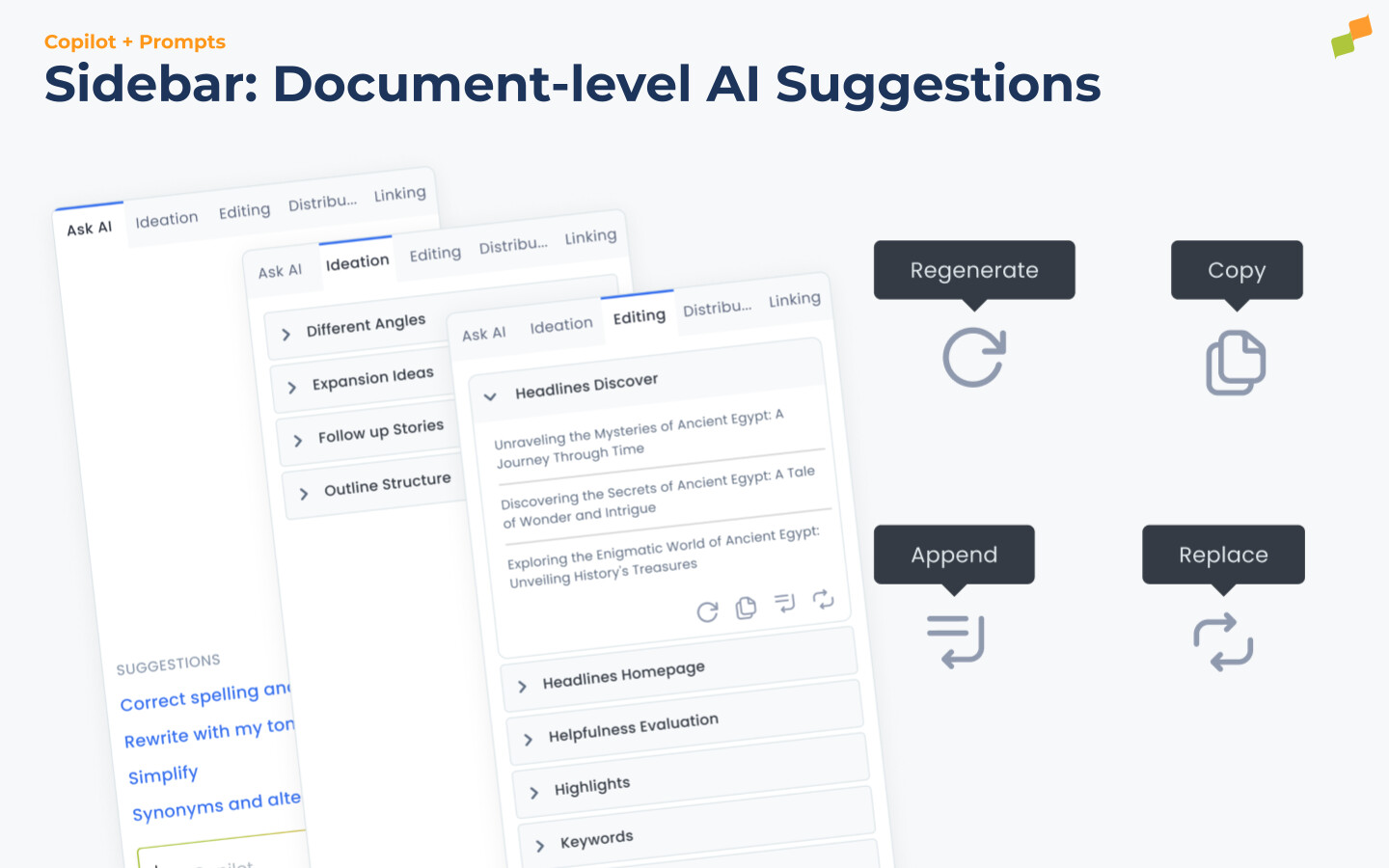
Section titled “Sidebar: document-level AI Suggestions”Sidebar AI Suggestions operate at the document level. These suggestions are grouped into three buckets — Ideation, Editing, and Distribution — so editors can locate the right tool quickly.
Sidebar AI Suggestions execute upon:
- Expanding the suggestion accordion for the first time.
- Clicking the
Regeneratebutton if the document has changed. - ⌘ + Click the
Regeneratebutton to force regenerating the AI Suggestion.
Marfeel Copilot text responses are parsed into blocks such as paragraphs or list elements. These blocks can then be:
- Copied
- Appended at the cursor caret
- Used to replace the document selection
- Substituted for a given element of the document (i.e., the title)
You can explore alternative options by pressing ⌘ + Click on the Regenerate button.
Ask AI: selection-level AI Suggestions
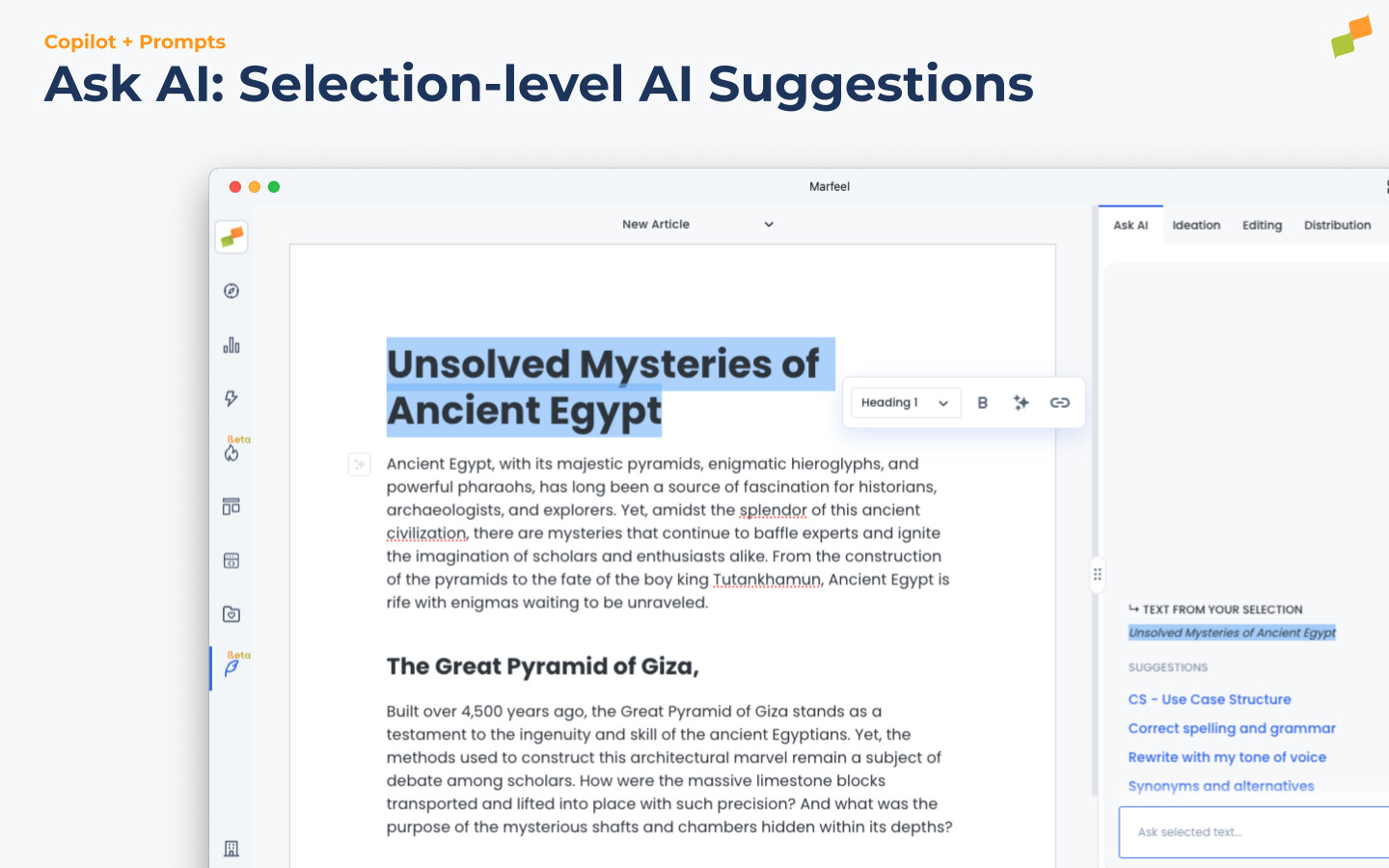
Section titled “Ask AI: selection-level AI Suggestions”When a user selects a portion of the document and presses Esc, the Ask AI section appears, providing access to pre-defined selection-level AI Suggestions:
- Correct spelling and grammar: Quickly check the selected text and detect misspellings.
- Synonyms and alternatives: Find the right words for your document.
- Rewrite with my tone of voice: Adapt the selected text to any writing style defined by the user or the organization. More info.
The chosen AI runs contextually on the selected text and displays the answer or suggested changes. When the system detects that the response closely matches the original text, it displays a Diff editor where users can accept or reject the suggested changes before merging them.
Ask AI: new-block AI Suggestions
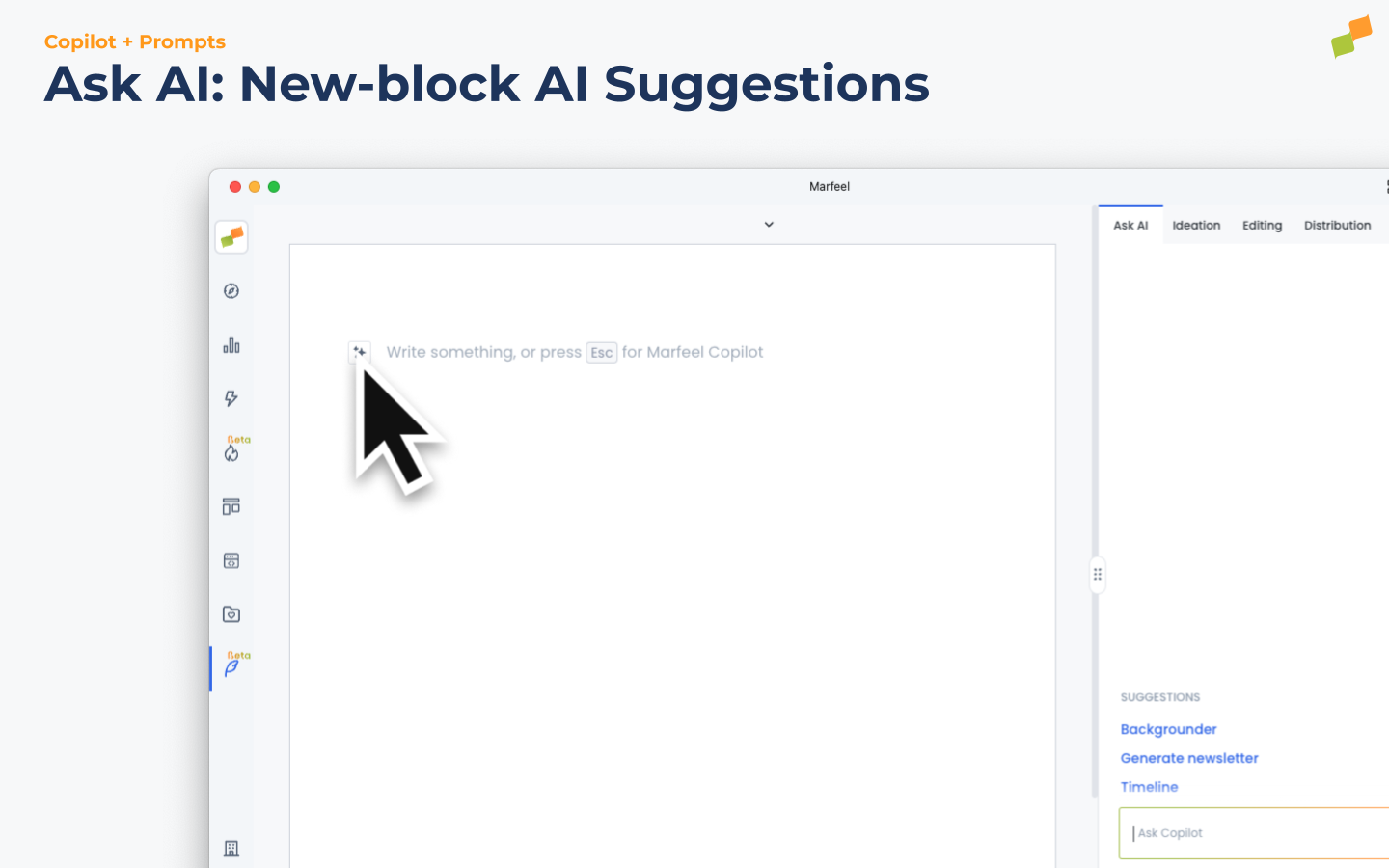
Section titled “Ask AI: new-block AI Suggestions”When the user focuses on a new line in the document, Marfeel Copilot+ offers a different set of AI Suggestions designed to generate content from scratch:
- Backgrounder paragraphs: Provide in-depth information and context on a particular topic, offering detailed explanations and analysis to help readers understand the subject matter comprehensively.
- Timeliner blocks: Organize and present information chronologically using timeline blocks.
New-block AI Suggestions are commonly paired with Parametrized Suggestions to let the user choose a set of articles as input.
Ask AI: ad-hoc AI questions
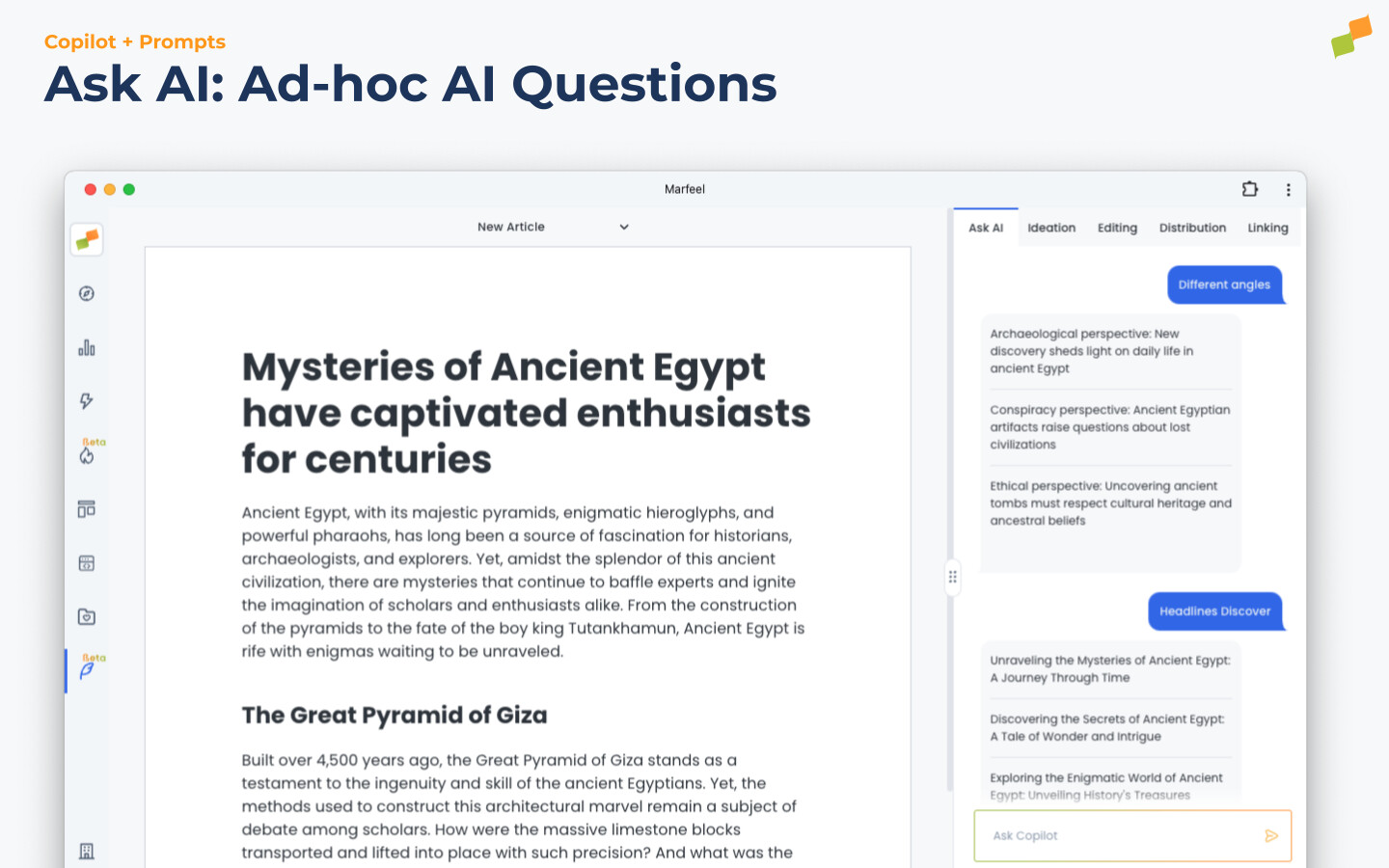
Section titled “Ask AI: ad-hoc AI questions”Editors can execute custom questions directly to the LLM. The answers respect the selected Tone of Voice and support advanced block formatting.
Examples of custom prompts:
- Selection-level:
- “Apply bold to the most important words of the selection to increase readability”
- “Give me a summary with bullet points”
- “Rewrite being as concise as possible”
- Document-level:
- “Translate to English, French, Spanish, Portuguese, etc…”
- “Give me 3 alternative catchy subtitles”
- “Who’s Julio Cortez?”
Article Details Suggestions
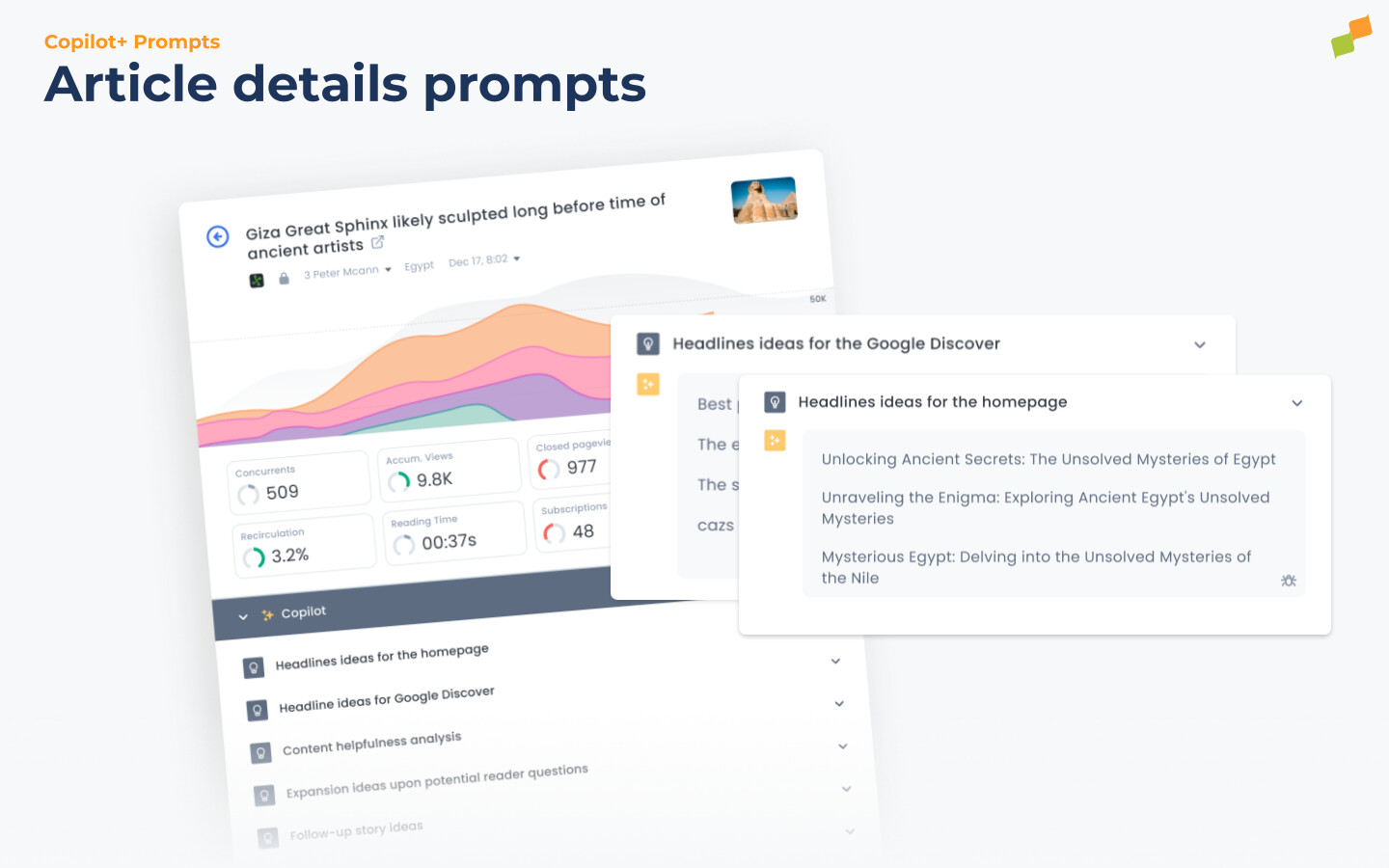
Section titled “Article Details Suggestions”Once an article is published, all its audience and performance KPIs are available via Marfeel Compass and the Article Details view. Marfeel Copilot default AI Suggestions, as well as custom individual and organization-wide suggestions, are accessible from Article Details too.
Article Details Suggestions results are cached and only executed:
- The first time a user runs the AI Suggestion.
- If a user re-executes the AI Suggestion and the article’s last update date has changed, effectively evicting the result cache.
HUD headline A/B testing suggestions
Section titled “HUD headline A/B testing suggestions”Marfeel Copilot is integrated directly into the Heads Up Display (HUD) to merge smoothly with newsroom daily habits. When selecting a story, Marfeel Copilot automatically suggests alternative headlines based on the historically successful A/B tests the newsroom has run in the past.
Clicking on any of the suggested headlines automatically sets up an A/B test for that variant, saving your Home editors time to focus on higher-priority tasks.

Marfeel Copilot+ default AI Suggestions
Section titled “Marfeel Copilot+ default AI Suggestions”Marfeel Copilot+ includes a collection of built-in AI Suggestions that:
- Use powerful data-enriched models not available to custom AI Suggestions.
- Use fine-tuned models for author and section, not available to custom AI Suggestions.
- Can be disabled by users with
Copilot Managerrole to better meet organization needs.
Here is the full table of Marfeel Copilot+ AI Suggestions:
| AI Suggestion | Sidebar | Ask AI | Article Details |
|---|---|---|---|
| Headline Discover | Editing | - | |
| Headline Home | Editing | - | |
| Helpfulness evaluation | Editing | - | |
| Highlights | Editing | - | - |
| Keywords | Editing | - | - |
| Leading paragraph | Editing | - | - |
| Rewrite for paper | Distribution | - | - |
| Facebook post ideas | Distribution | - | |
| TikTok video script ideas | Distribution | - | - |
| Twitter post ideas | Distribution | - | |
| Different angles | Ideation | - | - |
| Expansion ideas | Ideation | - | |
| Follow up stories | Ideation | - | |
| Outline structure | Ideation | - | - |
| Correct spelling & grammar | - | Selection | - |
| Rewrite with my tone of voice | - | Selection | - |
| Synonyms and alternatives | - | Selection | - |
| Backgrounder paragraph | - | New Block | - |
| Write Newsletter | - | New Block | - |
| Timeliner paragraphs | - | New Block | - |
To guarantee the highest quality of the suggestions make sure to integrate:
- Headline AB testing: The more manual headline AB tests variants you create the better the suggestions you will get.
- Google Search Console for Google Discover headline suggestions.
- Social Networks data. Marfeel will make you proposals based on your best hits.
- Headline ideas for the homepage. The recommendations are trained with the author’s tone of voice, the section, and your own headline A/B tests. The more A/B tests and the more data Marfeel has on recirculation modules and CTRs, the more accurate it gets.
- Headline ideas for Google Discover. The recommendations are trained with your best headlines based on Google Search Console and CTR data. If you don’t have Google Search Console connected to Marfeel, then it’s trained based on the articles with the most Discover traffic.
- Content Helpfulness Analysis. Search engines like Google classify content into what they define as helpful content. Algorithms and concepts like EEAT or YMYL apply here. Marfeel Content Helpfulness Analysis suggestions runs your articles by a quality rater with Google public documentation and provides you with the results.
- Expansion ideas upon potential reader questions. It helps focus on making sure that the article or content is as comprehensive and thorough as possible in addressing the potential questions that readers may have. It emphasizes the importance of leaving no gaps or missing pieces of information that could leave the reader with unanswered questions. It helps:
- Increase user engagement encouraging readers to stay on the page longer
- Extend the lifespan of articles with an evergreen touch
- Improve search engine rankings addressing user questions and intentionality
- Establish authority by demonstrating your expertise and providing valuable insights
- Follow-up story ideas: Recommendations for new related articles and different angles you might want to cover.
- Facebook post ideas. Facebook recommendations trained on your own Facebook posts.
- Twitter post ideas. Twitter recommendations trained on your own Tweets.
What types of AI Suggestions does Marfeel Copilot offer?
Marfeel Copilot offers document-level AI Suggestions via the Sidebar (grouped into Ideation, Editing, and Distribution), selection-level and new-block AI Suggestions via Ask AI, ad-hoc AI questions, Article Details Suggestions for published content, and HUD-based headline A/B testing suggestions.
How do Sidebar AI Suggestions work in Marfeel Copilot?
Sidebar AI Suggestions execute at the document level. They run when you expand the suggestion accordion for the first time, click Regenerate after the document changes, or Cmd+Click Regenerate to force a refresh. Responses are parsed into blocks that can be copied, appended at the cursor, used to replace a selection, or substituted for a specific element like the title.
Can editors create custom AI prompts in Marfeel Copilot?
Yes. Through Ask AI, editors can type any custom question to the LLM. The answers respect the selected Tone of Voice and support advanced block formatting. Custom prompts work at both the selection level and the document level.