

Marfeel Recommender: Ranking signals explained
The Marfeel Content Recommender determines which articles to recommend by analyzing seven ranking signals. Each signal evaluates a different dimension of content relevance, from traffic volume and content similarity to user behavior and engagement quality. Understanding these signals allows you to adjust and optimize the recommendation engine to better meet your site’s needs.
Each ranking profile weights these signals differently, and you can further customize them through adjustment factors in the advanced configuration.
The seven ranking signals are:
- Threshold: Ensures that only articles with a minimum level of traffic are considered relevant for recommendation.
- Similarity: Measures how closely related the content is to the article or topic the user is currently viewing.
- Popularity: Assesses how popular an article is among all users, indicating general interest.
- Trend: Captures whether an article is gaining or losing popularity over time.
- Pageview Value: Reflects the average engagement time derived from each pageview of an article.
- Personalization: Tailors recommendations based on the individual user’s preferences and behavior.
- Click-Through Rate (CTR): Evaluates how well an article performs within recirculation modules based on user clicks.
1. Threshold
Section titled “1. Threshold”The threshold signal filters out articles with insufficient traffic, ensuring that only content with a proven level of user interest enters the recommendation pool. As a rule of thumb, articles below 50 page views during the last 7 days will find it hard to enter recommender listings.
Example
Section titled “Example”- An article that has been viewed by many users over the past week will pass the threshold and be eligible for recommendation.
- An article with very few views might not meet the threshold, so it won’t be recommended until it gains more traffic.
2. Similarity
Section titled “2. Similarity”Similarity measures how closely related a candidate article is to the content the user is currently viewing. Recommending similar content keeps users engaged by providing them with more of what they are interested in.
The system analyzes shared topics, sections, authors, and content similarities between articles:
- Topics: Articles that share the same subjects or themes.
- Sections: Articles from the same category or section on your site.
- Authors: Articles written by the same author.
- Title Match: Similarity in article titles.
- Content Similarity: Overall likeness of the content.
Example
Section titled “Example”- If a user is reading an article about “healthy recipes,” the recommender will suggest other articles on “nutrition,” “wellness,” or similar topics.
- If you want to diversify recommendations, you can reduce the influence of the similarity signal.
3. Popularity
Section titled “3. Popularity”The popularity signal assesses how widely read an article is among all users, indicating general interest. Popular articles are strong candidates for recommendation because they appeal to a broad audience.
Adjust the popularity signal to emphasize widely read articles.
Example
Section titled “Example”- An article that has gone viral with many views and shares will be recommended more due to its high popularity.
- If you want to focus on niche content, you might reduce the influence of popularity.
4. Trend
Section titled “4. Trend”The trend signal captures whether an article is gaining or losing popularity over time. Articles that are rapidly gaining attention are more relevant and timely for users.
The system compares recent traffic to historical traffic to determine if an article is trending upwards or downwards. Adjust the trend signal to prioritize articles that are currently gaining momentum.
Example
Section titled “Example”- An article about a breaking news event sees a sudden spike in views; the trend signal boosts its recommendation.
- An older article with declining views may be recommended less as it is no longer trending.
- A football team line-up announcement that becomes irrelevant once the game starts, showing a sudden drop in traffic, will be heavily penalized.
5. Pageview Value
Section titled “5. Pageview Value”The pageview value signal reflects the average engagement time derived from each pageview of an article. Articles that keep users engaged longer are often more valuable, enhancing user satisfaction.
This signal measures factors like the average engagement time spent on the page and user interactions. Prioritize articles with higher engagement metrics by increasing the influence of the pageview value signal.
Example
Section titled “Example”- An article with an average reading time of 5 minutes indicates high engagement and may be recommended more.
- An article with an average reading time of 10 seconds will be penalized, as even if it attracts a high volume of page views, it won’t deliver value in terms of engagement or revenue.
6. Personalization
Section titled “6. Personalization”The personalization signal tailors recommendations to the individual user based on their browsing history, favorite topics, authors, and sections. Personalized recommendations enhance user experience by showing content that aligns with their interests, increasing engagement and loyalty.
You can adjust how strongly personalization influences recommendations. For new users without much browsing history, personalization will have less impact.
Example
Section titled “Example”- A user frequently reads articles about “technology” and “gadgets.” The recommender will prioritize articles in these areas.
- If a user shows interest in a particular author, articles by that author will be recommended more often.
7. Recirculation Modules Click-Through Rate (CTR)
Section titled “7. Recirculation Modules Click-Through Rate (CTR)”The CTR signal evaluates how well an article performs within recirculation modules based on user clicks. Articles with higher CTRs are more appealing to users when recommended.
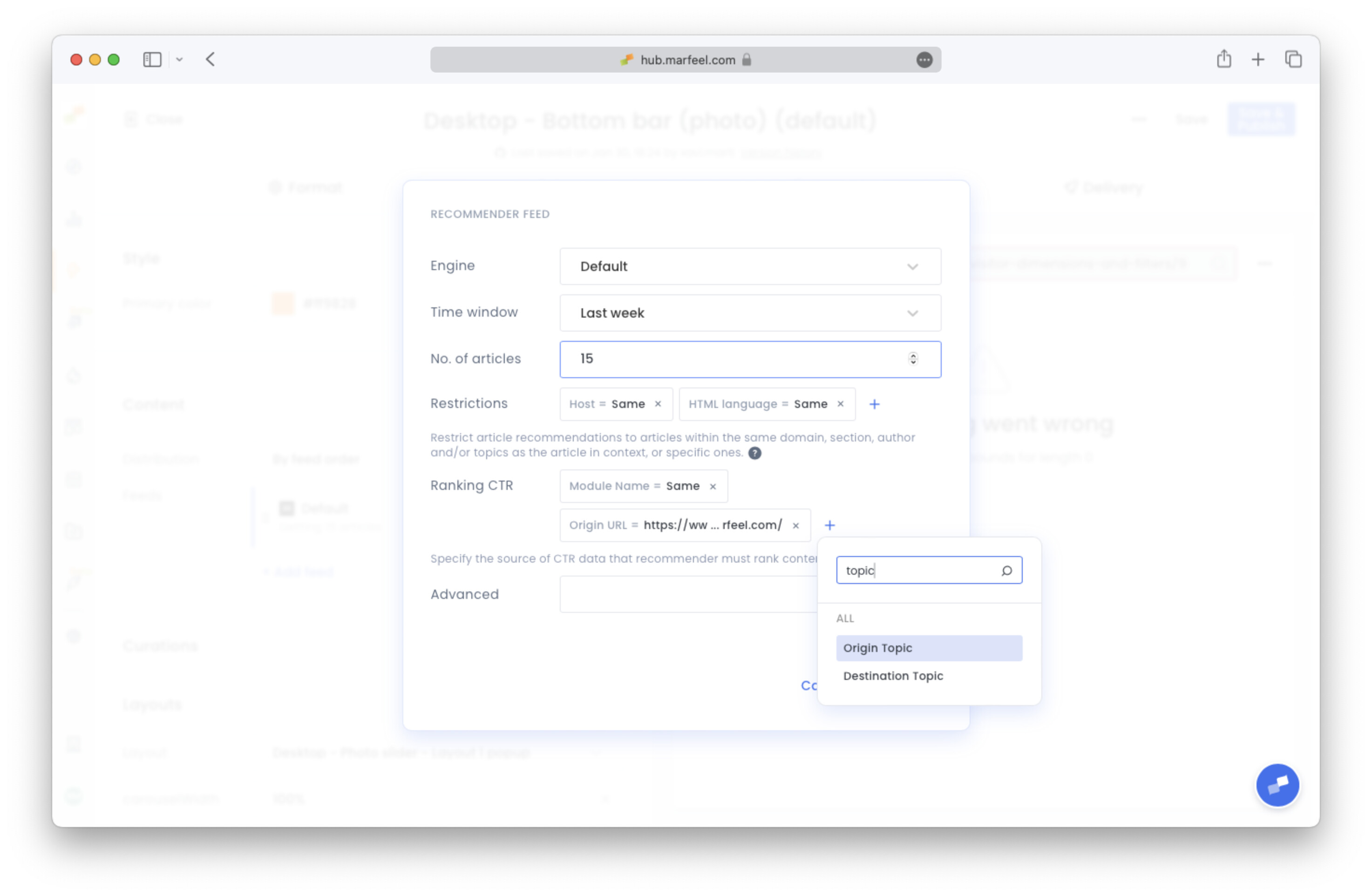
Also known as Open Rate, it is calculated as clicks / viewable, just as in Recirculation module. Marfeel’s recommender will calculate a ranking signal based on how this Open Rate compares to the average one of the module that the article is being shown in, promoting it when above average, and penalizing it when below.
By default, a recommender feed will use data from appearances in itself to calculate this ranking signal. This way, the recommender experience learns from itself.
It can also be configured to read from data different than its own module. Ranking CTR can be found inside any recommender feed configuration, just below Restrictions. All filters available in Recirculation can be applied, being the default one Module Name = Same.
Example
Section titled “Example”- An article with a higher than average CTR in the “Related Articles” module indicates that users find it attractive and may be recommended more frequently.
- An article with a lower than average CTR on homepage’s Breaking News module predicts that its performance on a recommender module will also be below par, and is therefore penalized to make its appearance less probable.
Custom Ranking Factors
Section titled “Custom Ranking Factors”Each signal has an associated adjustment factor that you can modify to influence its impact on the overall ranking. Each engine adjusts these factors according to their goals.
These factors can be changed through your recommender advanced configuration settings. They are used in the form of {{signal}}Factor=value , like trendFactor=1 . They take any positive value, like:
- Factor = 0: the recommender will not use this signal for ranking
- i.e.:
trendFactor=0will make trend irrelevant
- i.e.:
- Factor between 0 and 1: the signal is reduced
- i.e.:
trendFactor=0.5will halve trend’s weight
- i.e.:
- Factor higher than 1: the signal is amplified
- i.e.:
trendFactor=2would double trend’s weight
- i.e.:
- Factor = 1: this signal’s weight will remain as default.
Customizable ranking signals are the following:
similarity->similarityFactorpersonalization->personalizationFactorpopularity->popularityFactortrend->trendFactorpageviewValue->pageviewValueFactorctr->ctrFactor
Signals without having a custom factor configured will take their weight from the Engine being used.
Experimenting with different settings allows you to find the optimal balance that enhances user engagement and satisfaction. Remember:
- Start with Default Settings: Use the default factors as a baseline and adjust gradually.
- Monitor Performance: Keep an eye on key metrics like click-through rates, time on page, and user feedback.
- Iterate: Continuously refine your settings based on performance data and changing goals.
What ranking signals does Marfeel Recommender use?
Marfeel Recommender uses 7 ranking signals: threshold (minimum traffic), similarity (content relatedness), popularity (general interest), trend (momentum over time), pageview value (engagement time), personalization (individual user preferences), and click-through rate (CTR performance in recirculation modules).
How do custom ranking factors work in Marfeel Recommender?
Each signal has an adjustment factor you can modify through advanced configuration. A factor of 0 disables the signal, values between 0 and 1 reduce its weight, values above 1 amplify it, and 1 keeps the default weight. Customizable factors include similarityFactor, personalizationFactor, popularityFactor, trendFactor, pageviewValueFactor, and ctrFactor.
Which ranking signals are affected by the Time Window parameter?
Only Popularity and Click-Through Rate are affected by the Time Window parameter. The other five signals (threshold, similarity, trend, pageview value, and personalization) operate independently of the configured time window.