

How to reorder modules with Marfeel Recommender
The Reorder module experience rearranges articles within any module based on rankings from Marfeel Recommender, without altering the articles or needing to render them again. It is especially useful for personalizing the homepage or automating modules based on CTR.
Module reordering is particularly important on mobile. On desktop, a whole module may fit on screen, making the position of each element less relevant. On mobile, the same module can extend across several viewports, so article order directly affects engagement.
Reorder module configuration
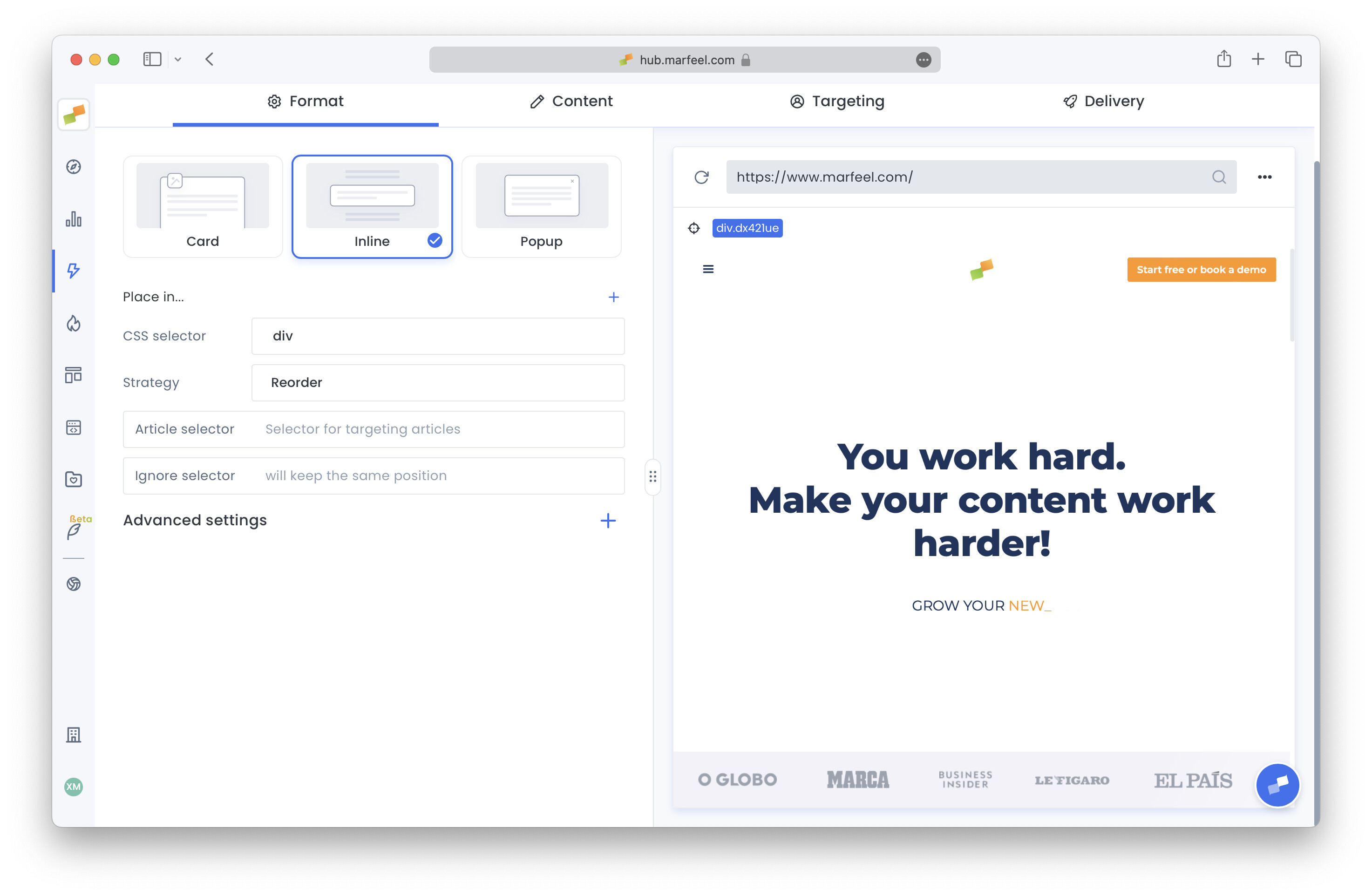
Section titled “Reorder module configuration”A recommender experience can be set in Reorder mode by selecting Reorder in its Strategy dropdown, inside the Format tab. A Reorder Module experience template is also available in the new experience creation dialog. Configure it using the following fields:
-
CSS selector — In the Format tab, the CSS selector identifies the module that will be reordered. Execution is recurrent, meaning every block matching this selector will be reordered.
-
Article selector — Optional. Specify a common selector for all articles that need to be reordered. Use it only to help the algorithm with complex modules that share a common article selector. Otherwise, the algorithm infers the definition of an article automatically based on anchor (link) positioning.
-
Ignore selector — Optional. Elements matching this selector will not be reordered. Useful for preserving ad positions, for instance.
-
Ranking CTR — Inside each feed configuration. Set the Module value to match the module being reordered. CTR metrics for ranking will be taken from this recirculation module.
Reorder module best practices
Section titled “Reorder module best practices”-
Time window — For modules with high dynamism, such as homepages, use short time windows so the algorithm focuses only on articles showing strong recent performance.
-
Highest CTR — To boost ranking by CTR when reordering a module, use the Highest CTR engine, which prioritizes the CTR signal. For further tweaking, modify ctrFactor as specified in Recommender’s Advanced Configuration.
-
Mobile targeting — Some modules cannot be reordered on desktop because the layout could break, leaving blank spaces between articles or failing to maintain visual harmony. A good strategy in these cases is to reorder only for mobile devices by setting
Device=Mobilein the targeting tab. -
Multiple block reordering — Some modules include sub-modules you want to preserve, for instance a module with one column per editorial section. Specify a common sub-module selector as the main CSS selector. Each sub-module will be reordered independently, but articles will not move between sub-modules.
What does the Reorder module experience do?
The Reorder module experience rearranges articles within any module based on rankings from Marfeel Recommender, without altering the articles or needing to render them again. It is especially useful for personalizing homepages or automating modules based on CTR.
Why is module reordering important on mobile?
On desktop, a whole module may fit on screen, making position less relevant. On mobile, the same module can extend across several viewports, so the order of articles has a much greater impact on engagement.
How do I configure which elements are excluded from reordering?
Use the Ignore selector field in the experience configuration. Elements matching this CSS selector will not be reordered. This is useful for preserving ad positions, for instance.