

Which recirculation modules produce internal traffic?
Marfeel’s recirculation modules help content creators, home editors, and product managers identify which user interactions, modules, and links generate internal traffic. This data reveals how users navigate and engage with your site, informing decisions about which content and modules are most effective at driving recirculation.
Browser and user interactions
Section titled “Browser and user interactions”Marfeel tracks several browser interactions as internal traffic sources. These include automatic page refreshes and navigation via browser buttons.
Refresh
Section titled “Refresh”Marfeel automatically tracks page refreshes as a traffic source.
Back Forward
Section titled “Back Forward”Marfeel automatically tracks page views generated by users when using the back and forward browser buttons.
Back Forward Cache
Section titled “Back Forward Cache”Back forward cache (or bfcache) is a browser optimization that enables instant back and forward navigation. It significantly improves the browsing experience for users, especially those with slower networks or devices.
bfcache is an in-memory cache that stores a complete snapshot of a page (including the JavaScript heap) as the user navigates away. With the entire page in memory, the browser can quickly and easily restore it if the user decides to return.
Marfeel identifies bfcache as a monetization opportunity because most publishing and news media sites do not refresh ad placements during bfcache navigations. Previously served impressions are visually reused without making bfcache inventory accountable.
Infinite Scroll
Section titled “Infinite Scroll”Marfeel allows tracking page views done via Infinite scroll interactions and helps you make them accountable.
Internal
Section titled “Internal”Internal traffic triggered through unknown or unclassified interactions or modules is reported as Traffic Source with Internal = Internal. Ideally this value should tend to be close to zero.
Traffic from page modules
Section titled “Traffic from page modules”Home page editors can use Marfeel HUD to visually understand the performance of links on the homepage.
They can also filter internal traffic in the Compass view, and named internal sources will appear. This view shows all articles linked from a given module along with their performance. Like with any other filter, the KPIs automatically update to reflect the real-time metrics for that module alone.
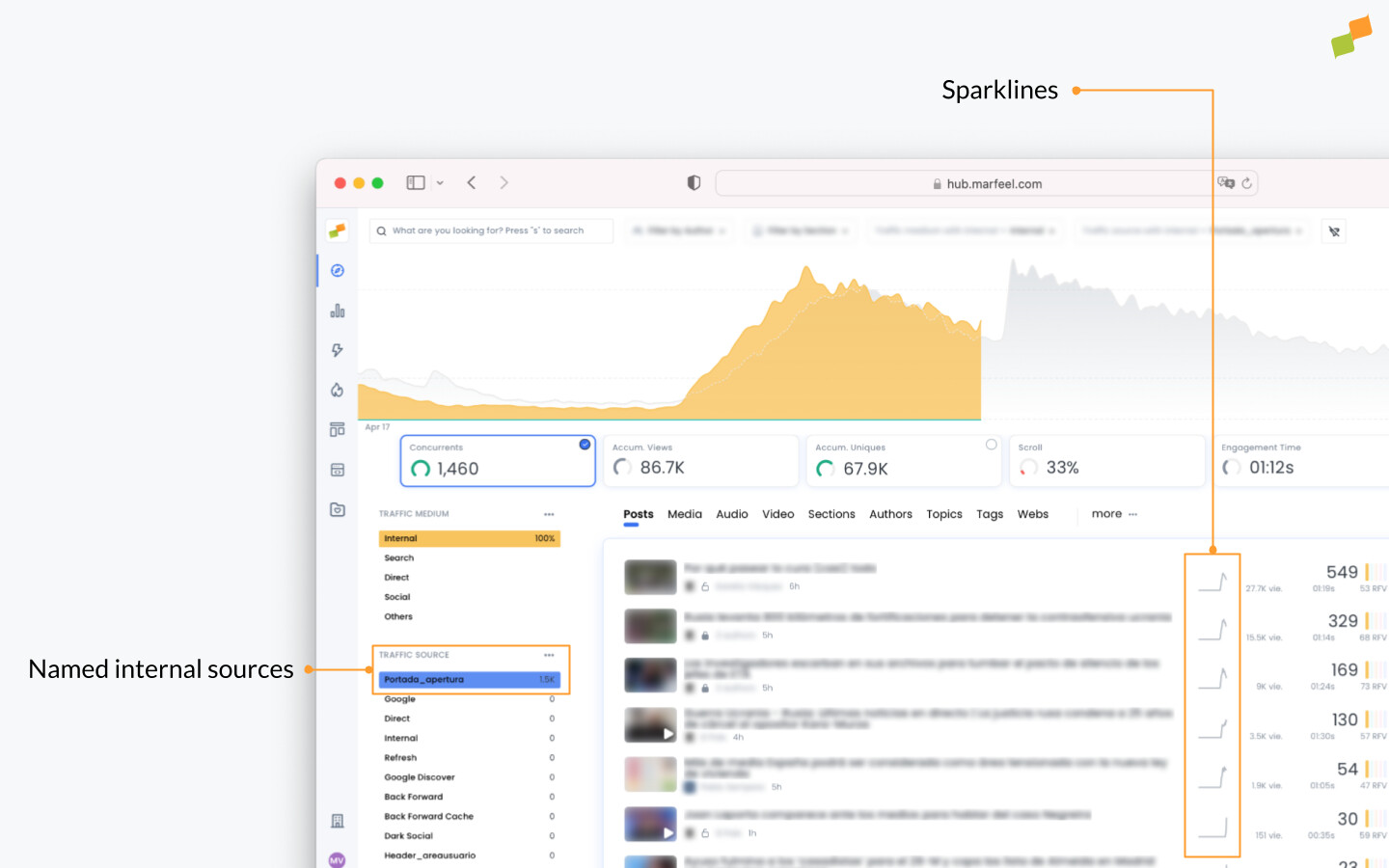
Filtering by one of the modules in Compass has the added bonus of including sparklines for each story. These visual cues show at a glance which stories are picking up speed versus which ones are losing traffic. In this way, homepage editors can decide in real time whether to pull an article because interest has waned, or to give additional visibility to another article that is gaining momentum.
🎓 Become a Realtime expert Learn how to monitor your live audience, spot trends early, and make data-informed editorial decisions with our Realtime Fundamentals Course.
✅ Real-time decision making ✅ Actionable use cases ✅ Certificate of completion included
🧠 Start now on Marfeel Academy.
Which modules are sending traffic to an article?
Section titled “Which modules are sending traffic to an article?”To identify which internal modules are driving traffic to a specific article:
- From the Compass view, click on any article
- Filter by
Internal - Under
Traffic sources, you will see the named sources sending traffic to the article
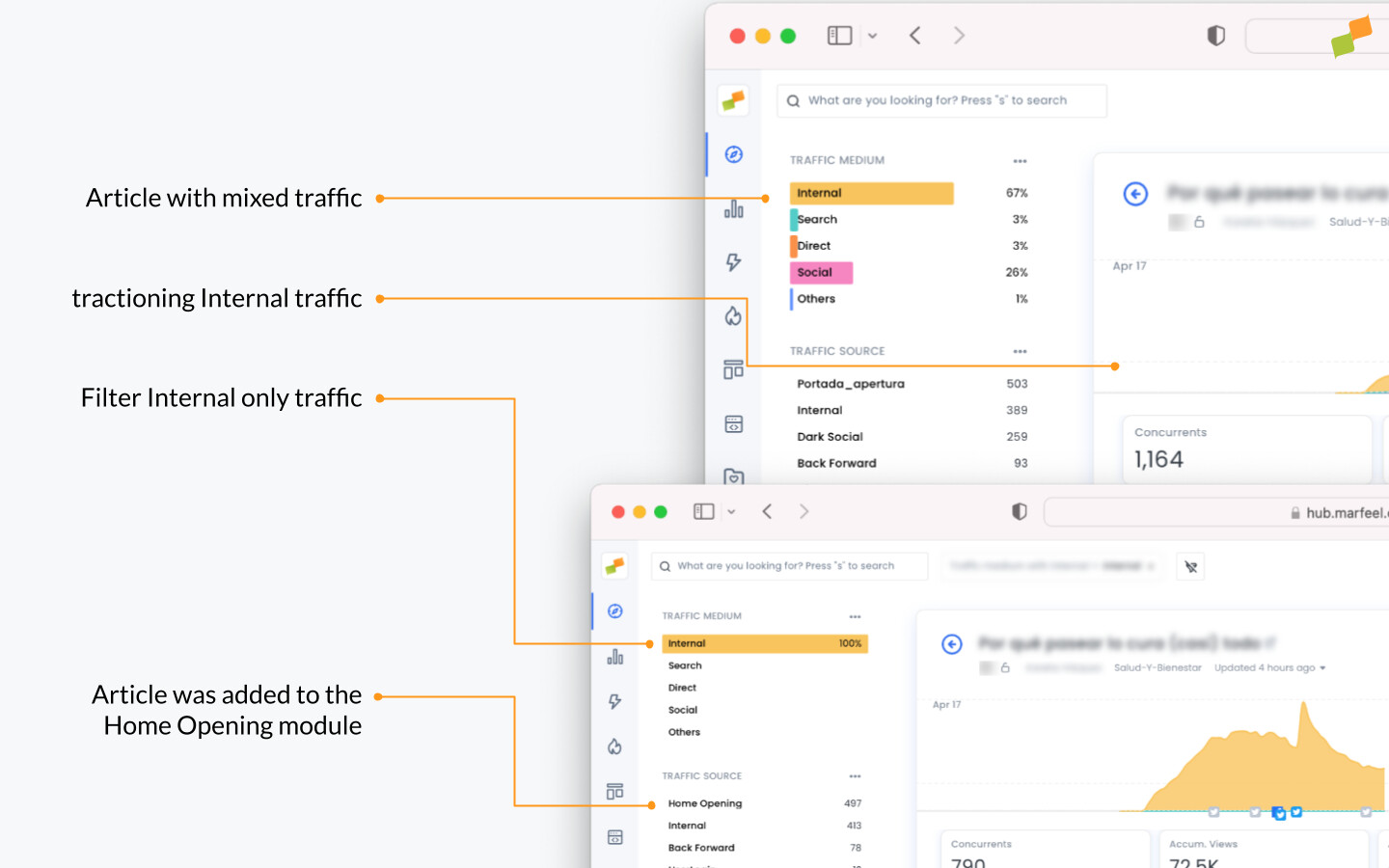
In the screenshot above, the article has growing traffic from the Home Opening module.
If users frequently click related articles after reading a piece of content, that indicates the related articles module is effective at keeping users engaged. Conversely, if users are not clicking internal links within an article, it may be time to reconsider the placement or design of those links. To understand which specific links users click next, see outgoing navigation.
Internal traffic sources over time
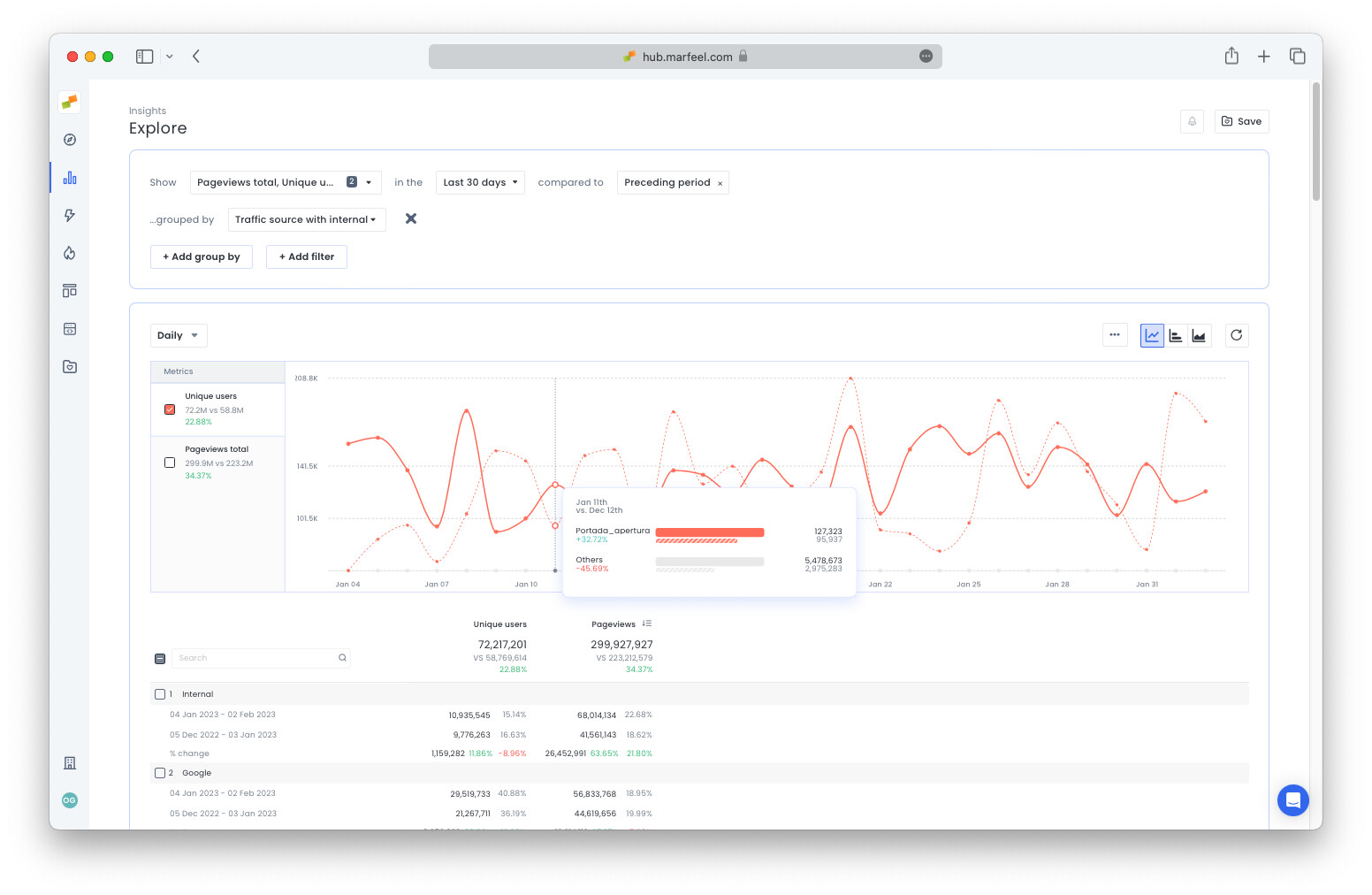
Section titled “Internal traffic sources over time”All recirculation data is available at the data warehouse level, so you can monitor module performance over a longer period in Explore.
- From Compass view, click the three dots next to
Traffic SourcetoDrill down in reportsand switch over to the Explore view. - Or go to Explore and drill down by
Traffic source with Internal
What browser interactions does Marfeel track as internal traffic sources?
Marfeel tracks page refreshes, back/forward browser button usage, back/forward cache (bfcache) navigations, and infinite scroll page views as internal traffic sources.
How do I find which modules are sending traffic to a specific article?
In the Compass view, click on any article, filter by Internal, and check the Traffic Sources section. Named sources sending traffic to that article will appear there.
Can I monitor internal traffic source performance over a longer period?
Yes. From the Compass view, click the three dots next to Traffic Source to Drill down in reports and switch to the Explore view. You can also go directly to Explore and drill down by Traffic source with Internal.