

Amazon affiliate revenue attribution setup
Amazon affiliate revenue can be attributed to individual articles by connecting Amazon Content Insights to Marfeel. This integration gives you per-article visibility into clicks, revenue, orders, and commission, so you can pinpoint which articles drive product sales.
This integration is available on the Private Beta Program. Get in touch with your Account Manager for further information.
Affiliation link instrumentation for Amazon Content Insights
Section titled “Affiliation link instrumentation for Amazon Content Insights”Amazon Content Insights requires three query parameters on every affiliation link to attribute revenue correctly:
asc_refurlshould have the canonical URL of the article the link is included in as a value.asc_sourceshould have the traffic source the user has come fromasc_campaignshould have the utm_campaign that obtained this user, if any
Example:
https://www.amazon.com/Apple-iPhone-Graphite-Carrier-Subscription/dp/B08L5PTDTK?tag=myTag&asc_refurl=https://your-website.com/article/best-planners-according-to-productivity-experts.html&asc_source=facebook&&asc_campaign=myCampaign2024Affiliation Enhancer experience
Section titled “Affiliation Enhancer experience”Marfeel already offers a way to insert these needed query parameters without having to do any development. Simply go to Experiences > New Experience and select the Affiliation Enhancer experience.
How to configure Affiliation Enhancer experience
Section titled “How to configure Affiliation Enhancer experience”- Settings > Query param to look up: If your affiliation links are hidden in a redirect like
https://domain.com/redirect?url=https://amazon.com/etc, you should insert here the query param that holds Amazon’s url (urlin the example) - Targeting: Select which articles you want the experience to modify links for. A usual targeting would be using the
Affiliation Network:Amazontag, which is automatically set on all articles including Amazon affiliation links.
Integrating Amazon Content Insights to Marfeel
Section titled “Integrating Amazon Content Insights to Marfeel”To connect Amazon data to Marfeel follow these steps:
- Go to Organization > Integrations and choose Affiliation tab.
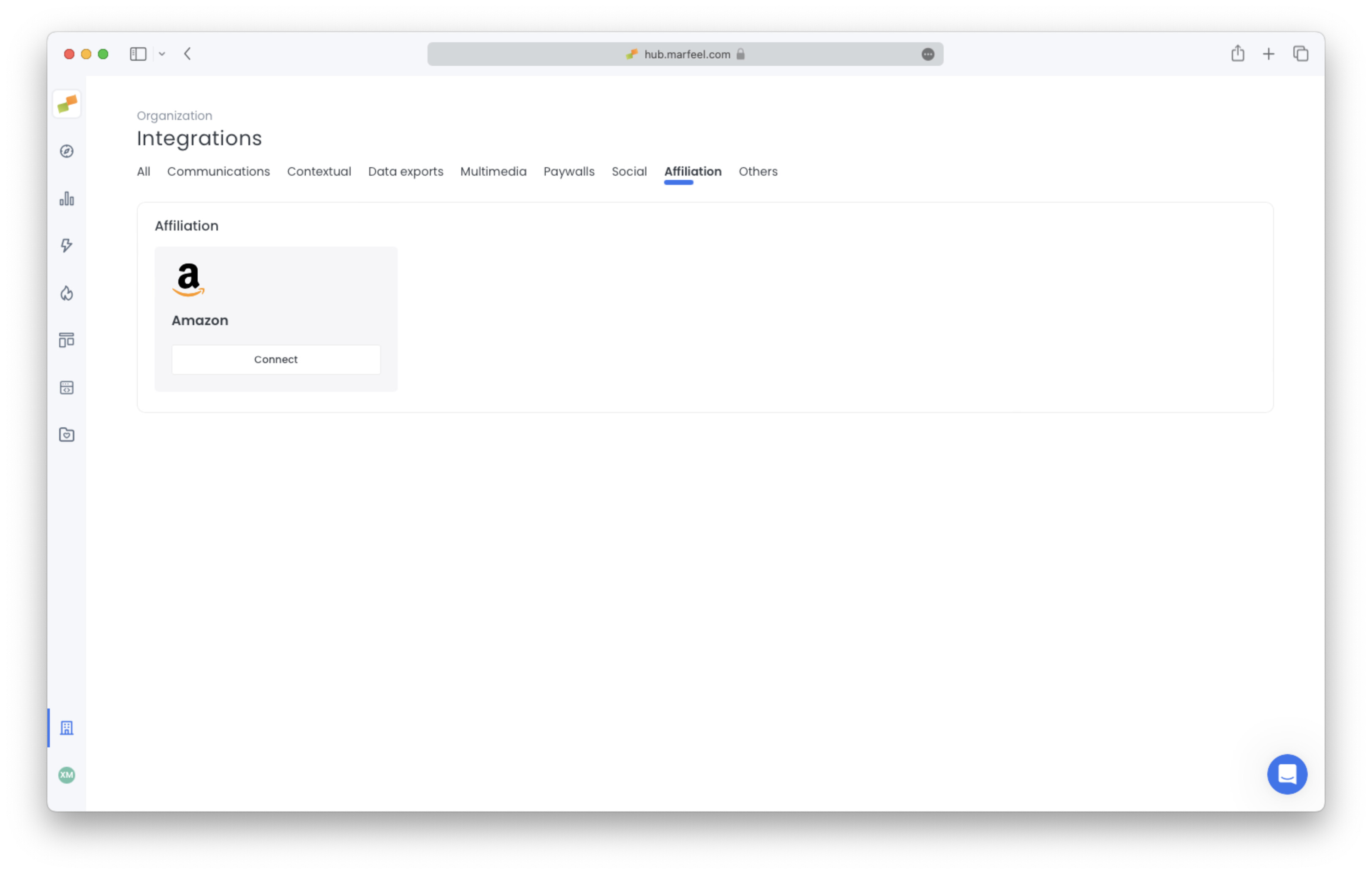
- Click on connect and introduce your User and Password from Amazon’s affiliate platform. You need to use the same credentials you use to connect to https://assoc-datafeeds-eu.amazon.com/datafeed/listReports
- Click on connect and introduce your User, Password, and account’s region from Amazon’s Associates Data Feeds.
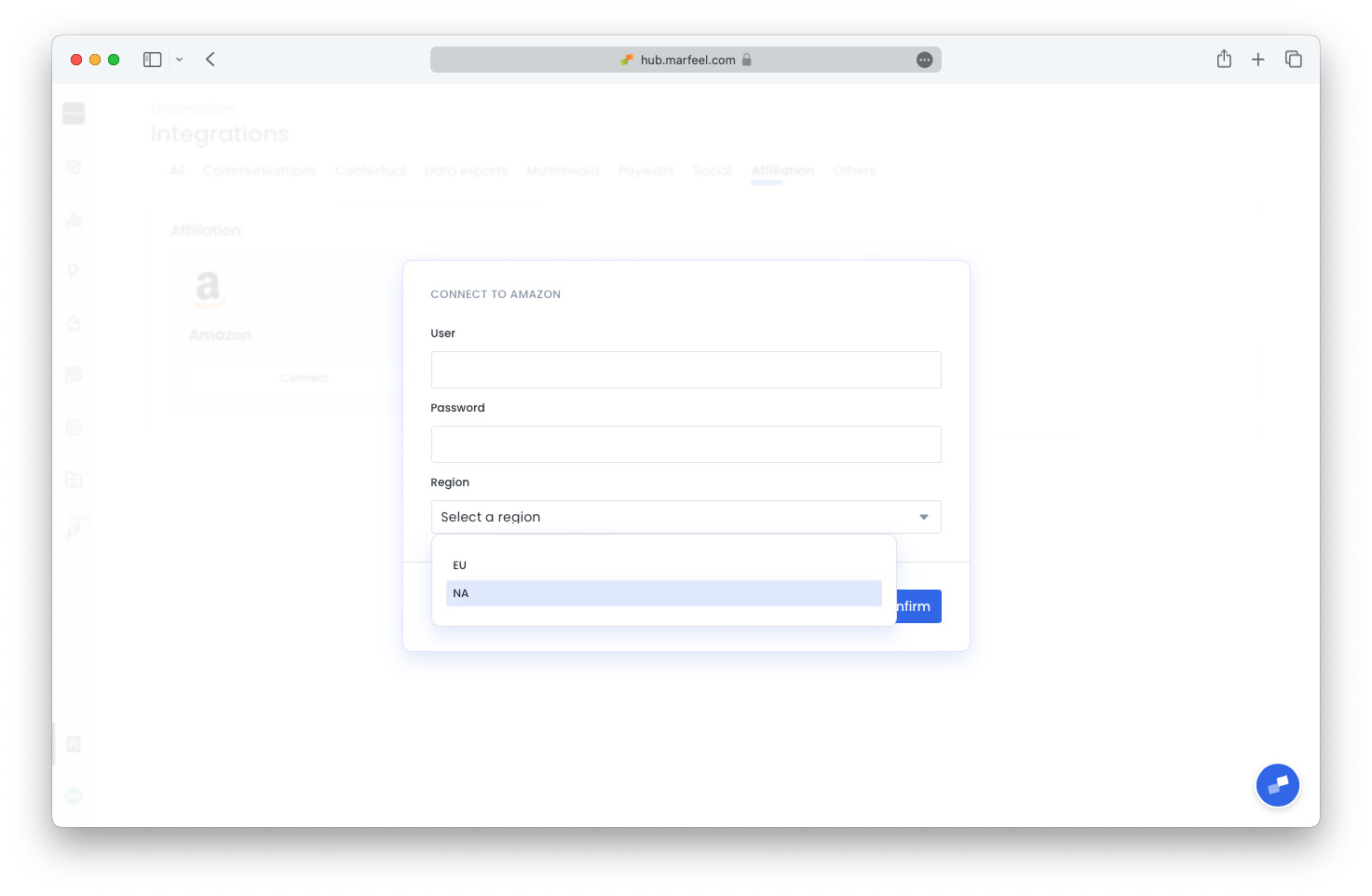 These credentials are different from the ones you use to access the Amazon affiliate program. To gain access to Amazon's Data Feed, it is necessary to reach out to Amazon Associates support or your Amazon affiliate account manager. If you have a dedicated account manager who regularly communicates with you, it is advisable to get in touch with them. It's essential to bear in mind that Amazon may not grant S3 Data Feed credentials to all publishers, as this access is not universally extended to all.All sensitive data such as passwords in Marfeel are encrypted and not accessible to Marfeel's employees.
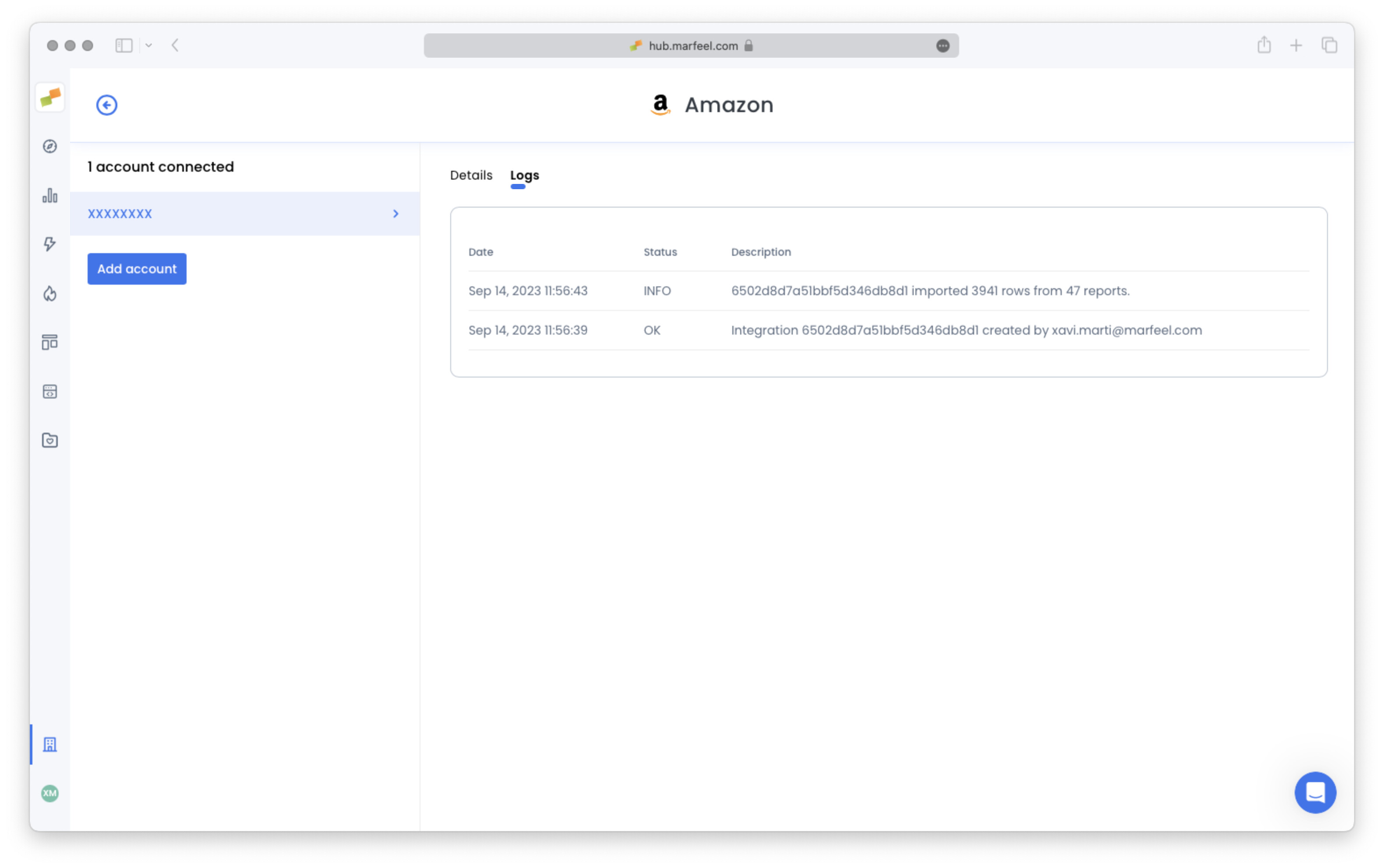
- Integration is now connected. It might take a few minutes for the first extraction to be completed. You can check the status in “Logs” tab.
Affiliation metrics and dimensions
Section titled “Affiliation metrics and dimensions”Marfeel collects Amazon’s data periodically and makes it available as new metrics. For a broader view of how Marfeel tracks affiliation performance across networks, see the affiliation tracking overview.
- Clicks
- Revenue
- Orders
- Commission
These new dimensions are available to group by and filter:
- Product
- Account
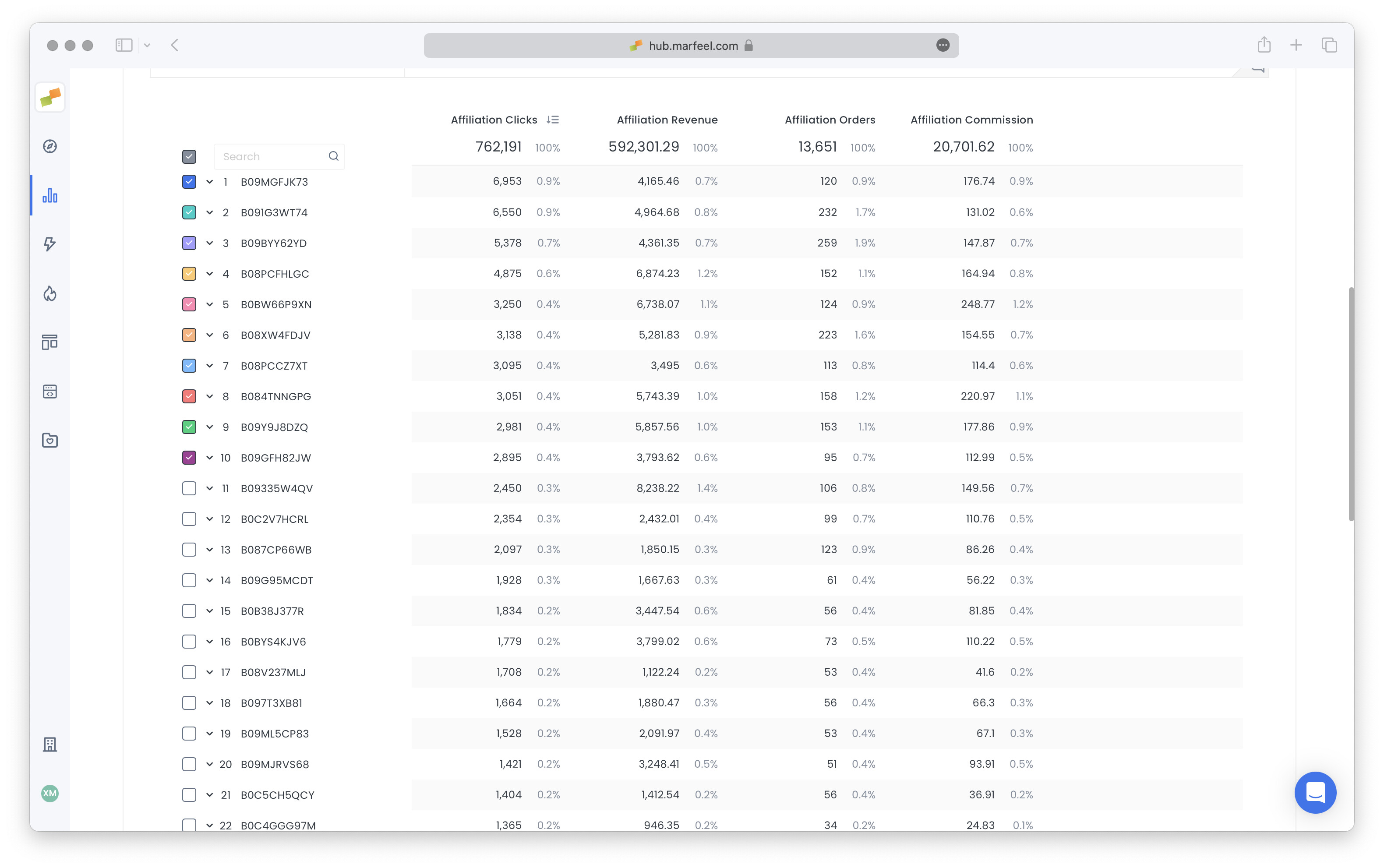
Additionally, affiliation data can be grouped and filtered by all dimensions related to content (url, title, section, folder, …), traffic source, and traffic campaign.
Amazon’s reporting limitations
Section titled “Amazon’s reporting limitations”Limitations on dimensions
Section titled “Limitations on dimensions”Amazon reports are aggregated on the following dimension combinations:
- page
- product
- source
- campaign
- page-product
- page-source
- page-campaign
Filtering or grouping by any combination not present (like source and campaign at the same time) is not possible.
Limitations on rows
Section titled “Limitations on rows”For privacy reasons, Amazon aggregates all rows under a certain volume threshold under a single “Redacted” entry. This means that some data points (like that some article made 1 sale on some day) may be unavailable.
Reports are also always offered in 2 versions: daily, and weekly (rolling). To ensure that data loss is minimal, you can view Amazon’s affiliation data in Marfeel Explore including long time ranges and using Weekly time period. This way Marfeel will use Amazon’s weekly reports that have a lower percentage of data grouped under “Redacted” row.
What query parameters do Amazon affiliation links need for Content Insights?
Three query parameters are required: asc_refurl (canonical URL of the article), asc_source (user traffic source), and asc_campaign (utm_campaign value, if any).
What are Amazon's reporting limitations for affiliation data?
Amazon reports are aggregated on specific dimension combinations (page, product, source, campaign, and select pairings). Filtering by combinations not listed is not possible. Amazon also aggregates low-volume rows under a “Redacted” entry for privacy.
How do I reduce data loss from Amazon's redacted rows?
Use longer time ranges with the Weekly time period in Marfeel Explore. Weekly reports from Amazon have a lower percentage of data grouped under the “Redacted” row compared to daily reports.