

MarfeelPass FAQ for setup, design, AMP, and performance
Can MarfeelPass no-code and custom notice co-exist?
Section titled “Can MarfeelPass no-code and custom notice co-exist?”Yes, the no-code notice and a custom notice can coexist. The no-code notice provides a quick way to implement a standard consent notice. If you need further customization, you can integrate a custom notice alongside it.
Once you enable the experience and disable Didomi’s consent layer, the no-code notice is no longer applied and only the custom notice is visible. For a full walkthrough of the initial configuration, see Setting up MarfeelPass.
Do I need to upload the merchant file to each subdomain?
Section titled “Do I need to upload the merchant file to each subdomain?”Yes. If you have multiple subdomains, upload the merchant file to each one individually.
Custom reject duration
Section titled “Custom reject duration”You can specify your preferred reject duration during the Didomi integration step of the MarfeelPass setup process. For example, to switch from 24 hours to 7 days, change the value in your configuration:
// Fromwindow.didomiConfig.app.deniedConsentDuration = 86400;
// Towindow.didomiConfig.app.deniedConsentDuration = 604800;
Personalization
Section titled “Personalization”How to display a CMP notice in multiple languages
Section titled “How to display a CMP notice in multiple languages”Can I customize the language of the CMP notice?
Section titled “Can I customize the language of the CMP notice?”Yes. Customize the text of your CMP notice from the MarfeelPass experience details. This allows you to set it in any language you need.
Can I show a different CMP notice for different languages?
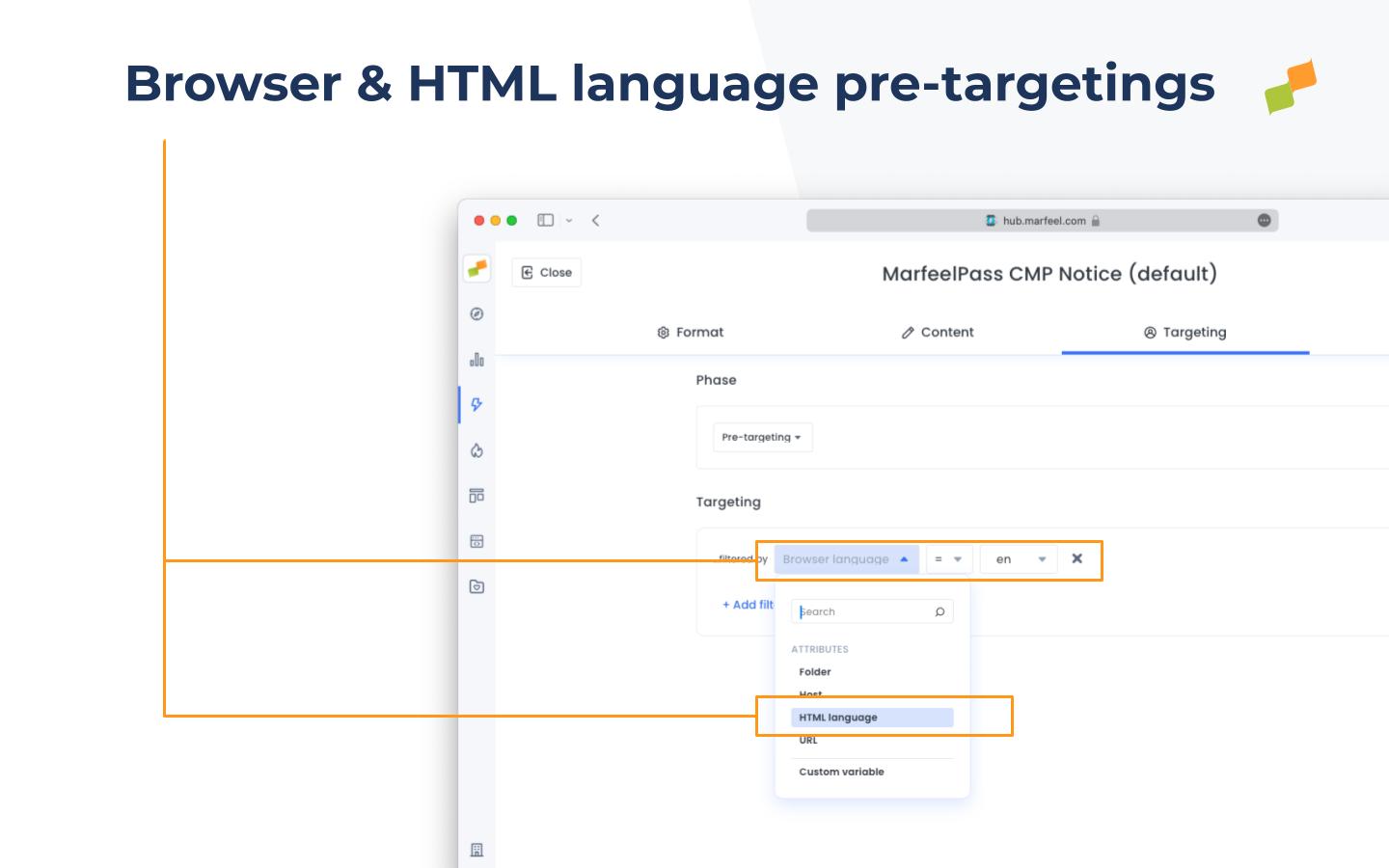
Section titled “Can I show a different CMP notice for different languages?”Yes. Create separate CMP notices tailored to different languages. Set the preferred language within the notice settings and ensure the pre-targeting language matches the one you configured in the text customization.
How does the system determine which language to display?
Section titled “How does the system determine which language to display?”The system uses the language settings of the user’s browser or the HTML language attribute of the webpage. Make sure your pre-targeting settings align with the languages you have chosen for each CMP notice.
What elements can I modify in the MarfeelPass notice design?
Section titled “What elements can I modify in the MarfeelPass notice design?”You can modify the HTML, CSS, and custom fields of the MarfeelPass notice. Follow these steps to create a custom layout.
Can I run A/B tests with different MarfeelPass notice designs?
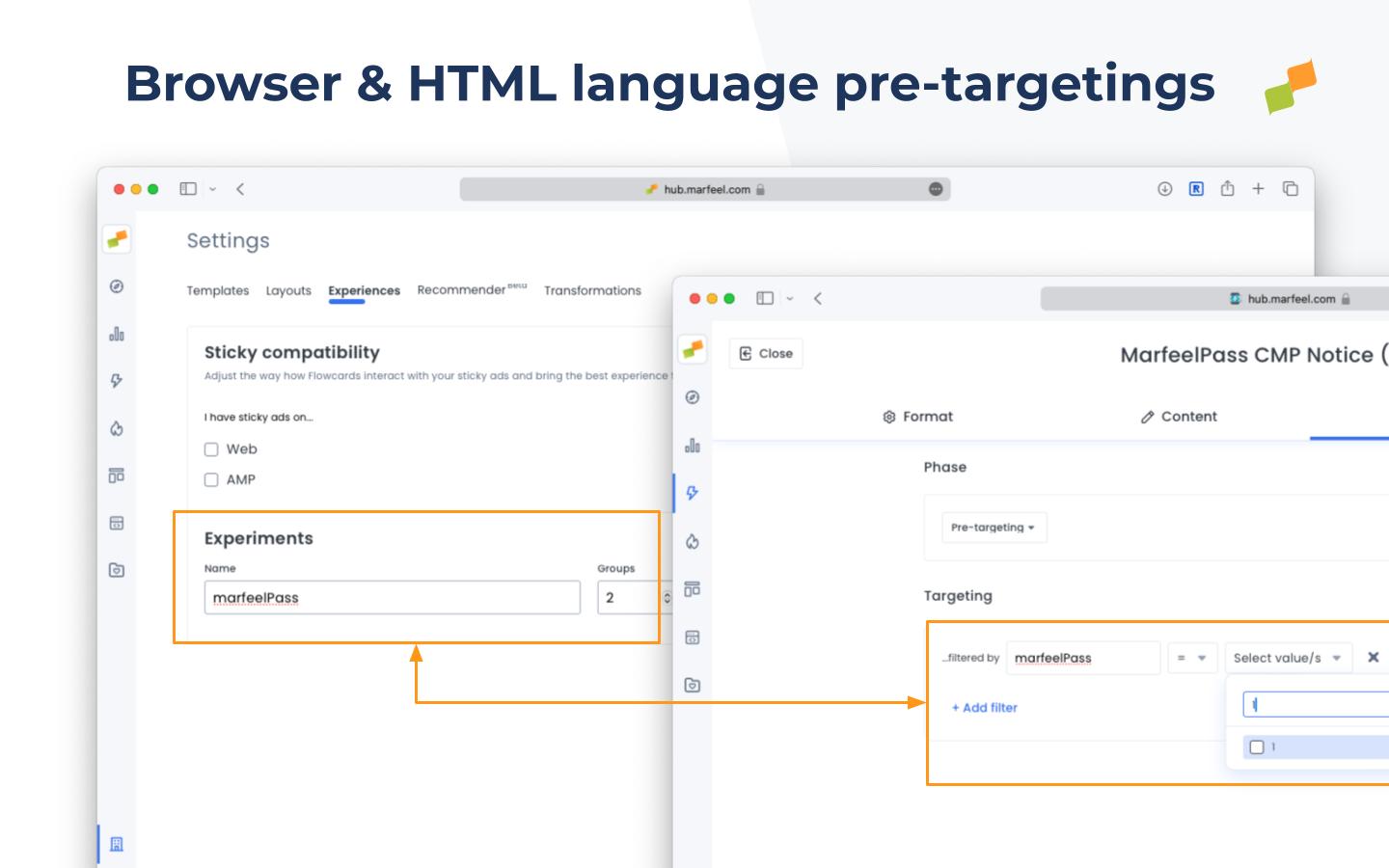
Section titled “Can I run A/B tests with different MarfeelPass notice designs?”Yes. Use custom experiment variables as pre-targeting to show different notices to each variant group.
- Add a new Experiment group on Experiences Settings
- Create 2 MarfeelPass experiences
- Use the newly created experiment group as a pre-targeting condition on each experience. One with value
1and the other with value2
Do users need to reconfirm cookie preferences in AMP if they revisit the web?
Section titled “Do users need to reconfirm cookie preferences in AMP if they revisit the web?”No. MarfeelPass maintains consistent consent status by connecting with Didomi in the AMP environment. When users return to the web, the same consent applies without requiring a repeat of the process. For more details on the consent flow, see MarfeelPass CMP integration.
How can I adjust the AMP consent notice size?
Section titled “How can I adjust the AMP consent notice size?”Modify the size and position in the amp-consent configuration:
"notice": { "initialHeight": "70vh"}This follows the AMP documentation on consent position, available at: AMP User Consent Modal UI.
The
initialHeightis a string that represents the viewport height the iframe should take. A viewport height between 30 and 60, inclusive, tells amp-consent to style the iframe as a bottom sheet. A viewport height greater than 60 and up to 80 tells amp-consent to style it as a centered modal.
Performance
Section titled “Performance”Some core web vitals INP offenders may reference elements related to MarfeelPass.
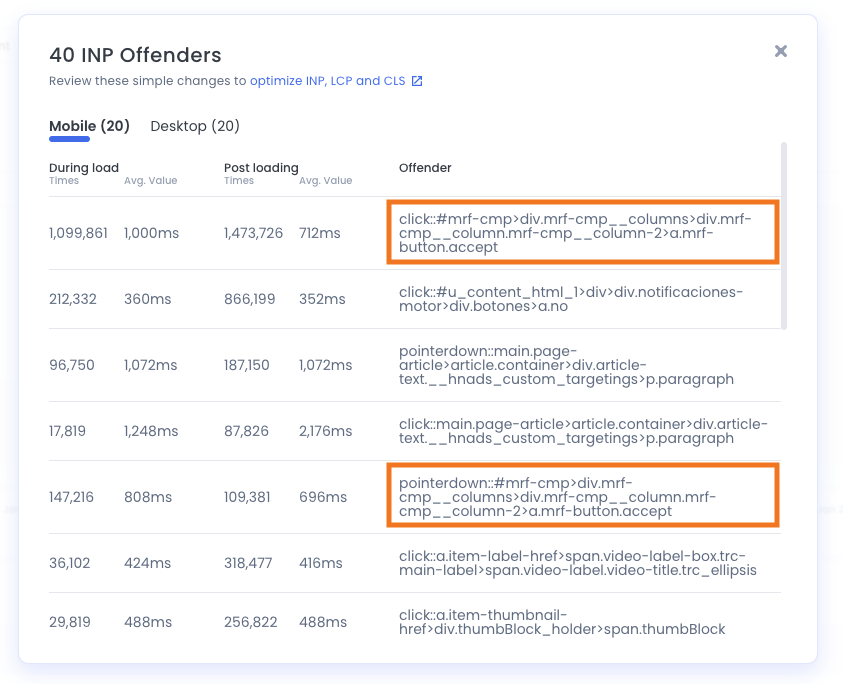
Performance bottlenecks attributed to a MarfeelPass interaction often originate from the underlying CMP implementation that MarfeelPass invokes. To isolate the root cause, open a flamechart performance analysis, click the reported offending button, and observe which methods consume the most resources in the subsequent frame.
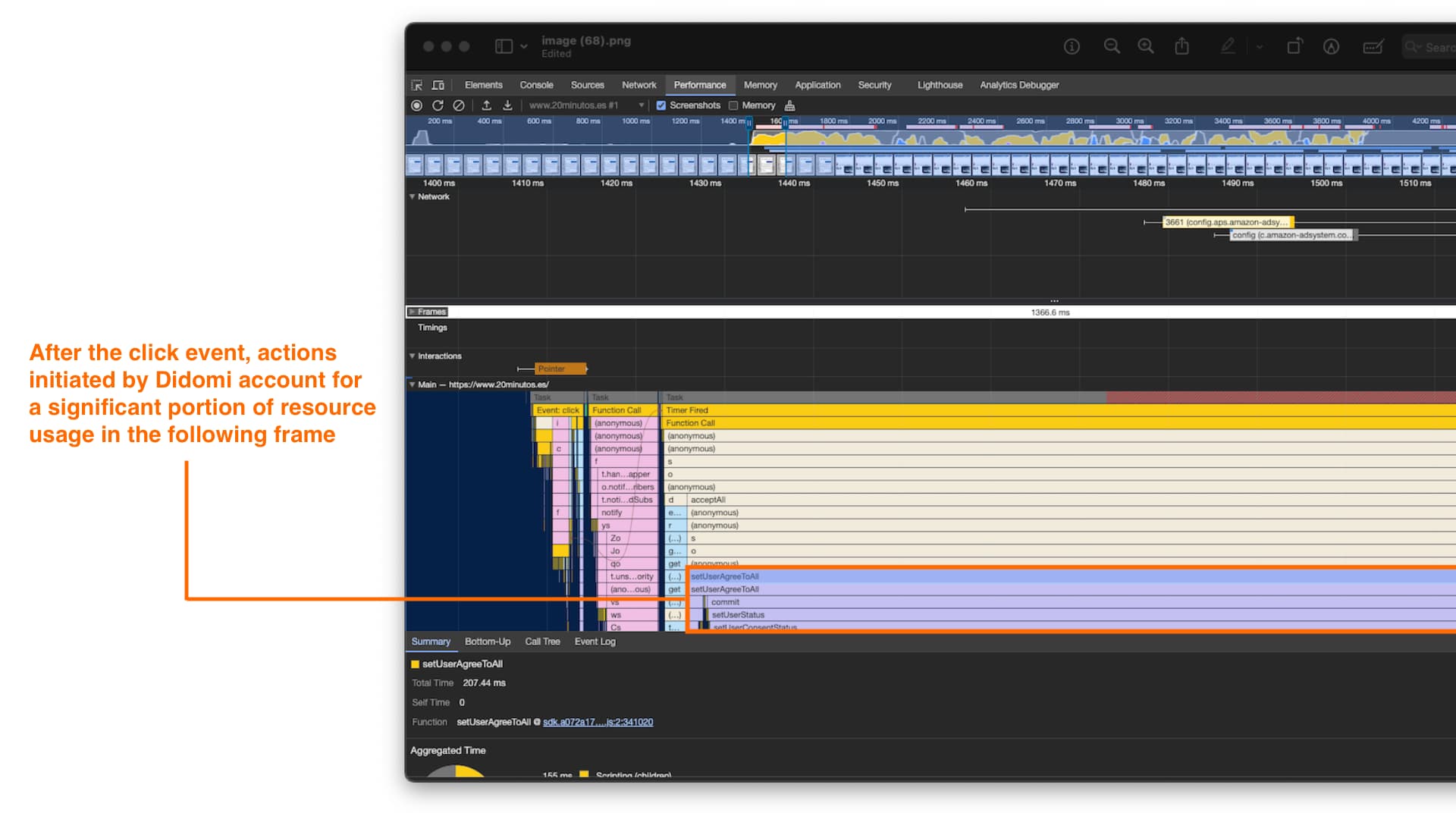
MarfeelPass implements various TCF enhancements that improve default behavior, but it cannot make further improvements to the CMP’s own execution cost.
Previews and simulations
Section titled “Previews and simulations”Can I preview my changes before publishing them?
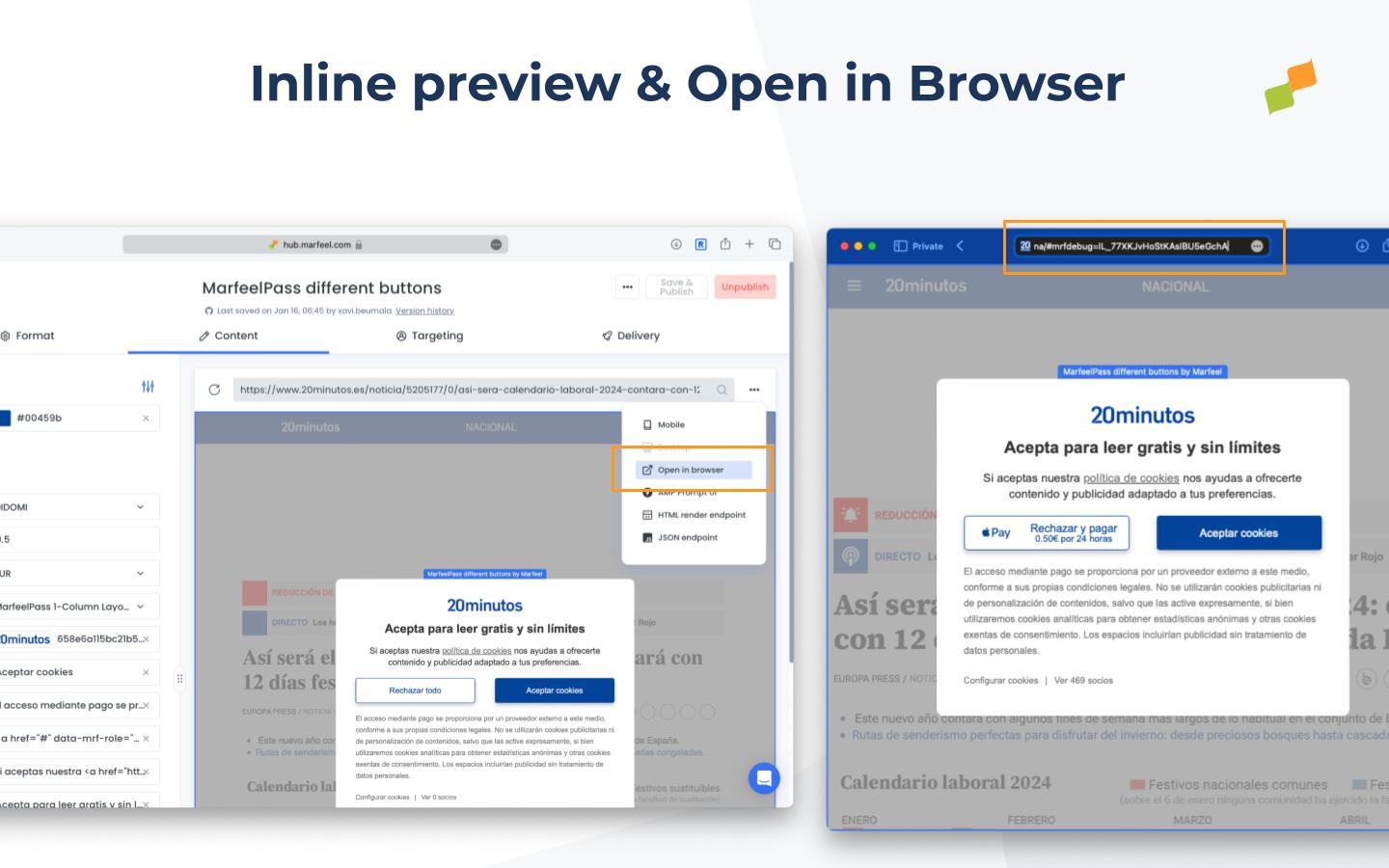
Section titled “Can I preview my changes before publishing them?”Yes. MarfeelPass offers two ways to preview changes before activating them:
- Experience Manager preview. The inline preview loads via the
playground.mrf.ioproxy, which renders your content in an iframe by converting relative paths to absolute. In certain cases the preview may not be fully accurate. - Preview in browser. Click
Preview in browserto open the URL directly. This appends#mrfdebug=followed by the ID of the MarfeelPass experience you want to preview.
Can MarfeelPass no-code and custom notice co-exist?
Yes. The no-code notice and a custom notice can coexist. Once you enable the experience and disable Didomi’s consent layer, only the custom notice is visible.
How does MarfeelPass display a CMP notice in multiple languages?
Create separate CMP notices for each language, set the preferred language in notice settings, and match the pre-targeting language to the text customization. The system uses the browser language or the HTML lang attribute to select the correct notice.
Do users need to reconfirm cookie preferences in AMP when they revisit the web?
No. MarfeelPass connects with Didomi in the AMP environment and maintains the same consent status when users return to the web, so they do not need to repeat the consent process.
Can I preview MarfeelPass changes before publishing?
Yes. You can preview in Experience Manager via the playground.mrf.io proxy, or open the URL directly in your browser using the Preview in browser button, which appends #mrfdebug= followed by the MarfeelPass ID.