

Marfeel Recommender: Advanced configuration parameters
Several advanced configurations for the Marfeel Recommender are not available through dedicated UI components. These settings must be specified directly in the Advanced text field using query parameter syntax.
Available advanced options include ignoring specific filter values, promoting or demoting content by attribute, disabling autofill behavior, offsetting recommendation results, customizing ranking signal factors, including previously read articles, and activating inline recommenders on AMP pages.
Usage of Advanced Settings
Section titled “Usage of Advanced Settings”Advanced settings follow query parameter encoding. Each parameter uses the format key=value, or key=value1,value2,... when specifying multiple values. Combine multiple parameters with the & symbol:
key1=value1,value2&key2=value3Ignore values in filters of type Same
Section titled “Ignore values in filters of type Same”The ignore_filter_{{dimension}} parameter prevents the recommender from considering specific attribute values when filtering by Same. This is useful when broad sections (e.g., “News”) would dilute the relevance of recommendations.
Available dimensions:
sectionsauthorstopicstags
To configure:
- Set
ignore_filter_{{dimension}}=value1,value2,... - Replace
{{dimension}}with the appropriate dimension (e.g.,sections). - Replace
value1,value2,...with the Marfeel IDs of the attributes you want to ignore.
Obtaining Marfeel IDs:
- Visit the resource in the Compass view and copy the ID from the browser’s URL.
Example:
If you want the recommender to ignore the section with ID 135 when filtering by Same section:
ignore_filter_sections=135For an article with sections 135 and 124 and a content restriction of section=same, the recommender will only filter by section 124 and will not include articles that belong exclusively to section 135.
Disable autofill
Section titled “Disable autofill”By default, when strict filtering returns fewer articles than the module requires, the recommender removes all filters to fill the remaining slots up to a maximum of 5 articles. This prevents empty or broken layouts on your pages.
Setting disableautofill=true turns off this fallback behavior, giving you full control over what happens when a feed produces insufficient results. You can pair this with a multi-experience configuration that provides a specific backup feed.
disableautofill=trueCustom ranking signal factors
Section titled “Custom ranking signal factors”Each recommender engine combines different factors for its ranking signals. You can adjust these factors to build a custom engine tailored to your content strategy using custom ranking signal factors.
Soft restrictions: promoting and demoting
Section titled “Soft restrictions: promoting and demoting”Promoting and demoting content by attribute adjusts relevance scores without applying hard restrictions, increasing content diversity in recommendations. Configure this with rank_{{dimension}}={{value1}},{{factor1}},{{value2}},{{factor2}},...:
rank_sections=123,2,456,0.8&rank_topics=789,1.2This multiplies the relevance of articles in section 123 by 2, in section 456 by 0.8, and for topic 789 by 1.2. These factors are cumulative: an article meeting all three conditions has its relevance multiplied by 2 x 0.8 x 1.2 = 1.92.
Include previously read articles
Section titled “Include previously read articles”On Marfeel Recommender’s Advanced plan, the system automatically identifies which articles a user has already read and excludes them directly during the query.
To override this behavior and allow previously read articles to appear in recommendations, add red=0 to the advanced configuration field.
Offset
Section titled “Offset”The offset parameter skips the first N results from recommendations, including content curations. Configure it by setting offset=N in the Advanced text field, where N is the number of articles to skip.
Activating inline recommenders on AMP pages
Section titled “Activating inline recommenders on AMP pages”Inline recommenders can also run on AMP pages by selecting the AMP endpoint in the recommender configuration. When this endpoint is selected, the platform provides a working example as an implementation guide. Use it as a reference to complete the integration within your AMP pages, ensuring that markup and behavior comply with AMP requirements.
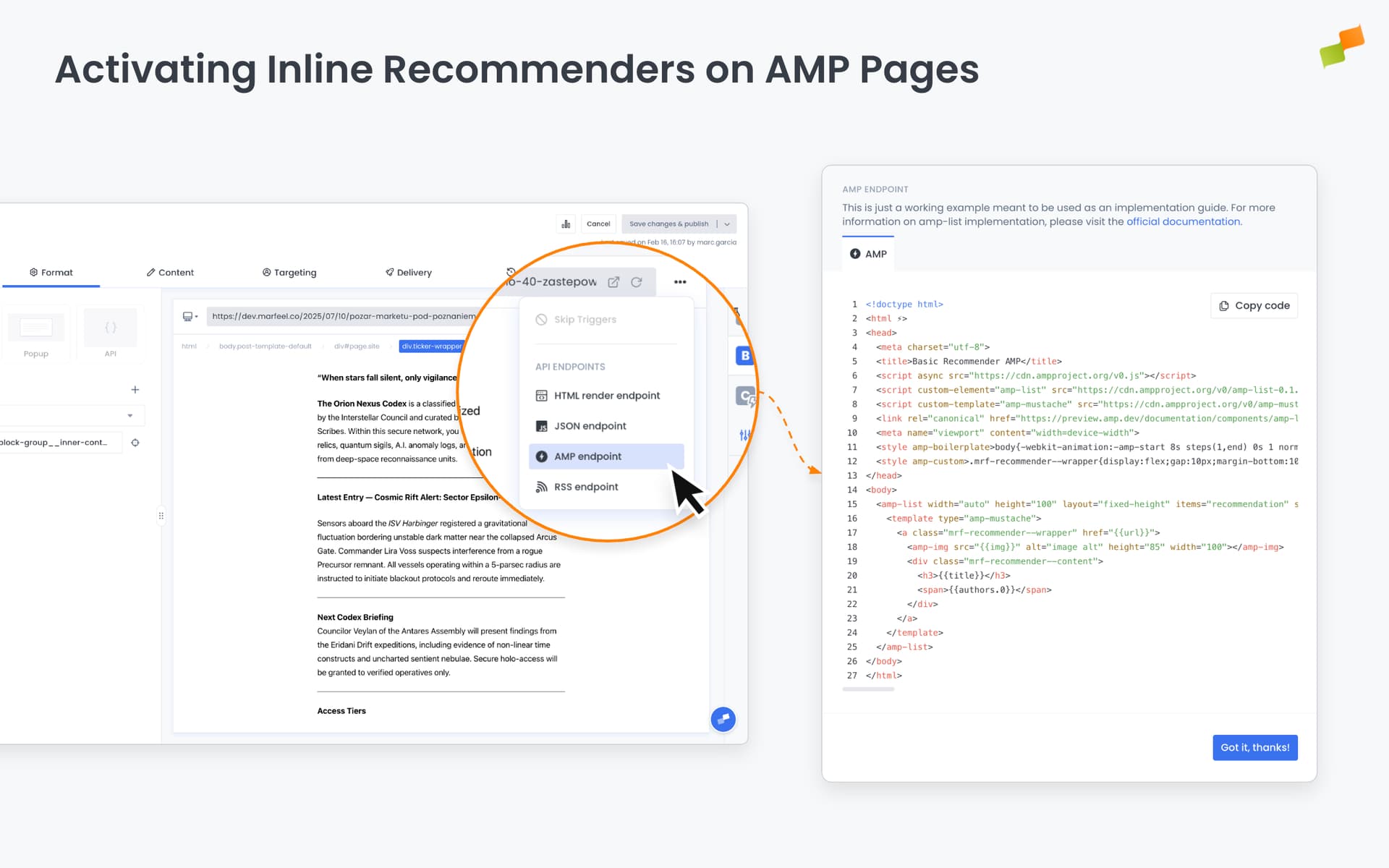
To finalize the setup:
- Use the provided example as a reference for structuring the AMP-based recommender.
- Implement the module using the AMP
amp-listcomponent and related templates. - Follow the official AMP documentation to guarantee proper validation and rendering.
For detailed implementation guidance, refer to the official AMP documentation for the amp-list component.
This approach maintains a consistent recommendation strategy across both standard and AMP pages while preserving AMP validation and loading performance.
How do I ignore specific filter values in the Marfeel Recommender?
Use the ignore_filter_{{dimension}} parameter with the Marfeel IDs of the attributes you want to exclude. Available dimensions are sections, authors, topics, and tags. For example, ignore_filter_sections=135 prevents section 135 from being used in Same-type filtering.
How do I promote or demote content in Marfeel Recommender results?
Use the rank_{{dimension}} parameter with pairs of Marfeel IDs and multiplier factors. For example, rank_sections=123,2 doubles the relevance of articles in section 123. Factors above 1 promote content, factors below 1 demote it, and the effects are cumulative across dimensions.
How do I disable autofill in the Marfeel Recommender?
Add disableautofill=true to the Advanced text field. By default, when strict filtering produces fewer than 5 articles, the recommender removes all filters to fill the remaining slots. Disabling autofill lets you control the fallback behavior, for example by configuring a multi-experience setup with a specific backup feed.