

Recommender Use Case: Geo-targeted recommendations
On the Recommender Advanced plan, Marfeel Recommender takes each reader’s location into account. Articles about the reader’s area move up and local stories about distant places move down, with nothing to configure. When you want a module that is entirely about the reader’s area, three more tools help you build it.
| Tool | What it does | When to use it |
|---|---|---|
| Location signal | Adjusts relevance-based ranking profiles lightly toward the reader’s area | Always on with the Advanced plan |
| Local ranking profile | Gives location far more weight, so most of the module is about the reader’s area | Regional blocks such as “News near you” |
| Location filters | Only recommends articles from the reader’s country, region, subregion or city, or from one you choose | Modules that must stay inside one area |
| Reader location in layouts | Prints the reader’s city, subregion, region or country in the template | Titles such as “More news from Girona” |
How location matching works
Section titled “How location matching works”The recommender compares two things: where the reader is, and which places each article is about.
Where the reader is
Section titled “Where the reader is”Marfeel estimates the reader’s city, subregion, region and country from their IP address on every request. IP geolocation is usually accurate to a city or a few tens of kilometers. Readers on a VPN or on some mobile networks can appear somewhere else.
What each article is about
Section titled “What each article is about”Marfeel detects the places each article mentions, such as cities, regions and countries, and classifies the article’s scope as local, national or international. You don’t need to tag anything.
The scope sets how strongly location acts on the article:
| Article scope | Effect of location |
|---|---|
| Local | Strongest: moves up for readers nearby and down for readers far away |
| National | Weaker |
| International | Weaker still |
| No detected place | Barely affected in most profiles; ranked below stories about the reader’s area with Local |
The location signal in every ranking profile
Section titled “The location signal in every ranking profile”With the Advanced plan, the Balanced, Popular, Trendy, Similar, Highest CTR and Personalized ranking profiles apply location as a light adjustment on top of their usual signals. You don’t need to configure anything.
Example: for a reader in Girona,
- A local story about Girona’s city council moves up.
- A local story about a town 800 km away moves down.
- A national politics story moves much less in either direction.
Most Read, Latest and Oldest order articles by their own fixed criteria and don’t use location.
Build a regional module with the Local profile
Section titled “Build a regional module with the Local profile”The Local ranking profile gives the reader’s location far more weight than any other profile. Within the reader’s area, it still orders articles by popularity and click-through rate, so the strongest local stories come first. One experience serves every area: readers in Girona get Girona stories, and readers in Tarragona get Tarragona stories.
- Open the experience in Experience Manager.
- On the Content tab, click the three-dot options of the Recommender feed, then Edit.
- In Ranking profile, select Local.
- Save the feed, then save the experience.
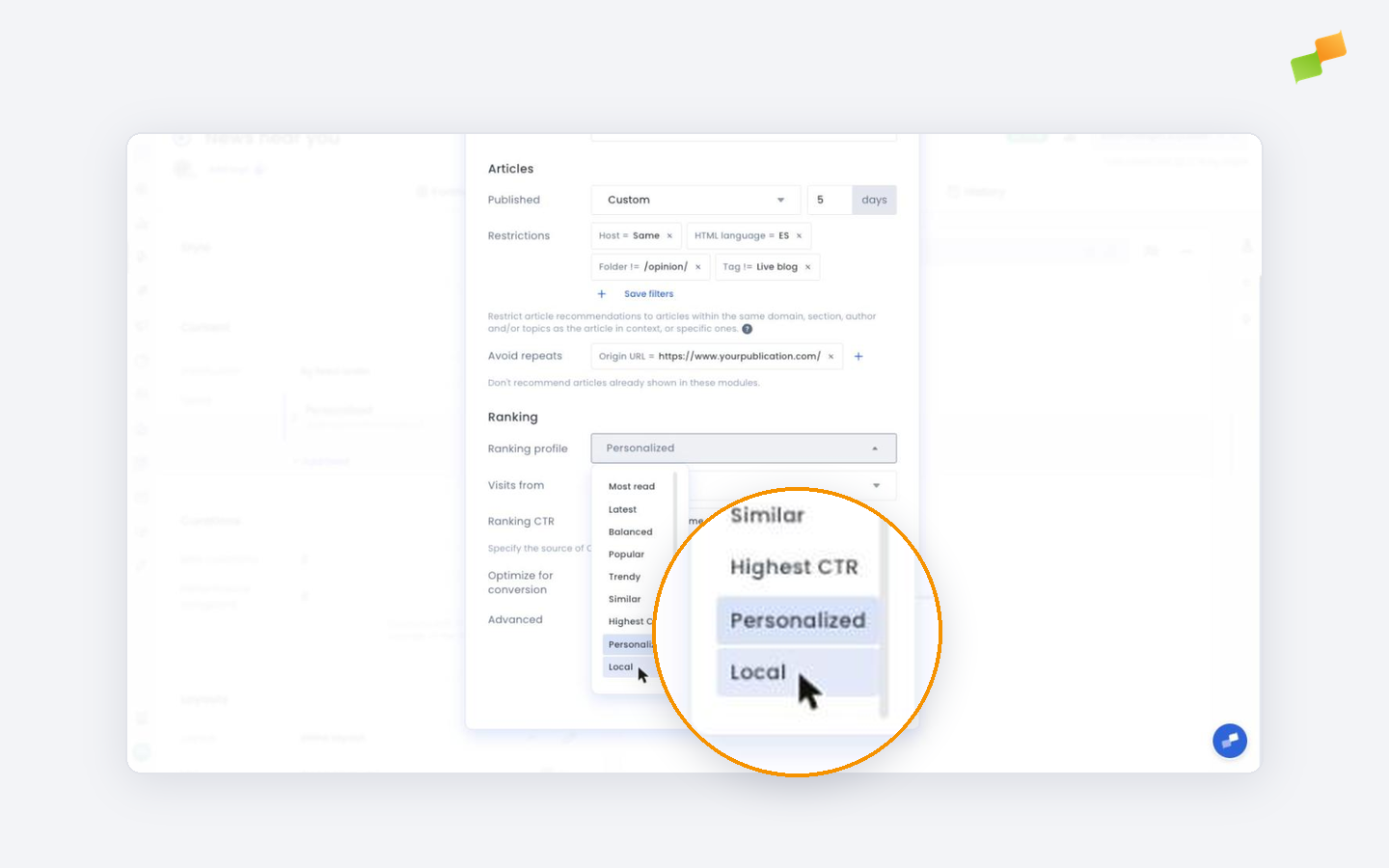
profile=local in the advanced parameters keep working as before.
Restrict recommendations by location
Section titled “Restrict recommendations by location”Location filters are strict: only articles from the chosen area qualify.
- In the Recommender feed, go to Restrictions.
- Add a Country, Region, Subregion or City filter.
- Choose Same to match the reader’s own area, or pick a specific value.
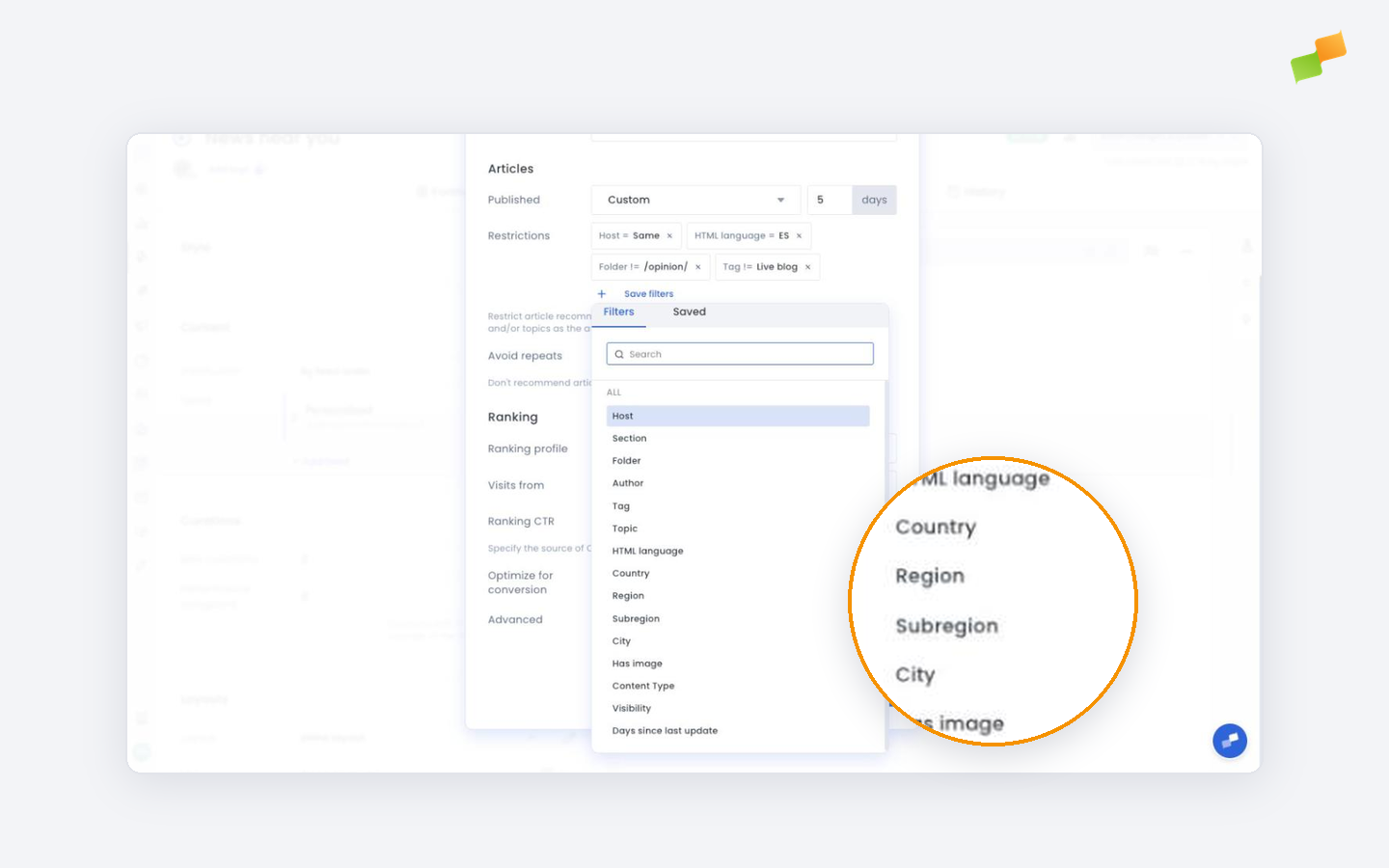
If not enough articles match, the recommender completes the list with other content.
Filters combine with any ranking profile. For example, Latest with a Region filter set to Same gives each reader the newest stories from their region.
| Local ranking profile | Location filter | |
|---|---|---|
| How strict | Prefers the reader’s area, then nearby areas, then the rest | Only articles from the area, then other content if there aren’t enough |
| Distance | Nearer articles rank higher | Exactly the level you pick, nothing in between |
| Best for | “News near you” blocks on the home page | Modules that must stay inside one region or country |
Show the reader’s location in a layout
Section titled “Show the reader’s location in a layout”Recommender layouts can print where the reader is, for example in the module title.
| Attribute | Example value |
|---|---|
{{geo.city}} | Barcelona |
{{geo.subRegion}} | Barcelona |
{{geo.region}} | Catalonia |
{{geo.country}} | Spain |
{{geo.countryCode}} | ES |
Always add a fallback for readers whose location is unknown:
{{#geo.city}}<h2>More news from {{geo.city}}</h2>{{/geo.city}}{{^geo.city}}<h2>More news</h2>{{/geo.city}}Catalonia instead of Catalunya.
Preview recommendations as a reader from another city
Section titled “Preview recommendations as a reader from another city”- Open the experience preview.
- Click Simulate profile, then Add new simulated profile.
- Click Set Property, choose City, and pick a city.
The preview shows the recommendations a reader in that city gets.
Going deeper
Section titled “Going deeper”- Ranking profile types explained
- Ranking signals explained
- Recommender setup and configuration guide
- Build and customize recommender layouts
Which plans include geo-targeted recommendations?
The location signal and the Local ranking profile are part of the Marfeel Recommender Advanced plan. On other plans, recommendations are ranked without the reader’s location and Local appears in the ranking profile list with an upgrade badge.
How does Marfeel know where a reader is?
Marfeel estimates the reader’s city, subregion, region and country from their IP address. This is usually accurate to a city or a few tens of kilometers, so it works for regional and city modules but not for neighborhood-level targeting.
Do I need to tag my articles with locations?
No. Marfeel detects the places each article is about and classifies its scope as local, national or international. Articles with no detected place are barely moved in most profiles, and the Local profile ranks them below stories about the reader’s area.
What is the difference between the Local ranking profile and a location filter?
The Local ranking profile prefers articles about the reader’s area and falls back to nearby and other stories. A location filter only accepts articles from the area you choose and fills any remaining slots with other content.