

Amplify troubleshooting for social posting issues
Diagnosis steps and fixes for common Amplify publishing issues across social networks.
All issues documented in this guide, grouped by network:
How Amplify recovers from invalid sessions and rate limits
Section titled “How Amplify recovers from invalid sessions and rate limits”Amplify monitors each connection for two API-side conditions and reacts automatically, so publishing keeps moving without manual intervention.
Invalid session
Section titled “Invalid session”When a network rejects the stored session, Amplify triggers the reconnect flow for that feed. The owner is prompted to sign in again to restore the connection. Common triggers: a password change or revoked Amplify access.
Rate limit errors
Section titled “Rate limit errors”When a network returns a rate limit error, Amplify pauses publishing on the affected account for 1 hour before retrying. The pause gives the network time to clear the throttle and prevents repeated requests from escalating the restriction.
Link previews missing on social networks
Section titled “Link previews missing on social networks”Social networks fetch metadata directly from your site when you share a link. Amplify does not control this process. If the preview image or metadata (title, description) does not appear on Facebook, X, or LinkedIn, the problem is between the platform’s crawler and your server.
Common causes
Section titled “Common causes”- Missing or invalid Open Graph tags (
og:image,og:title,og:description) robots.txtblocking the platform’s crawler- Server blocking the crawler (e.g.
403 Forbidden) - Cached or outdated data on the social platform
How to diagnose
Section titled “How to diagnose”Test with the exact URL Amplify would publish, not the clean article URL. Amplify appends query parameters for tracking, and some servers or CDNs handle parameterized URLs differently (redirects, blocks, stripped metadata). If you test only the base URL, you might miss the actual problem.
Amplify URLs follow this pattern:
https://example.com/article-slug/?utm_campaign=mrf-facebook-feedname&mrfcid=20260305...Paste the full parameterized URL into the platform’s diagnostic tool:
| Platform | Diagnostic tool | What to look for |
|---|---|---|
| Sharing Debugger | Warnings, errors. Use Scrape Again to refresh. | |
| X | Card Validator | Confirm og: tags are rendering correctly |
| Post Inspector | If you see “We can’t access this content. It may be blocked by robots.txt”, the crawler is blocked |
Fix crawler blocks in robots.txt
Section titled “Fix crawler blocks in robots.txt”Each social network uses its own crawler to fetch link previews. If your robots.txt blocks any of them, previews will fail on that platform. Add the following rules to allow all social crawlers:
# Facebook (link previews and product catalogs)User-agent: facebookexternalhitAllow: /User-agent: facebookcatalogAllow: /
# X / Twitter (Twitter Cards)User-agent: TwitterbotAllow: /
# LinkedIn (links shared in posts, messages)User-agent: LinkedInBotAllow: /
# WhatsApp (chat previews, uses Facebook infrastructure)User-agent: WhatsAppAllow: /
# Pinterest (Rich Pins)User-agent: PinterestAllow: /
# Telegram (chat previews)User-agent: TelegramBotAllow: /
# Reddit (post and comment previews)User-agent: redditbotAllow: /
# YouTube / Google (embedded link previews, also used for search indexing)User-agent: GooglebotAllow: /
After updating your robots.txt:
- Use each platform’s diagnostic tool (see table above) to confirm the crawler can now access your pages
- Click Scrape again or equivalent refresh option to clear cached data
- Confirm your
og:imagetag points to a valid, accessible image - For LinkedIn specifically, verify the image meets LinkedIn’s requirements: minimum 1200 x 627 px, under 5 MB
Quick workaround
Section titled “Quick workaround”Switch Amplify to Photo mode instead of Link Preview. Amplify hosts the image directly, so it displays regardless of crawler issues while you resolve the underlying problem.
“Could not retrieve the image” error on manual posts
Section titled ““Could not retrieve the image” error on manual posts”Manual posting fails with Could not retrieve the image. Please try again later, while automated posting on the same feed keeps working. The problem is a CORS restriction on the server or CDN that hosts your images, not on the Amplify side.
Why manual and automatic posting behave differently
Section titled “Why manual and automatic posting behave differently”| Posting mode | Where the image is composed | Affected by CORS |
|---|---|---|
| Manual | In your browser, from hub.marfeel.com | Yes |
| Automatic | On Marfeel servers | No |
When you build a post manually, the browser downloads the article image from your image CDN on behalf of hub.marfeel.com. If the CDN does not return an Access-Control-Allow-Origin header, the browser blocks the download and Amplify shows the error. Autopilot and scheduled posts render server side, where the browser CORS policy does not apply, so they publish normally.
How to confirm it is CORS
Section titled “How to confirm it is CORS”- Check whether automatic posts on the same feed are publishing correctly. If they are and only manual posts fail, CORS is the likely cause.
- Open your browser’s developer console while composing the post and look for a blocked cross-origin request to your image host.
- Do not rely on social network debuggers. Meta’s Sharing Debugger fetches the page from Meta’s servers and does not evaluate CORS, so it reports no problem even when manual posting is blocked.
How to fix it
Section titled “How to fix it”The fix is on the publisher side, in the configuration of the server or CDN that serves your images (for example CloudFront, Cloudflare, or Fastly). Return this header on image responses:
Access-Control-Allow-Origin: https://hub.marfeel.comA wildcard (Access-Control-Allow-Origin: *) also works if your policy allows it. Once the header is in place, manual posting works again with no changes needed in Amplify.
https://hub.marfeel.com on the font CDN as well. See Amplify settings for social post branding and layout.
Meta (Facebook, Instagram, and Threads)
Section titled “Meta (Facebook, Instagram, and Threads)”Error 613: API rate limit exceeded
Section titled “Error 613: API rate limit exceeded”This error appears when the app exceeds Meta’s API rate limits, typically after changes to posting frequency or feed volume. Amplify emails the user who originally connected the affected feed.
From Meta’s documentation:
“Indicates that we have noticed inconsistent behavior in the API request volume of your app. If you have made any recent changes that affect the number of API requests, you may be encountering this error.”
How to fix:
- Connect a different Meta user. The rate-limited user remains restricted by Meta. Add a new integration using a different Meta user to resume publishing immediately.
- Reduce posting volume for a few days. If you recently changed your posting schedule or added new feeds, the combined volume may exceed Meta’s thresholds. Manage schedules from your Amplify settings.
Meta account activity restrictions
Section titled “Meta account activity restrictions”Meta applies account-level activity restrictions to the connected user when posting through the Graph API. Triggers include posting frequency, repetitive content, reused creatives, or activity that Meta’s automated systems classify as a Community Standards violation. The restriction typically clears in 24 hours to a few days, and the affected user can review and appeal it from Facebook’s Account Status page.
The same family of restriction surfaces in Amplify logs with three different error signatures, depending on the Meta surface that triggered it. The user-facing message comes localized in the Meta user’s account language.
Code 368, subcode 1404112: Facebook security-related limitation:
Media upload error, com.restfb.exception.FacebookOAuthException:Received Facebook error response of type OAuthException:For security reasons, your account will have limited access to the sitefor a few days. (code 368, subcode 1404112)Code 1, subcode 2424009: Facebook/Instagram active account restriction:
An unknown error occurred (code 1, subcode 2424009)'This action is restricted for your account - Your account has anactive restriction that prevents you from completing this action.If you believe this is a mistake, you can appeal through the"Account Status" page.'Code 1, subcode 2207051: Threads activity restriction:
An unknown error occurred (code 1, subcode 2207051)'Action blocked - We restrict certain activity to protect ourcommunity. If you think we have made a mistake, let us know.'Fix: Fail over to a different Meta user. Amplify publishes through the backup user until Meta lifts the restriction on the original one.
Facebook flagging comments as spam
Section titled “Facebook flagging comments as spam”Facebook’s anti-spam system flags repetitive comments. To avoid this, include dynamic text in your comments: the article’s og:title, og:description, or Marfeel Copilot prompts. Dynamic elements make each comment unique and more engaging, keeping you clear of spam detection.
If your feed is already flagged
Section titled “If your feed is already flagged”| Action | Why it helps |
|---|---|
| Stop posting comments for a few days | Resets Facebook’s spam detection |
| Reduce posting frequency when you resume | Avoids re-triggering thresholds |
| Review recent posts for repetitive content | Identify patterns that triggered the flag |
| Avoid catchy, repeatable titles like “the 10 most XX” | Facebook recognizes clickbait patterns |
| Vary structure and phrasing across articles | Breaks repetition signals, even when using similar templates |
Instagram “Suspicious Activity Detected” notifications
Section titled “Instagram “Suspicious Activity Detected” notifications”Instagram may flag automated activity as suspicious. For detailed diagnosis and resolution steps, see the dedicated troubleshooting guide.
TikTok
Section titled “TikTok”Custom thumbnails not accepted
Section titled “Custom thumbnails not accepted”TikTok’s API does not accept image files as custom video covers. Only frames extracted from the video itself can be assigned as the thumbnail. This is a TikTok platform restriction, not an Amplify limitation. No setting can override it.
To set a specific visual as the cover:
- Pick the frame in Amplify. During upload, choose a frame from the video timeline as the cover.
- Edit the video so the desired image appears at the start. If you need a branded intro card or specific shot, embed it as the opening frame of the video file. TikTok will then offer it as a selectable cover.
- Update the cover natively in TikTok. TikTok’s mobile app allows uploading a custom cover image directly. Publish through Amplify, then edit the cover from the TikTok app.
Rate limit: HTTP 403 spam_risk_too_many_posts
Section titled “Rate limit: HTTP 403 spam_risk_too_many_posts”TikTok returns HTTP 403 with the code spam_risk_too_many_posts when an account exceeds its daily posting threshold. TikTok is intentionally vague about the exact limit; in practice the threshold sits between 15 and 25 posts per day per account. If you hit this regularly, reduce the daily volume on the affected account or distribute posts across additional connected accounts.
WhatsApp integration disconnection
Section titled “WhatsApp integration disconnection”The WhatsApp integration may disconnect unexpectedly. This is triggered by changes on the connected device. If it disconnects, you need to reconnect your feed to resume functionality.
Known causes
Section titled “Known causes”- Device unlinked explicitly from the mobile phone
- Phone not connected for 14 consecutive days
- Exceeding the maximum of 4 linked devices per feed
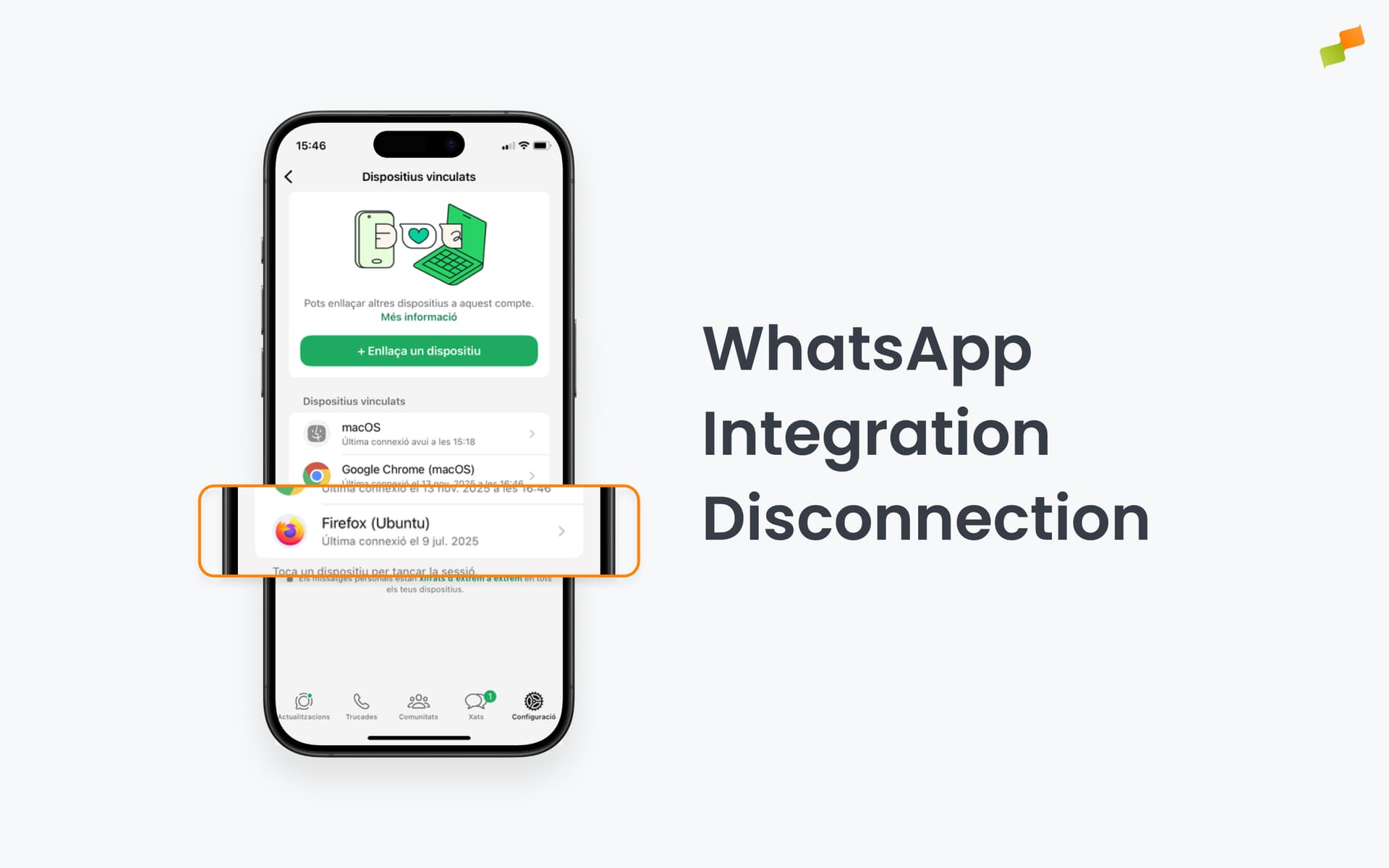
The Amplify integration is identified as Firefox on Ubuntu in your WhatsApp linked devices list:
Why are link previews missing when Amplify shares to social networks?
Social networks fetch metadata directly from your site, not from Amplify. Missing previews are usually caused by invalid Open Graph tags, robots.txt blocking the platform’s crawler, server errors like 403 Forbidden, or cached outdated data. Test with the exact parameterized URL Amplify publishes using each platform’s diagnostic tool.
Why does Amplify say "Could not retrieve the image" only on manual posts?
Manual posting composes the image in your browser from hub.marfeel.com, so the browser must be allowed to download it from your image server or CDN. If that host does not return an Access-Control-Allow-Origin header, the browser blocks the request and Amplify shows the error. Automatic posts render on Marfeel servers, where CORS does not apply, which is why they keep working. Fix it by returning Access-Control-Allow-Origin: https://hub.marfeel.com on image responses.
How do I fix Meta API rate limit error 613 in Amplify?
Error 613 means your app has exceeded Meta’s API rate limits. Connect a new integration using a different Meta user to resume publishing immediately, then slow down posting for a few days. To prevent future rate limits, connect multiple Meta users. Amplify automatically fails over to another user if one becomes rate-limited or invalid.
What do Meta errors 368/1404112, 1/2424009, and 1/2207051 mean in Amplify?
All three error signatures are account-level activity restrictions applied by Meta to the connected user, not by Amplify. Code 368 subcode 1404112 surfaces as a Facebook security-related limitation, code 1 subcode 2424009 as a Facebook/Instagram active account restriction, and code 1 subcode 2207051 as a Threads activity restriction. The cause is the same across all three: automated systems flagged the user for abuse signals such as repetitive media uploads, reused creatives, or activity that violates Community Standards. The restriction usually clears in 1 to 7 days. Switch to a backup Meta user to keep posting while the block is active, and reduce posting cadence when access returns. The affected user can appeal from Facebook’s Account Status page.
Why does the WhatsApp integration keep disconnecting from Amplify?
WhatsApp disconnects when the linked device is removed from the mobile phone, when the phone is not connected for 14 consecutive days, or when you exceed the maximum of 4 linked devices per feed. The Amplify integration appears as Firefox on Ubuntu in the WhatsApp linked devices list.