

Marfeel Reporting API developer guide
The Marfeel Reporting API provides programmatic access to report data from Marfeel Explore, built on Marfeel’s data reporting infrastructure. Use it to:
- Build custom dashboards to display Marfeel data.
- Automate complex reporting tasks to save time.
- Integrate your Marfeel data with other business applications, including via the Marfeel Google Sheets Add-On for spreadsheet-based workflows.
- Create recirculation modules. We strongly recommend using Marfeel’s Recommender for this, though, which has its Starter configuration included in Pro plan.
This guide covers every parameter of the Marfeel Reporting API request object, with curl examples you can run immediately.
Every API call requires a JSON request body with the following structure. The fields dates, filters, groupBy, metrics, and order are all mandatory, even when empty.
{ "dates": { "last": { "number": 30, "dimension": "minute" } }, "filters": [ ], "groupBy": [ ], "metrics": [ "uniqueUsers" ], "order": { "metric": "uniqueUsers", "sort": "DESC" }, "granularity": "realtime", "limit": 100, "from": 0}The Reporting API endpoint is https://api.newsroom.bi/api/dashboard/query
Metrics
Section titled “Metrics”Every request requires at least one metric. Metrics are quantitative measurements, such as unique users, page views, or revenue, and you can request several in a single call. See the full list of available metrics and dimensions.
Get the number of unique users
In the following example the uniqueUsers metric is supplied to the metrics object.
curl --location --request POST 'https://api.newsroom.bi/api/dashboard/query' \-H 'Content-Type: application/json' \-H 'Authorization: Bearer eyJh...' \--data-raw '{    "dates": {        "last": {            "number": 30,            "dimension": "minute"        }    },    "granularity": "realtime",    "filters": [    ],    "groupBy": [    ],    "metrics": [        "uniqueUsers"    ],    "order": {        "metric": "uniqueUsers",        "sort": "DESC"    },
    "limit": 100,    "from": 0}'
The response body indicates the total number of uniqueUsers is "total":10. As "granularity": "realtime" has been requested. The Response also includes "data" buckets of 5 min each with the uniqueUsers metric.
[ { "metric": "uniqueUsers", "total": 10, "granularity": "realtime", "availableGranularities": [ "realtime", "hourly", "daily" ], "actualData": { "values": [ { "key": "cfab1ba8c67c7c838db98d666f02a132", "total": 10, "items": [ { "id": "--", "value": "--", "type": "metric" } ] } ], "data": [ { "cfab1ba8c67c7c838db98d666f02a132": 5, "label": "2022-03-26 07:25" }, { "cfab1ba8c67c7c838db98d666f02a132": 4, "label": "2022-03-26 07:30" }, { "cfab1ba8c67c7c838db98d666f02a132": 2, "label": "2022-03-26 07:35" }, { "cfab1ba8c67c7c838db98d666f02a132": 2, "label": "2022-03-26 07:40" }, { "cfab1ba8c67c7c838db98d666f02a132": 3, "label": "2022-03-26 07:45" } ] }, "compareData": null }]Get the number of unique users, page views and revenue
In the following example the "uniqueUsers", "pageViewsTotal", "revenueTotal" metrics are requested.
curl --location --request POST 'https://api.newsroom.bi/api/dashboard/query' \-H 'Content-Type: application/json' \-H 'Authorization: Bearer eyJh...' \--data-raw '{    "dates": {        "last": {            "number": 30,            "dimension": "minute"        }    },    "granularity": "realtime",    "filters": [    ],    "groupBy": [    ],    "metrics": [        "uniqueUsers", "pageViewsTotal", "revenueTotal"    ],    "order": {        "metric": "uniqueUsers",        "sort": "DESC"    },
    "limit": 100,    "from": 0}'
The response body returns an array of metric results, one per requested metric.
[ { "metric": "uniqueUsers", ... }, { "metric": "pageViewsTotal", ... }, { "metric": "revenueTotal", ... }Dimensions
Section titled “Dimensions”Dimensions describe characteristics of your users, their sessions, and interactions with your content. Visitor Loyalty, for example, classifies users by engagement level: “New”, “Fly by”, “Casual”, “Won back”, “Loyal”, or “Lover”. You can specify zero or more dimensions from the ones available.
Get the urls with the most users during the previous day
curl --location --request POST 'https://api.newsroom.bi/api/dashboard/query' \-H 'Content-Type: application/json' \-H 'Authorization: Bearer eyJh...' \--data-raw '{    "dates": {        "last": {            "number": 1,            "dimension": "day"        }    },    "granularity": "daily",    "filters": [    ],    "groupBy": [        "url"    ],    "metrics": [        "uniqueUsers"    ],    "order": {        "metric": "uniqueUsers",        "sort": "DESC"    },
    "limit": 100,    "from": 0}'
Get the number of unique users by Visitor Loyalty
In the following example the visitorFrequency dimension is used.
curl --location --request POST 'https://api.newsroom.bi/api/dashboard/query' \-H 'Content-Type: application/json' \-H 'Authorization: Bearer eyJh...' \--data-raw '{    "dates": {        "last": {            "number": 1,            "dimension": "day"        }    },    "granularity": "daily",    "filters": [],    "groupBy": [        "visitorFrequency"    ],    "metrics": [        "uniqueUsers"    ],    "order": {        "metric": "uniqueUsers",        "sort": "DESC"    },
    "limit": 100,    "from": 0}'
Response object
Section titled “Response object”[ { "metric": "uniqueUsers", "total": 919, "granularity": "daily", "availableGranularities": [ "realtime", "hourly", "daily" ], "actualData": { "values": [ { "key": "cfcd208495d565ef66e7dff9f98764da", "total": 875, "items": [ { "id": "0", "value": "New", "type": "visitorFrequency" } ] }, { "key": "c81e728d9d4c2f636f067f89cc14862c", "total": 95, "items": [ { "id": "2", "value": "Fly by", "type": "visitorFrequency" } ] }, { "key": "eccbc87e4b5ce2fe28308fd9f2a7baf3", "total": 15, "items": [ { "id": "3", "value": "Casual", "type": "visitorFrequency" } ] }, { "key": "c4ca4238a0b923820dcc509a6f75849b", "total": 5, "items": [ { "id": "1", "value": "Won back", "type": "visitorFrequency" } ] }, { "key": "a87ff679a2f3e71d9181a67b7542122c", "total": 3, "items": [ { "id": "4", "value": "Loyal", "type": "visitorFrequency" } ] }, { "key": "e4da3b7fbbce2345d7772b0674a318d5", "total": 2, "items": [ { "id": "5", "value": "Lover", "type": "visitorFrequency" } ] } ], "data": [ { "cfcd208495d565ef66e7dff9f98764da": 593, "c81e728d9d4c2f636f067f89cc14862c": 73, "eccbc87e4b5ce2fe28308fd9f2a7baf3": 14, "c4ca4238a0b923820dcc509a6f75849b": 4, "a87ff679a2f3e71d9181a67b7542122c": 3, "e4da3b7fbbce2345d7772b0674a318d5": 2, "label": "2022-03-25 00:00" }, { "cfcd208495d565ef66e7dff9f98764da": 282, "c81e728d9d4c2f636f067f89cc14862c": 25, "eccbc87e4b5ce2fe28308fd9f2a7baf3": 2, "c4ca4238a0b923820dcc509a6f75849b": 1, "a87ff679a2f3e71d9181a67b7542122c": 0, "e4da3b7fbbce2345d7772b0674a318d5": 0, "label": "2022-03-26 00:00" } ] }, "compareData": null }]Filtering
Section titled “Filtering”Filters restrict API responses to rows that meet specific criteria. Specify one or more filter objects in the request body with these properties:
filter: the dimension to filter by.op: the comparison operator.value: an array of values. Multiple values in the same filter are combined with OR logic.
You can add as many filters as needed. Multiple filters are combined with AND logic.
Each filter evaluates as follows:
if {filter} {op} {value} return the rowThe six available op values are:
eq: equalneq: not equallike: containsnlike: not containsgt: greater thanlt: less than
Get the urls with the most loyal and lover users during the previous day
curl --location --request POST 'https://api.newsroom.bi/api/dashboard/query' \-H 'Content-Type: application/json' \-H 'Authorization: Bearer eyJh...' \--data-raw '{    "dates": {        "last": {            "number": 1,            "dimension": "day"        }    },    "granularity": "daily",    "filters": [{        "filter": "visitorFrequency",        "op": "eq",        "value": [5, 4]    }],    "groupBy": [        "url"    ],    "metrics": [        "uniqueUsers"    ],    "order": {        "metric": "uniqueUsers",        "sort": "DESC"    },
    "limit": 100,    "from": 0}'
Get the urls with the most users from Google Discover
curl --location --request POST 'https://api.newsroom.bi/api/dashboard/query' \-H 'Content-Type: application/json' \-H 'Authorization: Bearer eyJh...' \--data-raw '{    "dates": {        "last": {            "number": 1,            "dimension": "day"        }    },    "granularity": "daily",    "filters": [{        "filter": "source",        "op": "eq",        "value": ["Google Discover"]    }],    "groupBy": [        "url"    ],    "metrics": [        "uniqueUsers"    ],    "order": {        "metric": "uniqueUsers",        "sort": "DESC"    },
    "limit": 100,    "from": 0}'
Get the urls or articles in section 3674 that acquired the most users from Google Discover
curl --location --request POST 'https://api.newsroom.bi/api/dashboard/query' \-H 'Content-Type: application/json' \-H 'Authorization: Bearer eyJh...' \--data-raw '{    "dates": {        "last": {            "number": 1,            "dimension": "day"        }    },    "granularity": "daily",    "filters": [{        "filter": "source",        "op": "eq",        "value": ["Google Discover"]    },{        "filter":"section",        "op":"eq",        "value":[3674]    }],    "groupBy": [        "url"    ],    "metrics": [        "uniqueUsers"    ],    "order": {        "metric": "uniqueUsers",        "sort": "DESC"    },
    "limit": 100,    "from": 0}'
Ordering
Section titled “Ordering”Sort results by supplying a metric name and a sort direction: ASC (ascending) or DESC (descending).
Date Ranges
Section titled “Date Ranges”The Marfeel Reporting API accepts both absolute date ranges (with range) and relative time periods (with the last operator).
Get the unique users of February
curl --location --request POST 'https://api.newsroom.bi/api/dashboard/query' \-H 'Content-Type: application/json' \-H 'Authorization: Bearer eyJh...' \--data-raw '{    "dates": {        "range": {            "start": "2021-02-01",            "end": "2021-02-28"        }    },    "granularity": "daily",    "filters": [],    "groupBy": [    ],    "metrics": [        "uniqueUsers"    ],    "order": {        "metric": "uniqueUsers",        "sort": "DESC"    },
    "limit": 100,    "from": 0}'
Get the unique users of the last 7 days
curl --location --request POST 'https://api.newsroom.bi/api/dashboard/query' \-H 'Content-Type: application/json' \-H 'Authorization: Bearer eyJh...' \--data-raw '{    "dates": {        "last": {            "number": 7,            "dimension": "day"        }    },    "granularity": "daily",    "filters": [],    "groupBy": [    ],    "metrics": [        "uniqueUsers"    ],    "order": {        "metric": "uniqueUsers",        "sort": "DESC"    },
    "limit": 100,    "from": 0}'
Granularity
Section titled “Granularity”The Marfeel Reporting API returns data at five granularity levels: realtime, hourly, daily, weekly, or monthly. See the granularity reference for details on each level.
Pagination
Section titled “Pagination”Paginate through large result sets using the limit and from fields. limit controls how many rows are returned per request (maximum 500), and from sets the offset.
Get the first 10 urls with the most traffic during the last 30 days
curl --location --request POST 'https://api.newsroom.bi/api/dashboard/query' \-H 'Content-Type: application/json' \-H 'Authorization: Bearer eyJh...' \--data-raw '{    "dates": {        "last": {            "number": 30,            "dimension": "day"        }    },    "granularity": "monthly",    "filters": [    ],    "groupBy": [        "url"    ],    "metrics": [        "uniqueUsers"    ],    "order": {        "metric": "uniqueUsers",        "sort": "DESC"    },
    "limit": 10,    "from": 0}'
Get the second page of urls (urls 10 to 20) with the most traffic during the last 30 days
curl --location --request POST 'https://api.newsroom.bi/api/dashboard/query' \-H 'Content-Type: application/json' \-H 'Authorization: Bearer eyJh...' \--data-raw '{    "dates": {        "last": {            "number": 30,            "dimension": "day"        }    },    "granularity": "monthly",    "filters": [    ],    "groupBy": [        "url"    ],    "metrics": [        "uniqueUsers"    ],    "order": {        "metric": "uniqueUsers",        "sort": "DESC"    },
    "limit": 10,    "from": 10}'
Examples
Section titled “Examples”The following queries demonstrate common reporting scenarios you can adapt to your own needs.
List of the articles with the most traffic from social during the the last 7 days
Section titled “List of the articles with the most traffic from social during the the last 7 days”curl --location --request POST 'https://api.newsroom.bi/api/dashboard/query' \-H 'Authorization: Bearer eyJh...' \--header 'Content-Type: application/json' \--data-raw '{ "dates":{ "last":{ "number":"7", "dimension":"day" } }, "filters":[{ "filter":"mediumInternal", "op":"eq", "value":["social"] }], "groupBy":[ "url" ], "metrics":[ "uniqueUsers" ], "order":{ "metric":"uniqueUsers", "sort":"DESC" }, "granularity":"daily"}'Which articles had more PV from paying users on march the 17th?
Section titled “Which articles had more PV from paying users on march the 17th?”curl --location --request POST 'https://api.newsroom.bi/api/dashboard/query' \-H 'Authorization: Bearer eyJh...' \--header 'Content-Type: application/json' \--data-raw '{ "dates":{ "groupedBy":"daily", "range":{ "end":"2022-03-17", "start":"2022-03-17" } }, "filters":[{ "filter":"userType", "op":"eq", "value":[3] }], "groupBy":[ "url" ], "metrics":[ "uniqueUsers" ], "order":{ "metric":"uniqueUsers", "sort":"DESC" }, "granularity":"daily"}'}'How many articles where published in each section on march the 17th and how many PV did they generate?
Section titled “How many articles where published in each section on march the 17th and how many PV did they generate?”curl --location --request POST 'https://api.newsroom.bi/api/dashboard/query' \-H 'Authorization: Bearer eyJh...' \--header 'Content-Type: application/json' \--data-raw '{ "dates":{ "groupedBy":"daily", "range":{ "end":"2022-03-17", "start":"2022-03-17" } }, "filters":[{ "filter":"publishDate", "op":"eq", "value":["2022-03-17"] }], "groupBy":[ "section" ], "metrics":[ "newArticles", "pageViewsTotal" ], "order":{ "metric":"pageViewsTotal", "sort":"DESC" }, "granularity":"daily"}'What are the top 50 articles based on internal traffic in a 10-minute-long period
Section titled “What are the top 50 articles based on internal traffic in a 10-minute-long period”curl --location --request POST 'https://api.newsroom.bi/api/dashboard/query' \-H 'Authorization: Bearer eyJh...' \--header 'Content-Type: application/json' \--data-raw '{ "dates":{ "groupedBy":"daily", "range":{ "end":"2022-03-17 12:10:00", "start":"2022-03-17 12:00:00" } }, "filters":[{ "filter":"mediumInternal", "op":"eq", "value":["internal"] }], "groupBy":[ "url","title" ], "metrics":[ "uniqueUsers" ], "order":{ "metric":"uniqueUsers", "sort":"DESC" }, "granularity":"daily", "limit":50, "from":0}'Building sophisticated queries
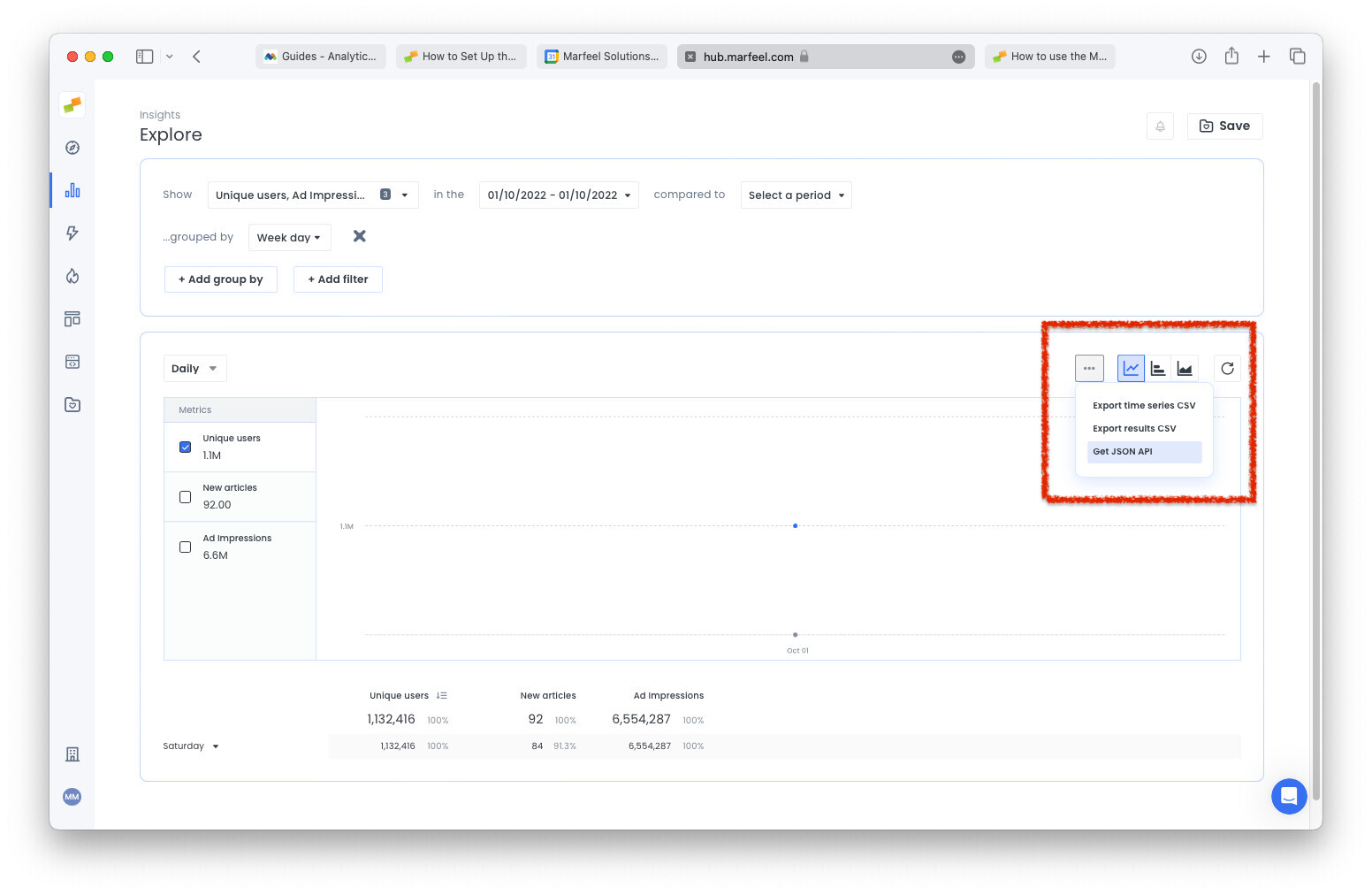
Section titled “Building sophisticated queries”The fastest way to prototype a query is to build it visually in Marfeel Explore and then export the underlying API call. Explore uses the Reporting API under the hood, so you can extract the exact request body through either of these methods:
- Use the Get JSON API option in Explore to copy the request body of the query you built.
- Open the Network panel in your browser’s Developer Tools and inspect requests to
https://api.newsroom.bi/api/dashboard/query. Copy the request object and pass it directly to--data-raw.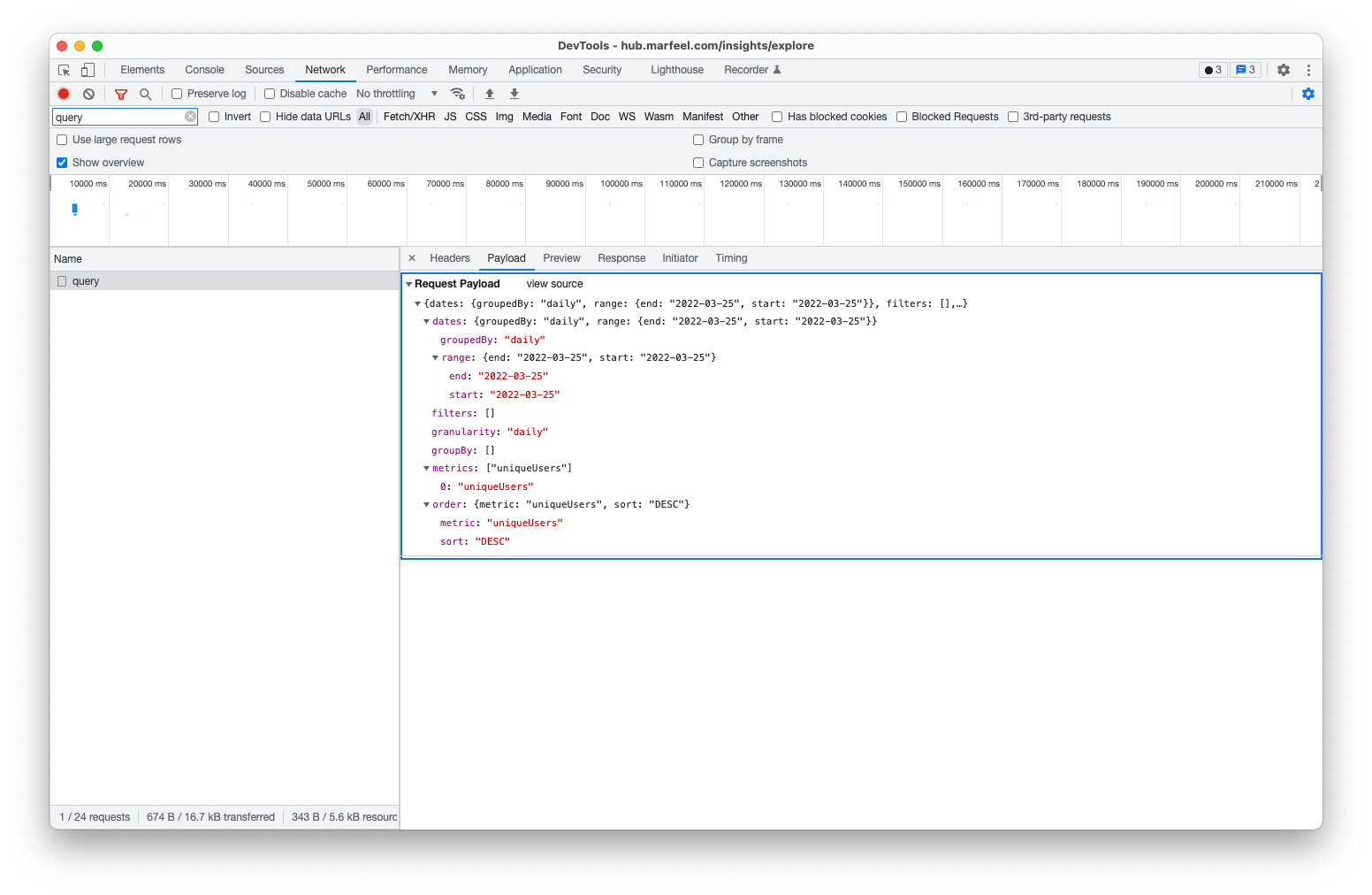
Troubleshooting
Section titled “Troubleshooting”HTTP 429 — rate limit exceeded
Section titled “HTTP 429 — rate limit exceeded”The API limit is 1 request per minute and 500 rows per response, enforced per account — all users and automated jobs in the account share this quota. If you receive a 429, wait and retry. We recommend using a dedicated generic user with the API role for automated pipelines to keep usage predictable. For a higher limit, contact your account manager.
Curl ends with error “upstream request timeout”
Section titled “Curl ends with error “upstream request timeout””This error usually means the curl command contains a stray backslash or invalid character before the output redirect. Remove any trailing \ between the closing quote and the redirect operator.
Incorrect: ...,"sort":"DESC"},"granularity":"hourly"}' \ > /Documents/data.txt
Correct: ...,"sort":"DESC"},"granularity":"hourly"}' > /Documents/data.txt