

How to set up Data Stream to Google Cloud Storage
The Data Stream to Google Cloud Storage integration lets you store raw data exports directly in a Google Cloud Storage bucket. Once configured, Marfeel continuously streams export files to your designated bucket, ready for analysis or loading into BigQuery.
How to set up Data Stream to Google Cloud Storage
Section titled “How to set up Data Stream to Google Cloud Storage”-
Go to Organization settings > Integrations. Scroll to find ‘Data exports’ section.
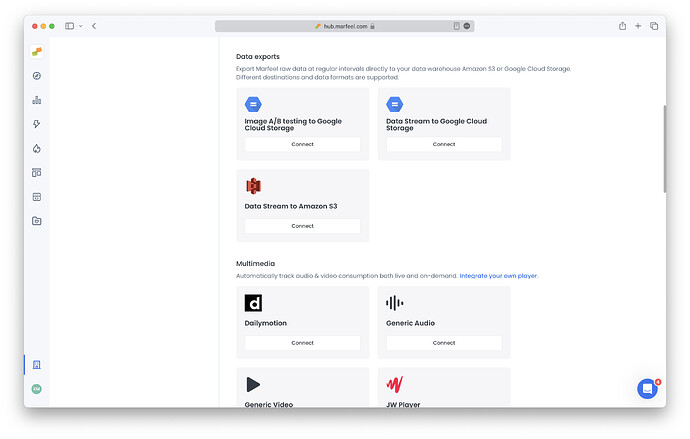
-
Select
Connectin ‘Data Stream to GA360’ integration.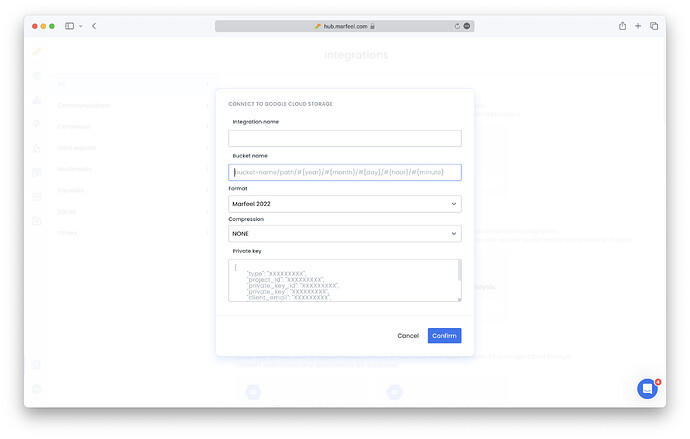
-
Fill in integration name: Enter any name here (this is for internal purposes only)
-
Fill in bucket name: this is the name of the bucket in the GCS service where the data will be stored. More on buckets here.
- It’s also possible to use a folder structure, as in:
<bucket_name>/folder1/folder2/ - Or to configure dynamic date folders such as:
<bucket_name>/folder/#{year}/#{month}/#{day}/#{hour}/#{minute} - If you have multiple types of exports (page views, conversions, recirculation…), configure a different folder for each one to prevent collisions.
- It’s also possible to use a folder structure, as in:
-
Choose format:
- Choose
Marfeel 2025to get the most out of your raw data exports. - Choose
Chartbeat Compatibleif you would like data exported in the same format as Chartbeat data streams. - Choose
Google Analytics 360 Compatibleif you would like data exported in the same format as GA360 data streams. Take a look at how to configure custom variables.
- Choose
-
Select export with or without compression.
-
Provide private key: This is your authentication information. More on how to obtain the key here.
-
Once you click on Confirm, you are all set. You can monitor its usage in the Logs tab. For more information on potential issues, check the Troubleshooting document.
What export formats are available for Data Stream to Google Cloud Storage?
Marfeel supports three export formats: Marfeel 2025 (recommended for full raw data), Chartbeat Compatible (same format as Chartbeat data streams), and Google Analytics 360 Compatible (same format as GA360 data streams with configurable custom variables).
Can I organize Data Stream exports into folders with dynamic dates?
Yes. You can use a folder structure like <bucket_name>/folder1/folder2/ or configure dynamic date folders such as <bucket_name>/folder/#{year}/#{month}/#{day}/#{hour}/#{minute}. If you export multiple data types (page views, conversions, recirculation), use a separate folder for each to prevent collisions.
Where do I find the private key to authenticate the Google Cloud Storage integration?
The private key is a service account key from Google Cloud IAM. You can create and manage service account keys in the Google Cloud Console following the official documentation.