

Google Analytics 360 custom variables for data exports
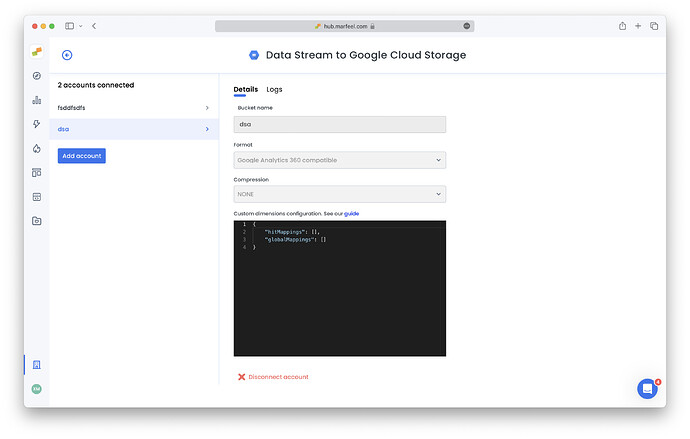
Marfeel custom variables can be exported in the Google Analytics 360 compatible format. When setting up a Data Exports integration, select Google Analytics 360 compatible as the output format. You can then provide a configuration JSON in the “Custom dimensions config” field that maps each Marfeel custom variable to a Variable ID in the Google Analytics format.
Supported custom variable types
Section titled “Supported custom variable types”Marfeel provides four custom variable types that can be mapped to Google Analytics 360 custom dimensions:
- Pageview variables - PAGE_VARS
- Session variables - SESSION_VARS
- User variables - USER_VARS
- Editorial tags - TAGS
Configuration JSON structure
Section titled “Configuration JSON structure”In the configuration JSON, create an array with each position mapping a variable name to its source (type) and an ID (integer). For example:
{ "hitMappings": [ { "index": 1, "source": "PAGE_VARS", "varName": "my_pagevar" }, { "index": 2, "source": "TAGS", "varName": "my_tagGroup" } ], "globalMappings": [ { "index": 1, "source": "USER_VARS", "varName": "my_uservar" } ]}hitMappings vs. globalMappings output
Section titled “hitMappings vs. globalMappings output”Variables defined in hitMappings are output as an array in hits.customDimensions, while variables defined in globalMappings are output as an array in customDimensions. Each variable is represented by its index and value (the variable name is not included in the output). For example:
{ "hits": [ { "customDimensions": [ { "index": "1", "value": "0.023" }, { "index": "2", "value": "foo" } ] } ], "customDimensions": [ { "index":"1", "value": "bar" } ]}What custom variable types does Marfeel support for Google Analytics 360 exports?
Marfeel supports four custom variable types: Pageview variables (PAGE_VARS), Session variables (SESSION_VARS), User variables (USER_VARS), and Editorial tags (TAGS). Each can be mapped to a Google Analytics 360 custom dimension via the configuration JSON.
What is the difference between hitMappings and globalMappings?
Variables defined in hitMappings are output as an array in hits.customDimensions, while variables defined in globalMappings are output as an array in the top-level customDimensions field. Each variable is represented by its index and value.
How do I configure the custom dimensions JSON mapping?
In the “Custom dimensions config” field, provide a JSON object with hitMappings and globalMappings arrays. Each entry maps a variable name (varName) to its source type (PAGE_VARS, SESSION_VARS, USER_VARS, or TAGS) and an integer index.