

Debug Marfeel SDK network requests and tracking parameters
Marfeel tracks page view data, multimedia events, and recirculation metrics through network requests sent at regular intervals during each session. This article provides a complete reference for every tracking parameter and explains how to inspect these requests using browser developer tools.
Each request may carry updated information such as reading time or engaged time. Tracking at regular intervals allows the Marfeel SDK to asynchronously capture metrics like user type or Core Web Vitals as they become available, without delaying the first hit. Server side, Marfeel collapses and merges all requests appropriately.
Network requests
Section titled “Network requests”Marfeel uses events.newsroom.bi as the endpoint for data collection:
https://events.newsroom.bi/ingest.phpcollects information about the page view. You could see more detailed information about what the code is sending herehttps://events.newsroom.bi/multimedia.phpcollects information about the multimedia elements of the page (loaded videos, plays, mute/unmute, play length… ). It could be enabled or disabled following this guidehttps://events.newsroom.bi/recirculation.phpcollects information about links on the page, viewability, and CTR of those links. You won’t see any call to that endpoint unless you tag some modules to be measured using data-mrf-recirculation=“Module Name” or via the no-code experience
Network developer tools
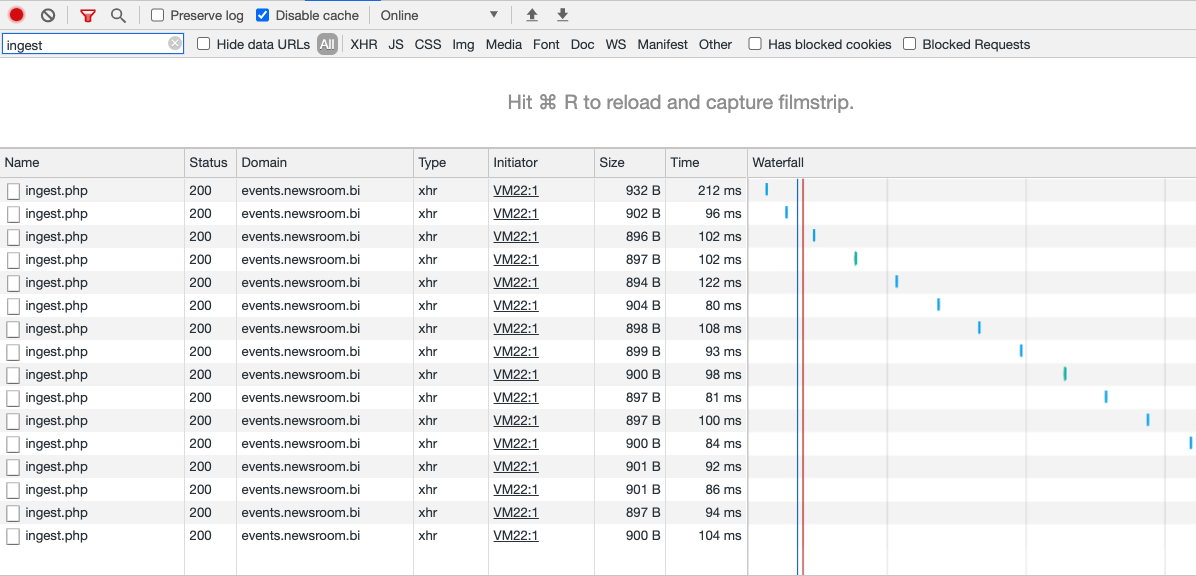
Section titled “Network developer tools”Open the Network tab in your browser developer tools and filter for “ingest” to find all Marfeel tracking requests at once.
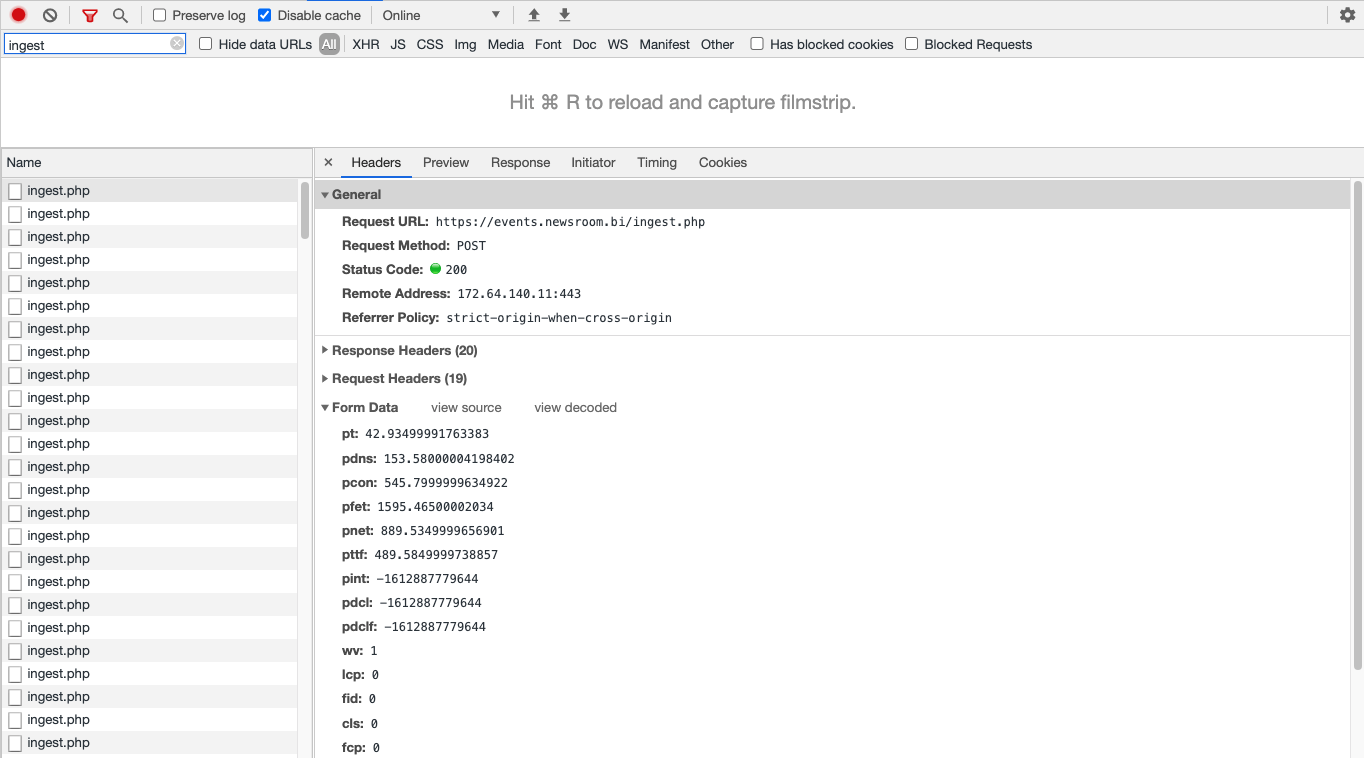
Click on any request to view the full set of key-value pairs sent to Compass:
User presence events
Section titled “User presence events”Every Compass request includes information about the user and their current session. Not all values are sent with all requests.
Here’s the detailed breakdown of all the other key-value pairs sent to Compass:
| Key | Description | Web | App |
|---|---|---|---|
| ac | Your Compass account ID. | ✔️ | ✔️ |
| co | null by default, it’s the custom domain on which Compass stores cookies. | ✔️ | ❌ |
| t | The time when the user started navigating on your site. | ✔️ | ✔️ |
| r | The referrer URL that brought the user to your site which is only populated when there is a referrer, not for direct sessions. To understand data acquisition, consider visiting your site in an incognito tab from a Google search. Clicking on the result link sets “r” to https://www.google.com. If you go to the home page by clicking the logo, the original Google referrer is maintained for reporting on Medium and Medium with Internal dimensions. | ✔️ | ✔️ |
| lp | The landing page: the first URL the user visited in the current session. | ✔️ | ✔️ |
| url | The current page URL. | ✔️ | ✔️ |
| c | The current page’s canonical URL. | ✔️ | ✔️ |
| pp | The current pageview’s referrer URL. | ✔️ | ✔️ |
| p | The pageview’s unique identifier. Defined by Compass. | ✔️ | ✔️ |
| u | The user’s unique permanent ID, to recognize them from one session to the next on the same browser. Defined by Compass. | ✔️ | ✔️ |
| s | The session’s unique identifier. Defined by Compass. | ✔️ | ✔️ |
| a | The number of Compass polling already sent for this page and user: 0 for the first one, 1 for the next one, etc. | ✔️ | ✔️ |
| n | The current timestamp. | ✔️ | ✔️ |
| l | Reading time: the number of seconds the user has been on the current page so far. | ✔️ | ✔️ |
| et | Engagement time: the number of seconds the user has been interacting with the page so far. | ✔️ | ❌ |
| ps | The timestamp when the user arrived on the page. | ✔️ | ✔️ |
| v | The current Compass tracker version. | ✔️ | ✔️ |
| ut | The type of user as you have defined it: logged, paid, or 0 if it is unknown. | ✔️ | ✔️ |
| sui | The user’s unique identifier as you have defined it. | ✔️ | ✔️ |
| uc | Indicates whether the user has consented to cookies for Compass. | ✔️ | ✔️ |
| cc | Consent choice. Values: rejected: 0; accepted: 1; pending: 2; disabled: 3 | ✔️ | ✔️ |
| sc | Scroll percent: the max scroll percent a reader reached while on the page. | ✔️ | ✔️ |
| fv | The timestamp marking the user’s first visit to the site. | ✔️ | ✔️ |
| uvar | An array of all the user variables you and Compass have defined. | ✔️ | ✔️ |
| svar | An array of all the session variables you and Compass have defined. | ✔️ | ✔️ |
| pvar | An array of all the page variables you and Compass have defined. | ✔️ | ✔️ |
| conv | New Conversions that happened since the last request. You define conversions according to your goals. | ✔️ | ✔️ |
| rs | The recirculation source (HTML module) that brought the user to the current page, if any. | ✔️ | ✔️ |
| rfv | The reader’s RFV score, if it exists. | ✔️ | ❌ |
| pageType | An identifier to distinguish between Standard Web and Facebook Instant Articles. | ✔️ | ✔️ |
| pti | Published Time Identifier | ✔️ | ❌ |
| uti | Updated Time Identifier | ✔️ | ❌ |
Advertisement
Section titled “Advertisement”Once the Google Ad Manager integration has been completed, the following fields will be sent as part of the ingest request:
| Key | Description |
|---|---|
| ads | A Marfeel-only value tracking how many Marfeel ads are rendered. |
Conversions
Section titled “Conversions”Once you’ve triggered a trackConversion, you can make sure it went through correctly by looking at the conv parameter in the next ingest request.
| Key | Description |
|---|---|
| conv | Conversion name. |
For example, after triggering compass.trackConversion('subscribe') you will find conv with value subscribe in the ingest request.
Core Web Vitals
Section titled “Core Web Vitals”Core Web Vitals are a Google-led initiative to unify essential metrics related to page speed and user experience. They impact Google results ranking, so they must be taken seriously.
Rather than waiting for a month for Google Search Console to update their reading of your site’s Core Vitals, Marfeel Compass provides real-time information.
Every tracking request contains the Core Vitals for that reader on that page.
| Key | Description | Good value |
|---|---|---|
| wv | 1 if web vitals were calculated, 0 otherwise. | |
| lcp | Largest Contentful Paint | Under 2500 |
| fid | First Input Delay | Under 100 |
| cls | Cumulative Layout Shift score | Under 0.1 |
| fcp | First Contentful Paint | Under 2000 |
You can find this data in your Compass dashboard as a breakdown tab named “Validations” for every article detail page.
Page Speed
Section titled “Page Speed”All the variables prefixed with a “p” relate to the page performance: they are a detailed breakdown of the page loading speed.
All the values are in milliseconds and, except for the first one, are calculated only once per pageview.
| Key | Description | Available for |
|---|---|---|
| pt | The delay between CompassJS starting tracking and when it is ready to send information. | All browsers |
| pdns | How long the Domain Name lookup took for the page, in milliseconds | Only modern browsers |
| pcon | How long it took the browser to establish a connection to the server to retrieve the page. | Only modern browsers |
| pfet | The time elapsed between starting to fetch the page and receiving its last byte. | Only modern browsers |
| pnet | The time elapsed between right before the browser requested the page and the moment it received its last byte. | Only modern browsers |
| pttf | The time elapsed between the first byte of HTML received and the last one. | Only modern browsers |
| pint | How long it took to parse the DOM, from start to until the page is interactive. | All browsers |
| pdcl | The time elapsed between the beginning of DOM parsing and when all the scripts have been executed. | All browsers |
| pdclf | The time elapsed between when the DOM parsing started and when the DOM is entirely ready. | All browsers |
You can read more on any of the variables used to calculate those values with Mozilla Developer Documentation. Compass audits your site’s real performance thanks to those values, rather than using lab data like Google Lighthouse does.
Recirculation
Section titled “Recirculation”In the recirculation call we can see some common fields from compass and some specific:
| Key | Description |
|---|---|
| t | Type: could be elegible, impression or click |
| m | Modules: the list of modules or recirculation found |
Every item of m it has this shape:
- n: the name of the module
- e: a list of urls of all links in order. Every link can be a string or an object with url and position.
{ "n": "NAME OF DE MODULE", "e": ["link", "link2", "link3", { "url": "link4", "position": "4" }]}Multimedia
Section titled “Multimedia”Specific fields in multimedia calls:
| Key | Description |
|---|---|
| m | Object containing playback information |
| m -> ads | Ads: list of times where an ad has started. Every item is the seconds where the event was triggered. |
| m -> ap | Number of ads played |
| m -> as | A boolean expressing if there has been any ad |
| m -> bscr | List of event times, in seconds, where there has been a back to normal screen event. |
| m -> e | True if the media has reached the end |
| m -> fscr | List of event times, in seconds, where there has been a fullscreen event. |
| m -> mp | Number expressing how far in seconds the media has been played |
| m -> mute | List of event times, in seconds, where there has been a mute event. |
| m -> pause | List of event times, in seconds, where there has been a pause event. |
| m -> play | List of event times, in seconds, where there has been a pause event. |
| m -> s | True if the media has started playing |
| m_il | A boolean expressing if the media is a live stream. |
| m_l | Duration: The duration of the media. |
| m_p | Provider: The name of the media player provider. For example: dailymotion, youtube, etc.. |
| m_pi | ProviderId: The identifier of the media. |
| m_pt | Publish time: The date when it was published the video. Timestamp in seconds. |
| m_t | Type: could be video or audio. |
| m_th | Thumbnail: URL of the image representing this media. |
| m_ti | Title: Title of the media. |
| m_u | URL: url of the media item. |
What endpoints does Marfeel use for data collection?
Marfeel uses events.newsroom.bi as the data collection endpoint. It sends page view data to ingest.php, multimedia tracking to multimedia.php, and recirculation metrics to recirculation.php.
How can I inspect Marfeel tracking requests in the browser?
Open the Network tab in your browser developer tools and filter for “ingest” to see all Marfeel tracking requests. Click on any request to view the full set of key-value pairs sent to Compass.
Does Marfeel track Core Web Vitals in real time?
Yes. Every Compass tracking request includes Core Web Vitals for that reader on that page, including LCP, FID, CLS, and FCP. This provides real-time performance data rather than waiting for Google Search Console updates.