

Google Discover editorial strategy with E-E-A-T
Google Discover is a personalized news feed that surfaces articles and videos based on user searches and preferences. Publications whose content gets picked up and distributed via Google Discover are in an excellent position to increase traffic.
Google does not circulate just any content on Discover. Publications and authors must align with Google’s guidelines on Experience, Expertise, Authoritativeness, and Trustworthiness (E-E-A-T). This guide explains how to use Marfeel to build a Google Discover strategy based on what is already working and measure its success over time.
Google Discover traffic attribution
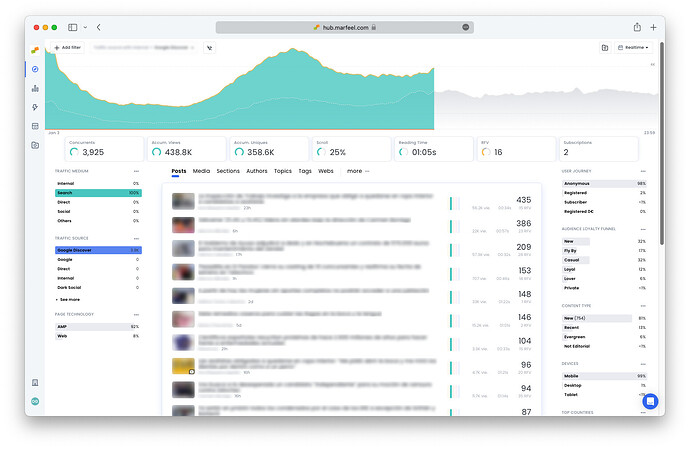
Section titled “Google Discover traffic attribution”Filter by Traffic source = Google Discover on the Compass Dashboard or any report at the data warehouse level to view all concurrent users who have accessed the publication via Google Discover. From there, break down results by articles, sections, topics, authors, or other dimensions to see which content brings in the most traffic from Google Discover:
Develop a Google Discover strategy
Section titled “Develop a Google Discover strategy”Google curates the Discover feed based on strict content requirements. Google guidelines indicate that websites, sections, and authors should demonstrate expertise, authority, and trustworthiness for the topics under discussion. This is especially important for content designated YMYL (Your Money Your Life).
Content should be written by individuals with the proper credentials or with experience writing on the topic successfully. For example, an article explaining how to file a tax form should be written by someone with knowledge of tax preparation.
The website itself must also have E-E-A-T in the subject and a history of successfully publishing similar content. For news sites, this applies to the section as well. A tax article published in the hockey section of a sports publication will not perform well on Google Discover.
E-E-A-T cannot be established overnight. However, publications and authors who take the proper steps can build E-E-A-T and increase the amount of content that appears on Discover.
How publications can improve E-E-A-T
Section titled “How publications can improve E-E-A-T”-
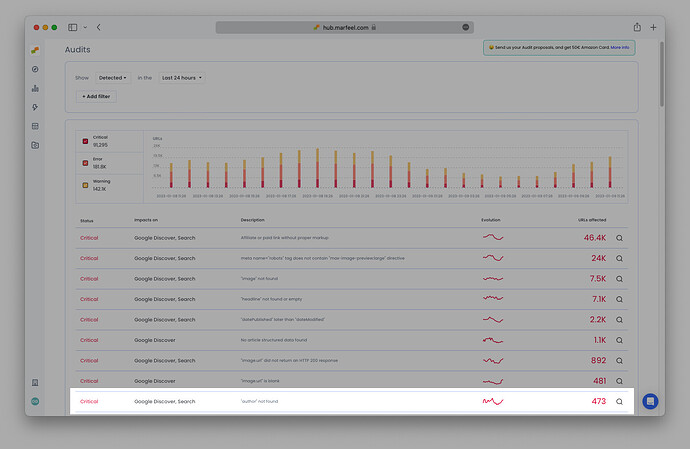
Identify the author of each article and include a link to the authors’ bios. Marfeel validates whether there is author information included in the structured data and in the body of the article in the Audits module:
-
'author' not foundindicates there is no ‘author’ property within the article’s structured data. -
'author.name' not found or emptyindicates there is an author property in the structured data, but it is missing the author’s name. -
author. not found in bodyindicates the author’s name is not present in the body of the article.
Read what Google has to say about including author names and bios.
-
-
Identify the section to which each piece of content belongs and consistently publish high-quality articles in those sections. Google receives signals from readers to determine if content was useful and creates connections between authors, topics, and sections to establish E-E-A-T.
For authors: reverse engineer E-E-A-T
Section titled “For authors: reverse engineer E-E-A-T”Marfeel shows authors which of the topics they already write about bring in the most traffic via Google Discover. Authors can identify what is already working and do more of that to further increase E-E-A-T in those subjects. To find which topics carry the most authority on Discover, follow these steps:
- In Optimize, select
Acquired trafficas the goal, drilldown bySection, and filter byTraffic sourceandAuthorname.
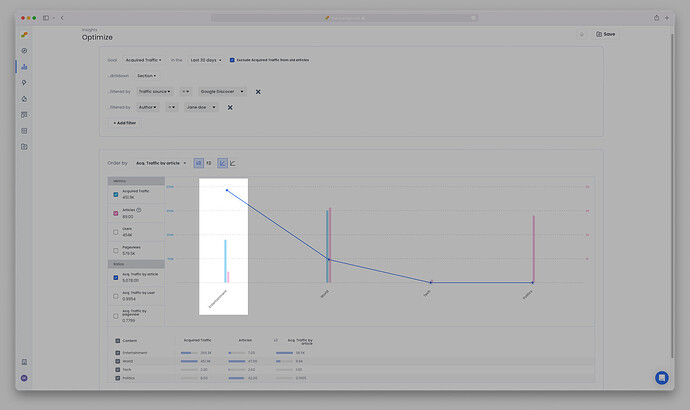
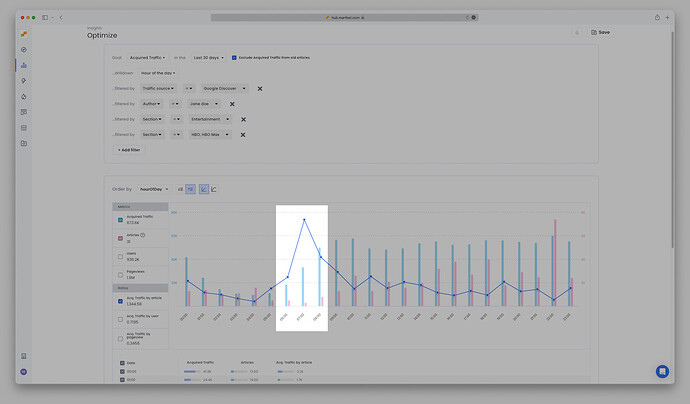
The blue line indicates the sections with the most Traffic per article. It represents the efficiency ratio you want to focus on: the sections where your articles perform best on Google Discover. These are the sections where Google has identified you as a reliable source.
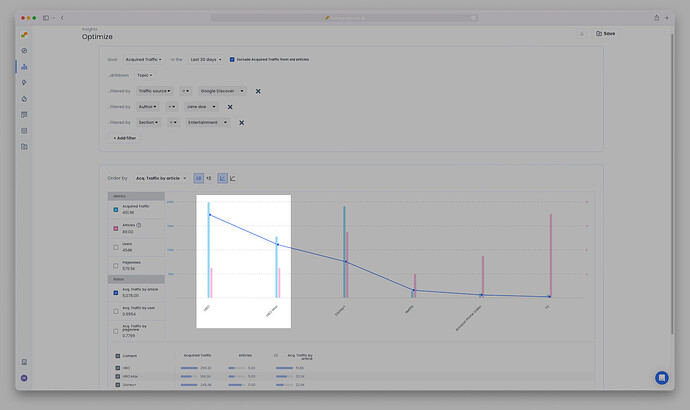
- Now drill down by
Topic, filtering by the best performing section (in the example above, Entertainment) to find out which topics had the most impact.
- Does the publishing time affect the success of the article on Google Discover? What about the word count or length of the title? Slice and dice by all of these dimensions to get clear answers.
In the example below, the author’s most successful topics bring in a high amount of traffic per article from 6 AM to 9 AM, and yet the author is publishing relatively few articles during these high-yield times that correspond to readers’ morning commute:
- Save these reports for future comparison.
Now, create a content strategy based on topics and sections where you have established E-E-A-T, or are well on your way to doing so. Factor in optimal article length, title length, and publishing time.
Monitor the progress of your Google Discover strategy
Section titled “Monitor the progress of your Google Discover strategy”Track the increase of acquired traffic via Google Discover in Compass, Explore, and Optimize views to measure success in real time and compare current results to historical data.
In real time
Section titled “In real time”In Compass, set Google Discover as the only Traffic source and filter articles by the Topics selected previously.
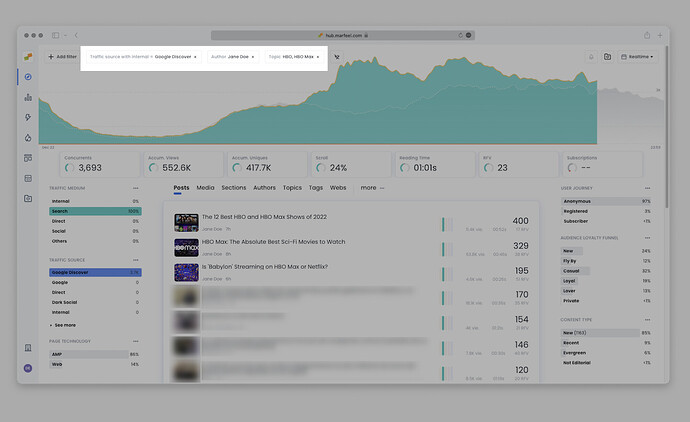
Roll over the Concurrent and Accum. Uniques Featured KPIs to see real-time data compared with data from the same day during the previous 4 weeks.
Evaluate effectiveness over the long term
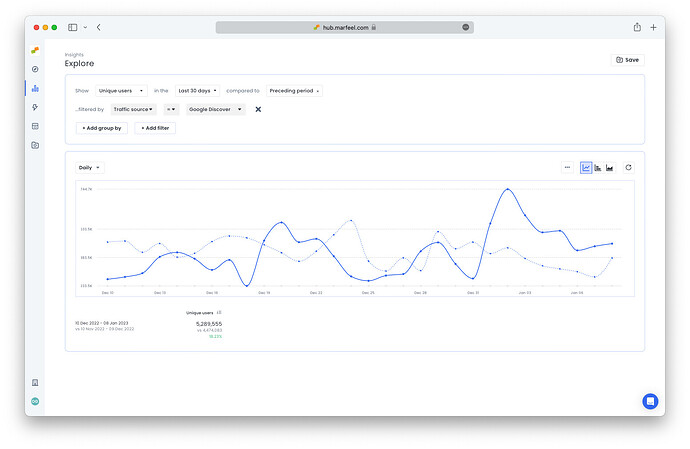
Section titled “Evaluate effectiveness over the long term”In Explore, filter by Traffic source as compared to the Preceding period to compare performance and view the percentage growth. In this case, Google Discover traffic compared with results from the previous 30 days shows a percentage increase of just over 18%:
You can also return to Optimize and compare the Google Discover Traffic per article with the reports generated earlier to research further opportunities.
How do I find Google Discover traffic in Marfeel?
Filter by Traffic source = Google Discover on the Compass Dashboard or any data warehouse report. You can break down results by articles, sections, topics, and authors.
How can publications improve E-E-A-T for Google Discover?
Identify the author of each article and include a link to their bio. Marfeel validates author information in structured data via the Audits module. Also identify the section each piece of content belongs to and consistently publish high-quality articles in those sections.
How can authors reverse engineer E-E-A-T using Marfeel?
In Optimize, select Acquired traffic as the goal, drilldown by Section, and filter by Traffic source and Author name. The Traffic per article metric reveals the sections where Google has identified you as a reliable source. Then drill down by Topic to find which subjects had the most impact.