

Custom Fields for editorial metadata extraction
Custom Fields lets you extract custom metadata from your articles during crawling and use it across Amplify, Recommender, and editorial workflows. You define what to capture, where to store it, and how it syncs. Extracted data automatically flows through your entire publishing stack.
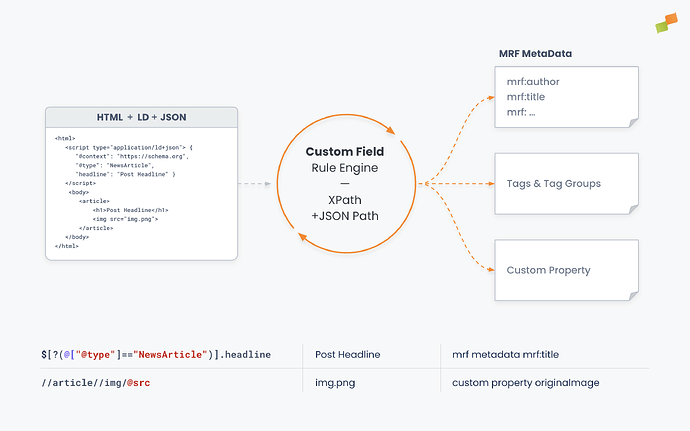
Extract metadata from your pages
Section titled “Extract metadata from your pages”Define extraction rules using XPath or JSONPath syntax to target specific elements in your page HTML or LD+JSON structured data. You can extract values from meta tags, HTML attributes, text content, and application/ld+json blocks embedded in the page.
Choose whether to capture attribute values or text content, store data as custom properties, tags, or system metadata, and set conditions for when extraction should happen. You control how extracted data behaves with existing values: overwrite, fill only empty fields, or append.
If the information exists in your server-side rendered HTML, Custom Fields captures it automatically during crawling. No manual tagging needed.
For more details on how Marfeel’s editorial crawler works and what metadata it extracts by default, see How does Marfeel extract the metadata from articles.
Custom Fields extends this system by letting you define your own extraction rules on top of the standard metadata detection, using the same XPath and JSONPath syntax to pinpoint exactly what you need.
Create a Custom Field
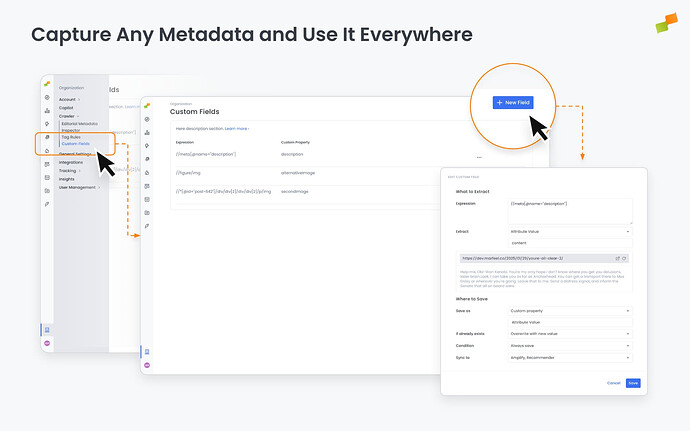
Section titled “Create a Custom Field”Navigate to Organization > Custom Fields and click + New Field.
The configuration form has two sections: What to Extract and Where to Save.
What to Extract
Section titled “What to Extract”- Expression: Enter an XPath (starts with
/or//) or JSONPath (starts with$) expression targeting the element you want to capture. A live preview lets you test the expression against any article URL before saving. - Extract: Choose what to pull from the matched element:
- Attribute Value: Extracts a specific attribute (e.g.,
content,src,href,alt) - Text Content: Extracts the text inside the matched element
Where to Save
Section titled “Where to Save”| Setting | Options | Description |
|---|---|---|
| Save as | Custom property, Tag, MRF Metadata | Determines how the extracted value is stored. Custom properties and tags flow to downstream products. MRF Metadata updates core article fields like mrf:authors, mrf:title or others |
| Name format | name or name:value or name:{value} | For tags it can define the key-value structure. Use {value} to dynamically insert the extracted value. |
| If already exists | Overwrite with new value, Fill only if empty, Append | Controls behavior when the target field already has a value. |
| Condition | Always save, Pattern | Determines whether extraction runs unconditionally or only when a pattern is found. |
| Sync to | Amplify, Recommender | Select which downstream products receive the extracted data. You can enable both. |
Expression Examples
Section titled “Expression Examples”| Expression | Extract | Result |
|---|---|---|
//meta[@name="description"]/@content | Attribute Value | Extracts the article’s meta description |
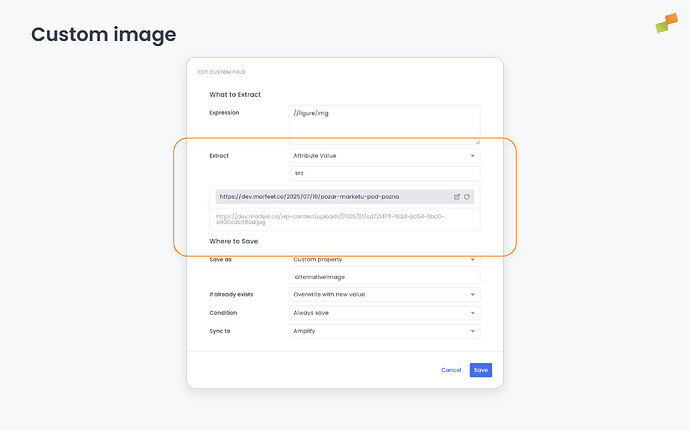
//figure/img | Attribute Value (src) | Extracts the first figure image URL |
//*[@id="post-642"]/div/div[2]/div/div[2]/p/img | Attribute Value (src) | Extracts a specific image by DOM path |
/html/head/meta[33] | Attribute Value (content) | Extracts a specific meta tag by position |
$.@graph[?(@.@type=="NewsArticle")].thumbnailUrl | — | Extracts thumbnailUrl from LD+JSON structured data |
Limits and restrictions
Section titled “Limits and restrictions”| Restriction | Limit |
|---|---|
| Maximum custom field rules per account | 5 |
| Tag value length | 128 characters |
| Custom property value length | 1,024 characters |
| Reserved fields | mrf:canonical and mrf:cms_id cannot be overwritten |
mrf:canonical field is protected and cannot be overwritten by Custom Fields. This prevents accidental changes to article canonicalization.
Use cases
Section titled “Use cases”Custom Fields opens up practical workflows across editorial, recommendations, and social distribution.
Editorial workflows
Section titled “Editorial workflows”- Content tiers and paywall status: Extract internal classifications that inform distribution strategies and performance analysis
- Tracking parameters: Capture values that feed into analytics initiatives or integrate with third-party systems your newsroom relies on
- Image alt text: Extract
altattributes from article images so downstream systems (like Recommender) can use proper alt text instead of falling back to the article title, improving PageSpeed scores - Article excerpts: Pull
og:descriptionor custom summary fields to make them available for newsletter rendering through Recommender layouts - Custom thumbnails: Extract
thumbnailUrlor other image properties from structured data so Recommender can use publisher-preferred images instead of applying automated crops
Recommendations
Section titled “Recommendations”Custom metadata automatically flows through the Recommender engine, making it available when building recommendation experiences. Combined with Recommender Layouts, custom properties become part of the recommendation data passed to your layout templates. You can display excerpts, use custom thumbnails, add premium badges, and more.
See Custom Fields in Recommender Layouts for template examples and implementation details.
Amplify: Templates and image selection
Section titled “Amplify: Templates and image selection”Custom metadata extends to your social distribution workflow in Amplify in two ways: custom placeholders in post templates let you include extracted metadata in social post text, and Post Image settings let you choose which image property is used when sharing.
See Custom Fields in Amplify Layouts for template examples and implementation details.
Going deeper
Section titled “Going deeper”- Custom Fields in Amplify Layouts — Use custom metadata in Amplify layout templates and post text
- Custom Fields in Recommender Layouts — Use custom metadata in Recommender layout templates
- How does Marfeel extract the metadata from articles
- Marfeel Crawlers
- Editorial Metadata API Endpoint — for submitting metadata programmatically when crawlers can’t access your content
What extraction methods does Custom Fields support?
Custom Fields supports XPath expressions (starting with / or //) to target HTML elements and JSONPath expressions (starting with $) to extract values from application/ld+json structured data blocks. You can extract attribute values or text content from matched elements.
What are the limits for Custom Fields?
Each account can have up to 5 custom field rules. Tag values are limited to 128 characters and custom property values to 1,024 characters. The mrf:canonical and mrf:cms_id fields are reserved and cannot be overwritten.
Can Custom Fields extract data from JavaScript or the DataLayer?
No. Custom Fields works only with static HTML content available at crawl time. It cannot extract values from the JavaScript DataLayer or any data that requires JS execution to be present on the page.