

Content Dimensions and filters
Content Dimensions and filters let you break down analytics data by editorial attributes such as Author, Byline, Content type, Sections, Tags, Topics, and Visibility. Each dimension is available in Explore, Optimize, and Compass views.
Author & Byline
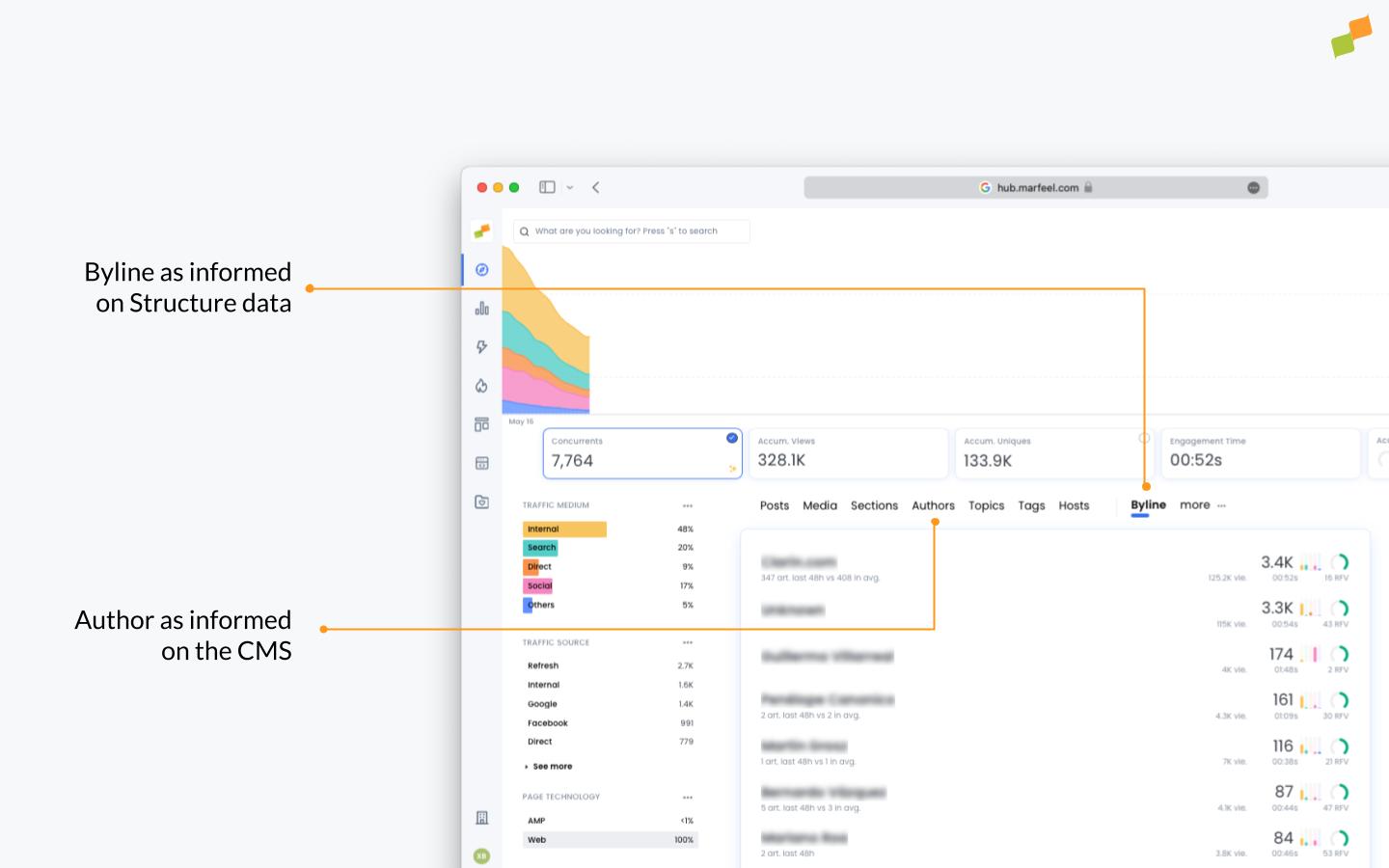
Section titled “Author & Byline”An Author is the person who created a piece of content, whether an article, blog post, or other written material. The Author normally matches the creator recorded in the CMS.
A Byline is the public text that identifies the author(s) of an article. The Byline normally matches the public credit line declared in structured data.
One Author can have multiple Bylines for different reasons:
- Pseudonyms or pen names: Some authors write under a pseudonym to maintain separation between different areas of their work. Each pen name becomes a separate Byline.
- Variations in name representation: An author’s name may appear differently across various publications or platforms.
As an example, the Author John Smith might publish articles using these different Bylines:
- John Smith
- JS
- J.S.
- John S.
- J. Smith
- Generic Editorial byline
Marfeel exposes both the real Author of an article along with the used Byline as dimensions on Explore, Optimize and Compass views.
All Authors is a filter variant of Author that restricts results to content where every listed author matches your selection. Unlike Author, which includes co-authored articles, All Authors excludes any article where additional authors are credited. Use it when you want to analyze content attributed exclusively to a specific person.
Content type
Section titled “Content type”Content type classifies concurrent users by the age of the content they are reading.
- New: Percentage of concurrent users reading articles created in the last 48 hours.
- Recent: Percentage of concurrent users reading articles between 48 hours and 7 days.
- Evergreen: Percentage of concurrent users reading articles created more than 7 days ago.
- Not Editorial: Percentage of concurrent users reading non-editorial content, for example, home the homepage or a checkout page.
For more details about Content Type, please check: https://community.marfeel.com/t/content-type-publication-date-and-last-update-date/5592
Publication date
Section titled “Publication date”The publication date determines the age of the content and thus which Content Type it will be classified as read more
Sections
Section titled “Sections”Sections list all site sections alongside their respective main KPIs and article production figures.
Tags are personalized labels created by the publisher to track specific content or characteristics. This dimension lists all Tag Groups and individual Tags with their respective main KPIs and article production. You can define custom tags and taxonomies to match your editorial workflow.
Topics
Section titled “Topics”Topics are labels automatically generated by Marfeel using Google’s natural language entity extraction methodology. This dimension aggregates main KPIs and article production by Topic.
Topics are only available in the following languages:
- Chinese (traditional)
- Chinese (simplified)
- English
- French
- German
- Italian
- Japanese
- Korean
- Portuguese
- Russian
- Spanish
Update date
Section titled “Update date”Visibility
Section titled “Visibility”Article visibility defines who can freely read a piece of content. An article can be publicly available to all users, accessible only to subscribers, or dynamically closed based on different criteria. Visibility is detected based on structured data or instrumented page vars and can help editors find opportunities to close articles.
What is the difference between Author and Byline in Marfeel?
An Author is the person who created the content, while a Byline is the public text that identifies the author. One Author can have multiple Bylines due to pseudonyms, pen names, or variations in name representation. Marfeel exposes both as separate dimensions in Explore, Optimize, and Compass views.
How does Marfeel classify content types?
Marfeel classifies content into four types based on age: New (created in the last 48 hours), Recent (between 48 hours and 7 days), Evergreen (older than 7 days), and Not Editorial (non-article pages like homepages or checkout pages).
What languages are supported for Topics extraction in Marfeel?
Topics extraction supports 11 languages: Chinese (traditional and simplified), English, French, German, Italian, Japanese, Korean, Portuguese, Russian, and Spanish. Topics are generated automatically using Google’s natural language entity extraction methodology.