

Consent Management Platform (CMP) integration with Marfeel
Marfeel is a certified IAB TCF 2.0 vendor and integrates automatically with any IAB TCF 2.0 compliant CMP. As a plug-and-play solution, Marfeel is committed to maintaining user privacy and works seamlessly with publishers’ consent and data management platforms.
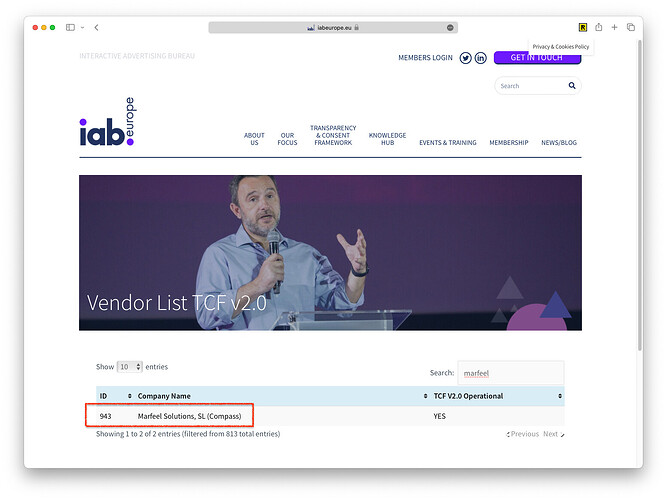
In commercial CMPs like Didomi or SourcePoint, depending on their specific setup, you might need to explicitly whitelist Marfeel Solutions, SL (Compass) with ID 943 as an authorized vendor.
If the CMP and Marfeel are not properly set up, Marfeel will not track user data and dimensions like Loyalty funnel will show as Private.
Read more about the cookies and entries on session and localStorage Marfeel SDK relies on.
Requested purposes
Section titled “Requested purposes”Marfeel requests permissions for purposes [1, 5, 6, 7, 8, 9, 10] as defined in the IAB Appendix A Definitions of Purposes, Features And Categories:
1-. Store and/or access information on a device 5-. Create profiles to personalise content 6-. Use profiles to select personalised content 7-. Measure advertising performance 8-. Measure content performance 9-. Understand audiences through statistics or combinations of data from different sources 10-. Develop and improve services
Categories of data
Section titled “Categories of data”Marfeel requests permissions for data categories [1, 2, 5, 6, 8, 10, 11] as defined in section G. Categories of data:
1-. IP Addresses 2-. Device characteristics 5-. Authentication-derived identifiers 6-. Browsing and interaction data 8-. Non-precise location data 10-. Users’ profiles 11-. Privacy choices
Using Marfeel with a non-IAB TCF 2.0 compliant CMP
Section titled “Using Marfeel with a non-IAB TCF 2.0 compliant CMP”For non-compliant CMPs, Marfeel exposes a series of methods to control how visitor data is stored and processed. You need to initialize Marfeel SDK with the manualConsent: true custom config as shown in the following code snippet.
<script type="text/javascript">function e(e){var t=!(arguments.length>1&&void 0!==arguments[1])||arguments[1],c=document.createElement("script");c.src=e,t?c.type="module":(c.async=!0,c.type="text/javascript",c.setAttribute("nomodule",""));var n=document.getElementsByTagName("script")[0];n.parentNode.insertBefore(c,n)}function t(t,c,n){var a,o,r;null!==(a=t.marfeel)&&void 0!==a||(t.marfeel={}),null!==(o=(r=t.marfeel).cmd)&&void 0!==o||(r.cmd=[]),t.marfeel.config=n,t.marfeel.config.accountId=c;var i="https://sdk.mrf.io/statics";e("".concat(i,"/marfeel-sdk.js?id=").concat(c),!0),e("".concat(i,"/marfeel-sdk.es5.js?id=").concat(c),!1)}!function(e,c){var n=arguments.length>2&&void 0!==arguments[2]?arguments[2]:{};t(e,c,n)}(window, /* AccountId */, { manualConsent: true } );</script>When manualConsent:true is set, Marfeel tracking is blocked until the client specifies that the CMP has been loaded or that it does not apply.
CMP is not applicable
Section titled “CMP is not applicable”Call this method when consent management does not apply to the user:
window.marfeel.cmd.push(['consent', function(consent) { consent.setCMPNotApplies();}]);CMP loaded, user has not yet accepted or rejected
Section titled “CMP loaded, user has not yet accepted or rejected”Call this method only when the consent screen is displayed for the first time:
window.marfeel.cmd.push(['consent', function(consent) { consent.setCMPLoaded();}]);User has made a consent choice
Section titled “User has made a consent choice”Once the user has made a choice, and on all following page views, inform Marfeel of the user’s consent preferences:
window.marfeel.cmd.push(['consent', function(consent) { consent.setConsentFeatures([ { feature: 'analytics_storage', consent: true|false }, { feature: 'personalization', consent: true|false } ]);}]);Consent flow overview
Section titled “Consent flow overview”flowchart TD
Start([Start]) --> InitializeMarfeel[Initialize Marfeel SDK `manualConsent: true`]
InitializeMarfeel -->|CMP Not Applicable| CMPNotApplicable[Set CMP Not Applicable]
InitializeMarfeel -->|CMP Loaded\nConsent Screen Shown| CMPLoaded[Set CMP Loaded]
CMPLoaded -->|User Makes a Choice| UserChoice[User Makes a Choice]
UserChoice --> ConsentFeatures[Set Consent Features\nwith User Preferences]
InitializeMarfeel -->|User Already Gave Consent| ConsentFeatures
Configuration params
Section titled “Configuration params”You can change some behaviors in the SDK initialization configuration.
| Variable | Default | What it does |
|---|---|---|
| manualConsent | false | Use your custom CMP implementation instead of default IAB |
| blockOnNoConsent | false | Allow to exclude private users from tracking |
| blockOnReject | false | Allow to exclude users that rejected cookies from tracking |
| consentCookieLength | 180 | Days of user cookie when consent is given |
| noConsentCookieEnabled | undefined | Determine the technology used on private sessions. undefined => session storage, 0 => session cookie, integer >0 days of permanent cookie. |
Does Marfeel work automatically with IAB TCF 2.0 compliant CMPs?
Yes. Marfeel is a certified IAB TCF 2.0 vendor (ID 943), so any compliant CMP integrates automatically without additional configuration.
How do I integrate Marfeel with a non-IAB TCF 2.0 compliant CMP?
Initialize the Marfeel SDK with manualConsent: true, then use the exposed consent methods to notify Marfeel when the CMP loads, when consent is not applicable, or when the user makes a consent choice.
What happens if the CMP and Marfeel are not properly set up?
Marfeel will not track user data, and dimensions like Loyalty funnel will display as Private.