

Marfeel Concurrents: real-time engaged users metric
Marfeel Concurrents is the total number of engaged users who have actively interacted with your site in the last 5 minutes. Qualifying interactions include opening a page, scrolling, clicking, moving the mouse, watching videos, listening to audio files, typing, and filling out forms.
The Marfeel Javascript SDK constantly listens for these acts of engagement and sends presence events every 5 seconds back to Marfeel servers. Presence events are sent less frequently the longer a user remains engaged, up to a maximum window of 20 seconds. This presence-based approach ensures that only genuinely active users are counted, unlike platforms that treat every open browser tab as a concurrent visitor.
Adjustable time windows
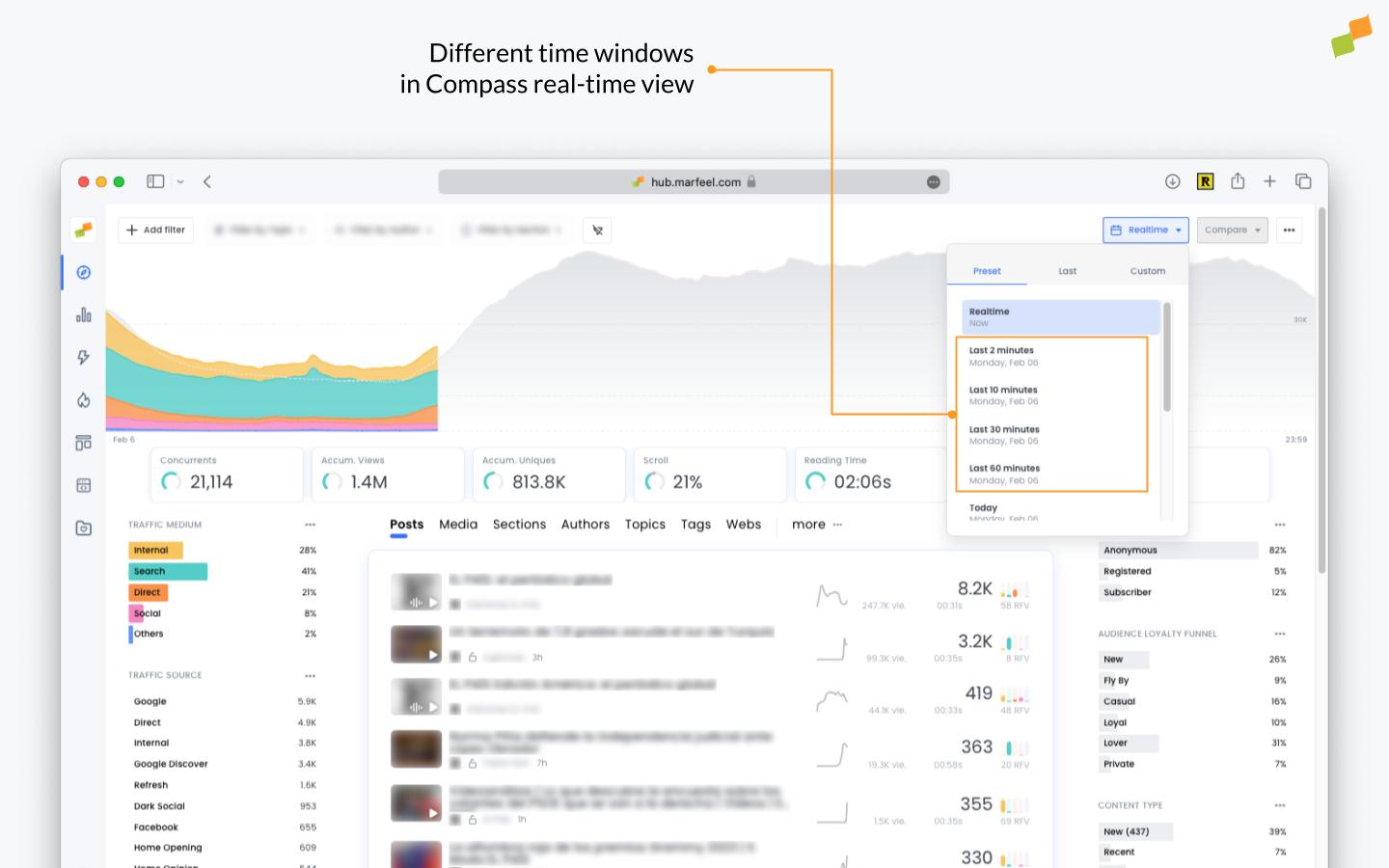
Section titled “Adjustable time windows”A time window is the frequency with which the system refreshes the data visible in the platform. While the standard time window of 5 minutes is recommended for real-time monitoring, Marfeel allows users to switch to other time windows (for example, 2 minutes).
Changing default time windows is possible because Marfeel is a raw data warehouse.
5 min real-time window
Section titled “5 min real-time window”As a digital publisher, having a mix of both light and long-form content to reach different stages of the funnel and engage your audience is important. Light content is crucial for attracting new visitors and acquiring traffic, while long-form content is important for engaging loyal users and moving them towards conversion.
Google Discover is an important distribution platform where easily digestible and shareable lighter content gains significant traction. On these kinds of platforms it is common to see engagement times of less than 30 seconds.
Within this context of high-traffic acquisition platforms like Google Discover that have short engagement times, longer time windows allow editors to monitor high-demand articles without discounting Concurrents prematurely. This is particularly relevant when tracking Marfeel Sessions alongside Concurrents for a complete picture of real-time audience behavior.
Common scenarios
Section titled “Common scenarios”1. Simple page read
Section titled “1. Simple page read”In this common scenario, a user opens a page, scrolls through it, and closes the browser tab.
| Time | Concurrents |
|---|---|
| 00:00 | 1 - User lands |
| 00:02 | 1 - User interacts |
| 00:04 | 1 - User interacts |
| 00:14 | 1 - User closes tab |
| 05:04 | 0 - 5 mins after the last interaction the Concurrent is discounted |
2. Coffee break with open tab
Section titled “2. Coffee break with open tab”A user opens a page and starts reading. She leaves the browser tab open and focused (in front of other windows open on the screen) for 10 minutes to get a coffee before coming back to continue reading.
| Time | Concurrents |
|---|---|
| 00:00 | 1 - User lands |
| 00:02 | 1 - User interacts |
| 00:04 | 1 - User interacts |
| 00:14 | 1 - User interacts & goes for a coffee |
| 05:14 | 0 - 5 mins after the last interaction the concurrent is discounted |
| 15:14 | 1 - User is back from her coffee break. Is counted as a concurrent again |
| 15:16 | 1 - User interacts |
3. Multi-tab session
Section titled “3. Multi-tab session”A user opens a page, scrolls through it, and opens a new tab with a new Google search.
| Time | Concurrents |
|---|---|
| 00:00 | 1 - User lands |
| 00:02 | 1 - User opens several tags: Page-1, Page-2, Page-3 |
| 00:04 | 1 - Home |
| 00:14 | 1 - User switches to Page-1 tab |
| 00:20 | 1 - User switches to Page-2 tab |
| 00:25 | 1 - User switches to Home tab |
Marfeel only counts one concurrent user when a user has multiple browser tabs open, whereas other platforms count open browser tabs as multiple concurrents.
4. Switch to another application
Section titled “4. Switch to another application”A user opens a page on her phone and reads through it. The user switches to another app without explicitly closing the tab or the browser.
| Time | Concurrents |
|---|---|
| 00:00 | 1 - User lands on the home page |
| 00:05 | 1 - User interacts |
| 00:10 | 1 - User interacts |
| 00:20 | 1 - User switches to Twitter native application without closing the tab |
| 05:10 | 0 - Marfeel discounts the concurrent 5 mins after the last action |
5. Locking the phone after reading
Section titled “5. Locking the phone after reading”A user opens a page and reads through it. Once she’s done, she locks her phone.
Marfeel discounts non-engaged users after 5 mins (or the selected time window) of inactivity whether they explicitly close a tab or leave it open. There are other real-time platforms that wait two hours to discount inactive tabs from concurrents.
| Time | Concurrents |
|---|---|
| 00:00 | 1 - User lands on home page |
| 00:05 | 1 - User interacts |
| 00:10 | 1 - User interacts |
| 00:20 | 1 - User puts the phone in her pocket without closing the tab |
| 05:10 | 0 - 5 mins after the last action, Marfeel discounts the concurrent |