

Discard bot and synthetic traffic from analytics
Marfeel filters bot and synthetic traffic by matching the user-agent string of incoming requests. Testing tools like New Relic, Content King, Sistrix, and Semrush generate synthetic visits that can skew your analytics data. Because most of these tools support custom user-agent configuration, Marfeel can identify and exclude their requests alongside other forms of bot traffic.
The sections below explain the user-agent configuration required for each supported tool.
New Relic
Section titled “New Relic”New Relic supports changing the user agent. Update the default user-agent constant so Marfeel can recognize synthetic monitoring requests:
Default value:
const USER_AGENT = "default" // set the user agent for ChromeRequired value for filtering:
const USER_AGENT = "Mozilla/5.0 AppleWebKit/537.36 (KHTML, like Gecko; +http://www.newrelic.com/bot.html) Chrome/W.X.Y.Z Safari/537.36" // set the user agent for ChromeContent King
Section titled “Content King”Sistrix
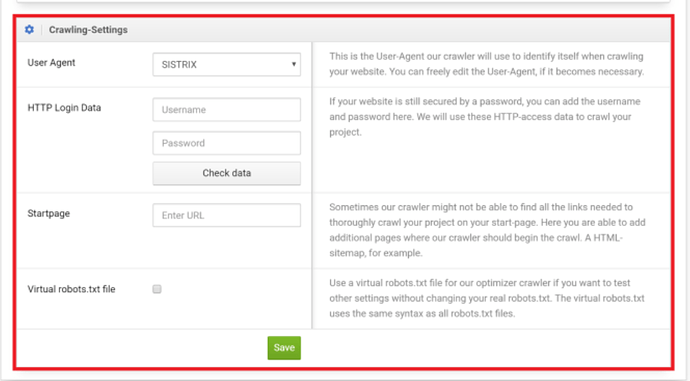
Section titled “Sistrix”Provide a user-agent containing the words http://sixtrix.com.
Semrush
Section titled “Semrush”How does Marfeel discard bot and synthetic traffic?
Marfeel filters traffic based on the user-agent string of incoming requests. Testing tools like New Relic, Content King, Sistrix, and Semrush support custom user-agent configuration, allowing Marfeel to identify and exclude their requests from analytics data.
Which testing tools can be excluded from Marfeel analytics?
Marfeel supports discarding traffic from New Relic, Content King, Sistrix, and Semrush. Each tool allows you to customize its user-agent string so Marfeel can recognize and filter those requests automatically.
What user-agent string should I set for Sistrix?
For Sistrix, provide a user-agent string containing the words http://sixtrix.com. Marfeel uses this identifier to filter Sistrix requests from your analytics.